A-8
Rev 8 Mar/2007
KMD 550/850 Appendix A
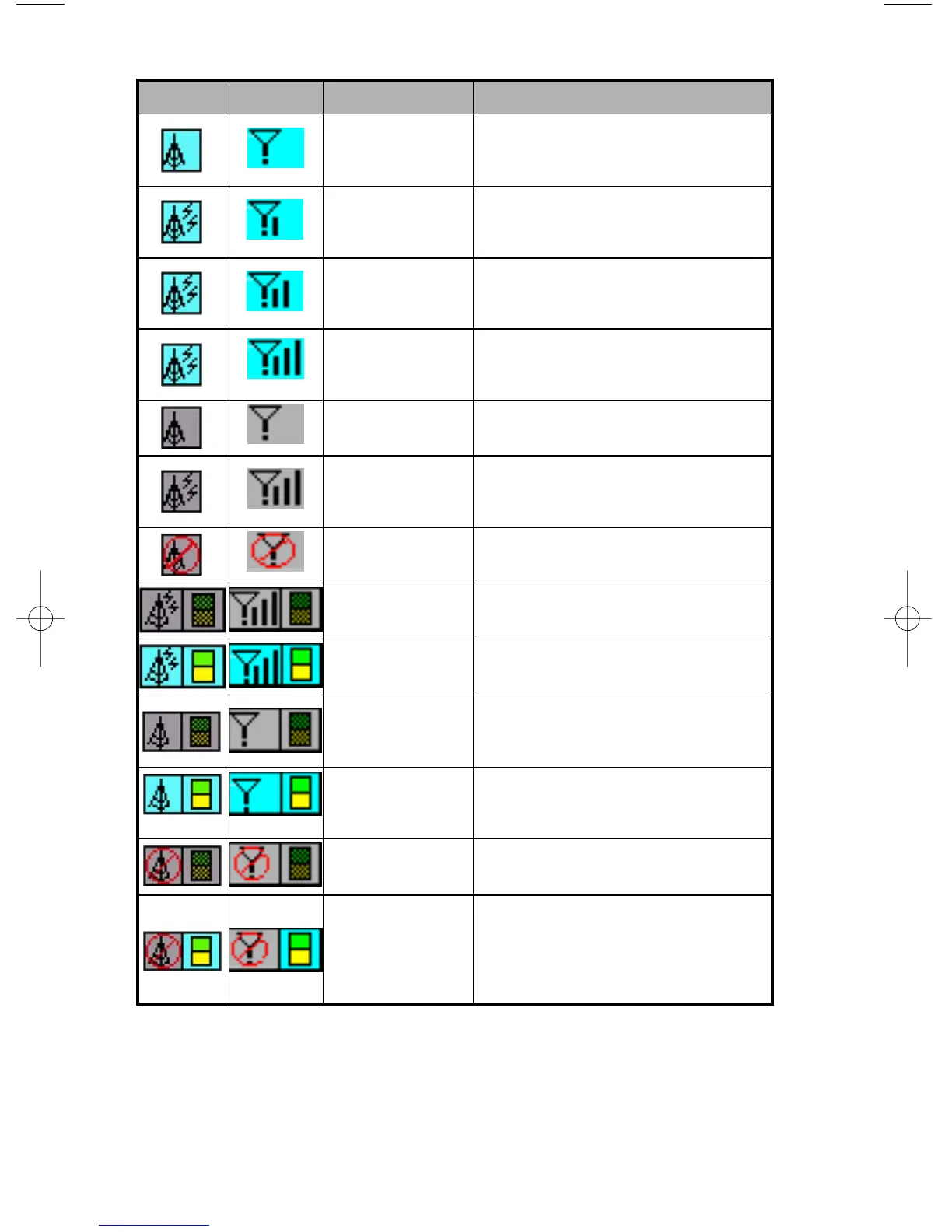
VDL Icon XM Icon Colors Description
Black on a cyan
background.
No weather data is currently being
received but previously received data is
being displayed on the present page.
Black on a cyan
background.
Weather data is currently being received
from a signal and displayed on the present
page. XM signal is weak.
Black on a cyan
background.
Weather data is currently being received
from a signal and displayed on the present
page. XM signal is marginal.
Black on a cyan
background.
Weather data is currently being received
from a signal and displayed on the present
page. XM signal is good.
Black on gray. Weather data not being received nor dis-
played on the present page.
Black on gray. Weather data is currently being received
from a signal but not displayed on the pre-
sent page.
Black on gray with
red slash.
Fault with connection or data link radio.
Black on gray. Graphical METAR overlay is available but
not displayed.
Black, green and
yellow on cyan.
Graphical METAR overlay is enabled and
displayed.
Black on gray. Weather data not being received.
Graphical METAR overlay is available but
not displayed.
Black, green and
yellow on cyan.
Weather data not being received.
Graphical METAR overlay is enabled and
displayed.
Black on gray with
red slash.
Radio Fault. Graphical METAR overlay is
available but not displayed.
Black on gray with
red slash; Black,
green and yellow
on cyan.
Radio Fault. Graphical METAR overlay is
enabled and displayed.



 To Next Page