11
:
l
l
l
l
l
l
l
l
→ →
→ → →
→
Ups
Time
Mileage
Power indi
c
ator
Gear indi
c
ation
Speed
Battery level
ON/OFF
Downshift
键
档位指示
电量显示
模式键
加档键
Pedal Assist
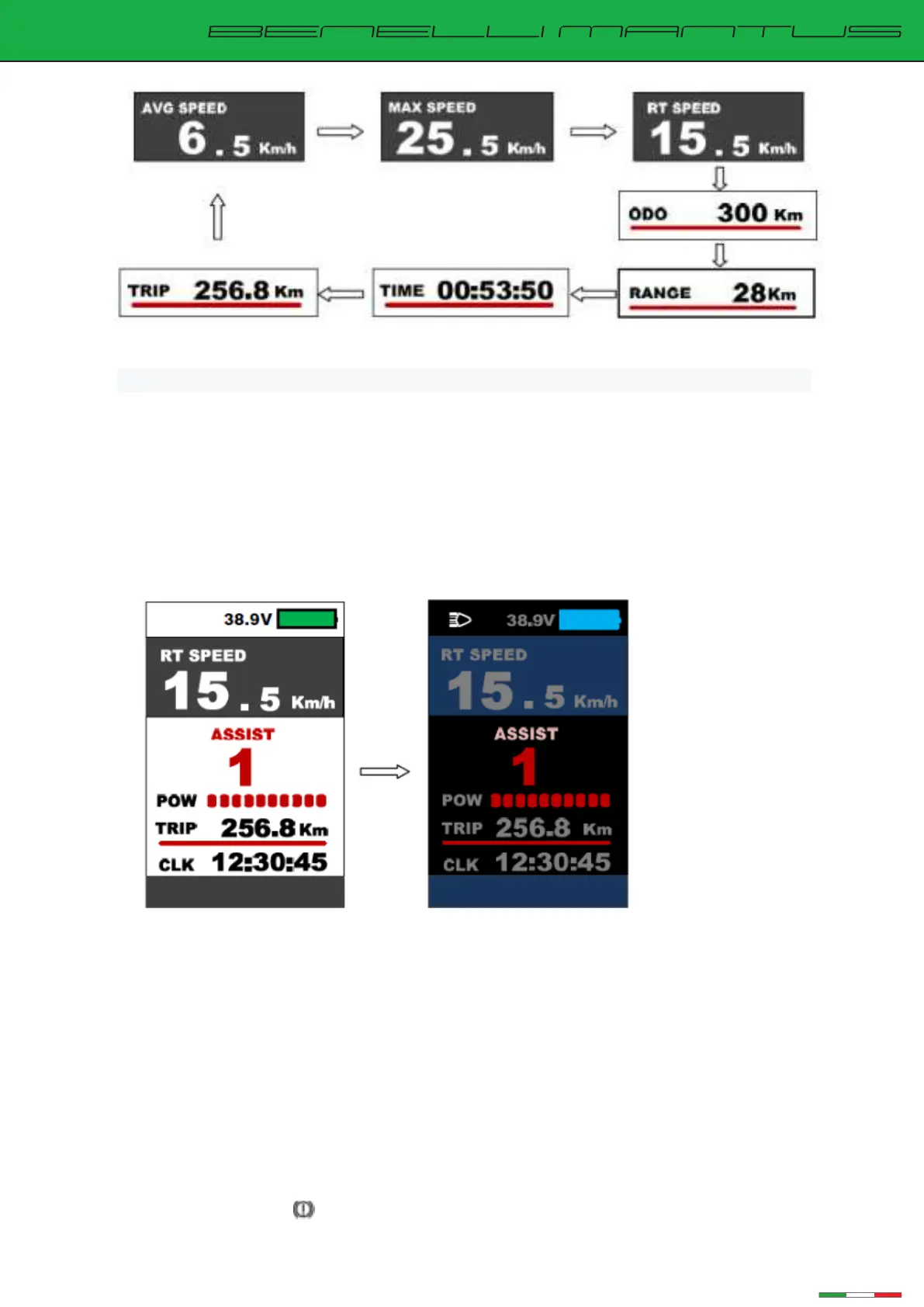
Speed mode and mileage mode switch display in
er
ace
※The meter will automatically return to the real-time speed display state after 5 seconds
7.5 Headlight switch/display mode switch
Long press the "+" button for 1 second, the indicator turns on the lights (supported
by the controller) and switches to display day/night modes. Long press the "+" button
for 1 second again, the indicator turns off the lights and switches the display mode.
Day Mode Night Mode
Walk assistance mode(6km/hr walk)
Press the “- ” button for 3 seconds, the bike enters walk-assistance mode, the
display shows the real-time speed, Pedal Assist level is P. Release the button, the
bike exits the walk assistance mode.
Brake indication:
Braking cut-off shows .


 To Next Page