35
EN
ERROR MESSAGES
The list is displayed of some messages which are shown on the display in the event of an operating anomaly:
Err1
Motor 1 circuit test error Check motor 1 connections
Err2
Motor 2 circuit test error Check motor 2 connections
Enc
Motor 1 encoder error Check motor 1 encoder connection
Amp
Obstacle error Check the presence of obstacles on the stroke of the door
OULD
Motor overload Check correct operation of the motor or presence of friction
Err4
PHOTA photocell test error Check connections, alignment of the photocell PHOT A or obstacles present.
Err5
PHOTC photocell test error Check connections, alignment of the photocell phot c or obstacles present.
Err8
Inputs enabling error
During the autoset phase, one of the control inputs was enabled (open/close/
s.S./Stop). Check the status of the inputs and repeat the autoset procedure.
Thrm
Thermal sensor intervention
Overheating due to permanent obstacles. Unlock the door and check for any
friction points.
bar
Sensitive edge test error Message displayed in the event of sensitive edge.
esuo
AUTOSET error
Opening limit switch not detected during initial phase of AUTOSET, check the
adjustment cam
Some malfunctions are also signalled by the courtesy light:
flashing Thermal error, overload error and motor1/motor2 error
2 flashes photocell opening and closure error
3 flashes sensitive edge test error
4 flashes encoder error
5 flashes obstacle/sensitive edge error
DIAGNOSTICS
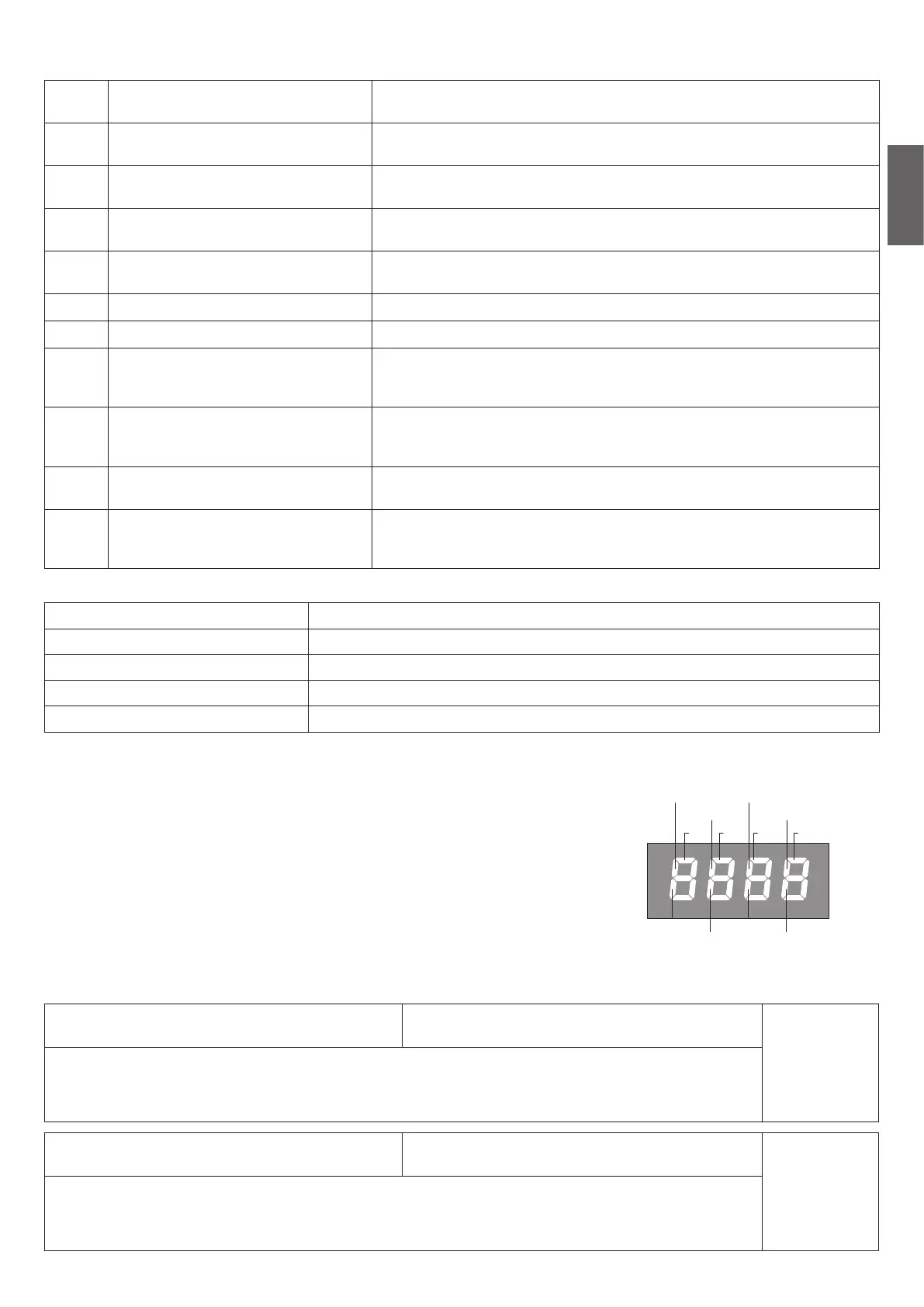
During normal operation, the LCD display shows the status of the inputs and outputs as
shown in the diagram opposite. Each activation of an input/output corresponds to the
switching on of the corresponding segment of the LCD display.
Note: Flashing of the SWC segment indicates the control panel has detected the closure
position of the gate using the position sensor.
PHOT-O
SWC-M1
STOP
SWO-M1 SWO-M2
SWC-M2
PHOT-C
BAR
P.P. PED OPEN CLOSE
MAINTENANCE
The following table is used to record maintenance operations, improvement or repair works carried out by the expert engineer.
Date _ _ _ _ _ _ _ _ _ _ _ _ _ _ _ _ _ _ _ _ _ _ _ _ _ _ _ _ _ _ _ _ Engineer's Signature _ _ _ _ _ _ _ _ _ _ _ _ _ _ _ _ _ _ _ _ _ _ _
Stamp
Description of operation
_ _ _ _ _ _ _ _ _ _ _ _ _ _ _ _ _ _ _ _ _ _ _ _ _ _ _ _ _ _ _ _ _ _ _ _ _ _ _ _ _ _ _ _ _ _ _ _ _ _ _ _ _ _ _ _ _ _ _ _ _ _ _ _ _ _ _ _ _ _ _ _ _
_ _ _ _ _ _ _ _ _ _ _ _ _ _ _ _ _ _ _ _ _ _ _ _ _ _ _ _ _ _ _ _ _ _ _ _ _ _ _ _ _ _ _ _ _ _ _ _ _ _ _ _ _ _ _ _ _ _ _ _ _ _ _ _ _ _ _ _ _ _ _ _ _
Data _ _ _ _ _ _ _ _ _ _ _ _ _ _ _ _ _ _ _ _ _ _ _ _ _ _ _ _ _ _ _ _ Firma Tecnico _ _ _ _ _ _ _ _ _ _ _ _ _ _ _ _ _ _ _ _ _ _ _ _ _ _ _
Timbro
Descrizione intervento
_ _ _ _ _ _ _ _ _ _ _ _ _ _ _ _ _ _ _ _ _ _ _ _ _ _ _ _ _ _ _ _ _ _ _ _ _ _ _ _ _ _ _ _ _ _ _ _ _ _ _ _ _ _ _ _ _ _ _ _ _ _ _ _ _ _ _ _ _ _ _ _ _
_ _ _ _ _ _ _ _ _ _ _ _ _ _ _ _ _ _ _ _ _ _ _ _ _ _ _ _ _ _ _ _ _ _ _ _ _ _ _ _ _ _ _ _ _ _ _ _ _ _ _ _ _ _ _ _ _ _ _ _ _ _ _ _ _ _ _ _ _ _ _ _ _


 To Next Page
 Loading...