28 How to adjust your monitor
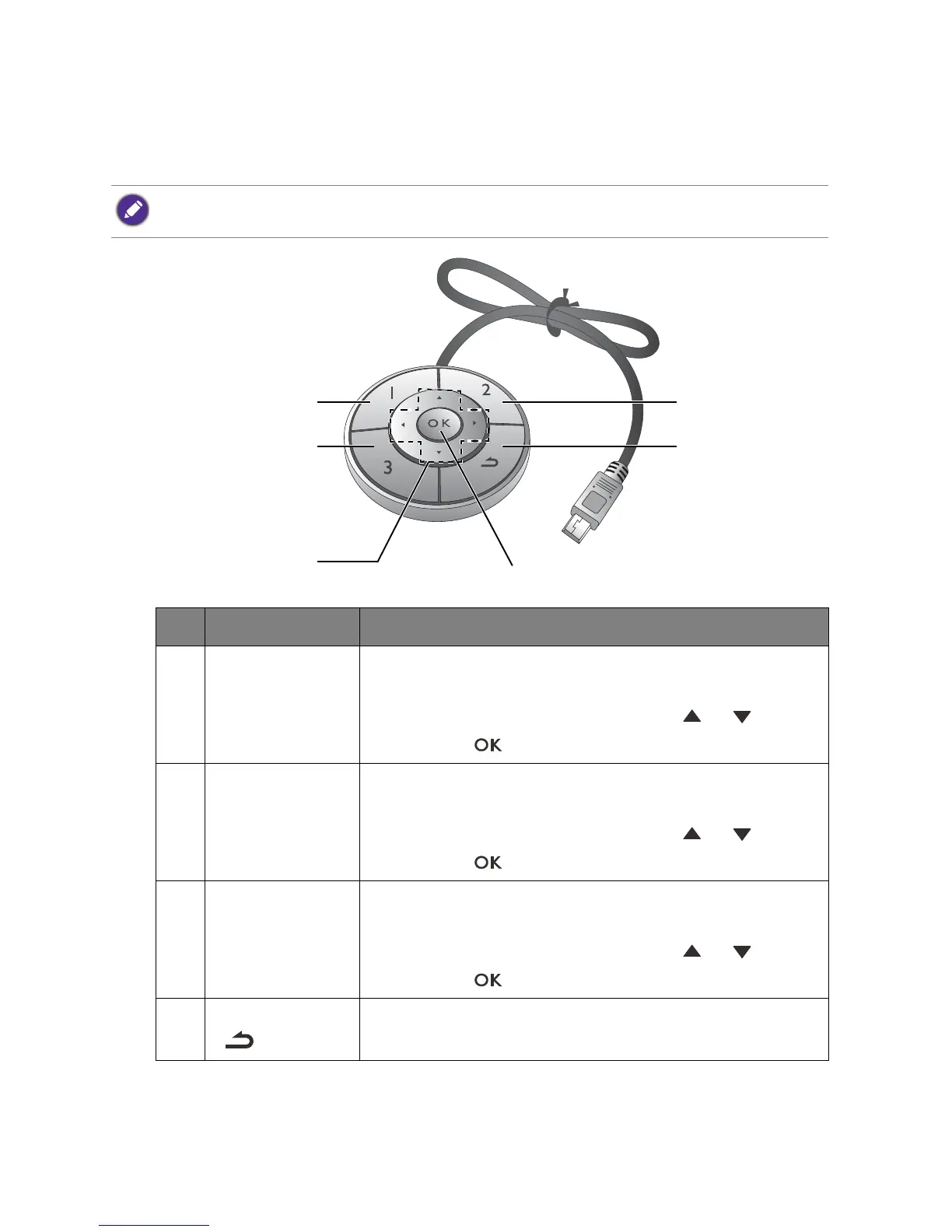
OSD Controller
Apart from the control keys, OSD Controller also provides a quick way to control and access
the OSD menus.
You need to connect the OSD Controller to your monitor prior to use. Follow the instructions in Connect the
OSD Controller to the monitor. on page 14.
No. Name Description
1. Controller Key 1 • Press to switch to sRGB (Picture Mode).
• Press and hold for 5 seconds to bring up a list of options, select
another feature of setup menu by pressing or , and
confirm with .
2. Controller Key 2 • Press to switch to CAD / CAM (Picture Mode).
• Press and hold for 5 seconds to bring up a list of options, select
another feature of setup menu by pressing or , and
confirm with .
3. Controller Key 3 • Press to switch to Low Blue Light (Picture Mode).
• Press and hold for 5 seconds to bring up a list of options, select
another feature of setup menu by pressing or , and
confirm with .
4. Return button
()
• Exits OSD menu.
• Returns to the previous menu.


 To Next Page