User’s Manual
Introduction
3
Installation
A. Positioning
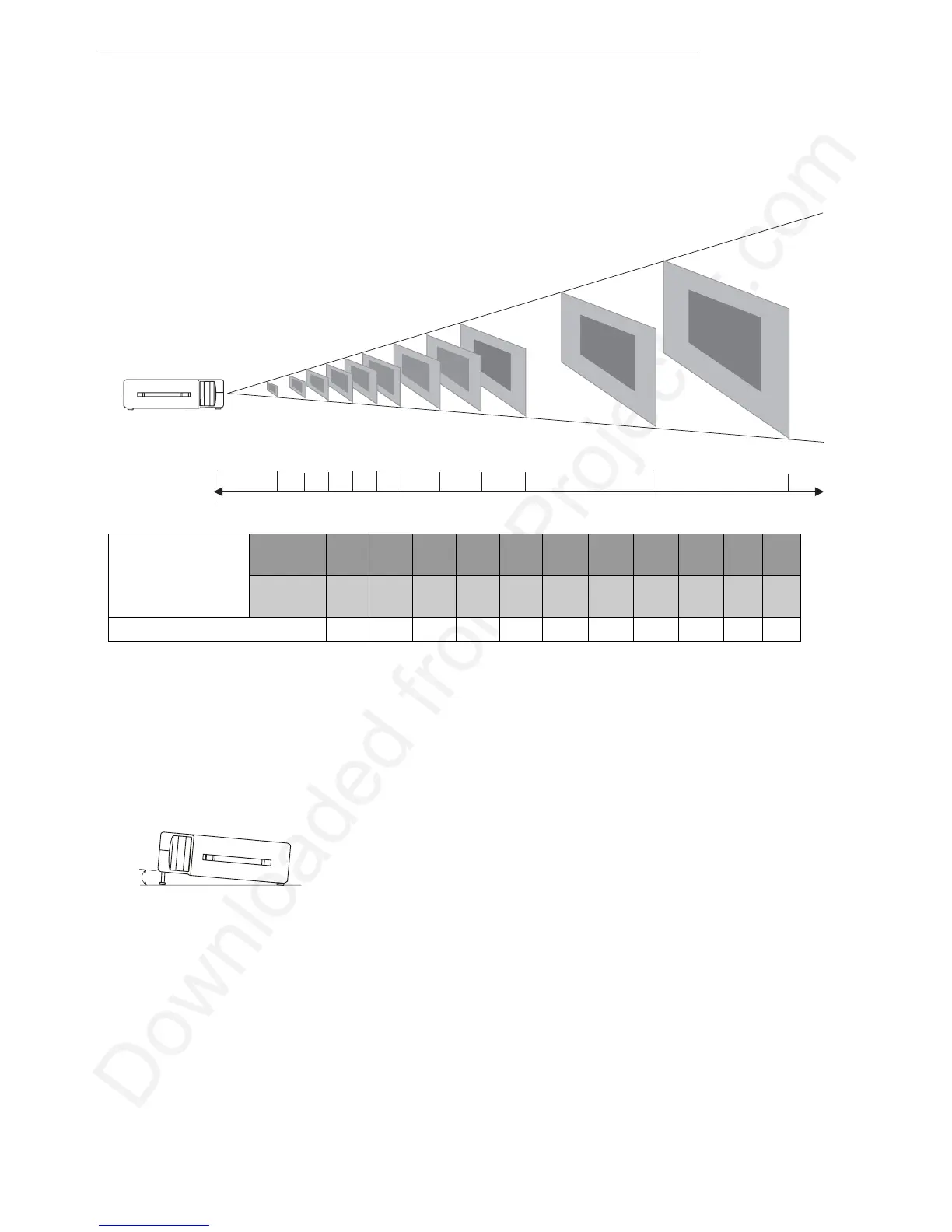
This projector is basically designed to project on a flat projection surface. It can focus from 1m–
10m and adjust the screen size like figure below.
145"
145"
203"
300"
112"
154"
225"
79"
68"
34
"
23"
30"
1 1.5 2 2.5 3 3.5 4 4.5
44"
59"
74"
88"
102"
116"
131"
45"
57"
89"
101"
5
710
Max.
Zoom
30” 44” 59” 74” 88” 102” 116” 131” 145” 203” 300”
Projection screen
size (diagonal
length)
Min.
Zoom
23” 34” 45” 57” 68” 79” 89” 101” 112” 154” 225”
Distance (unit: m) 1 1.5 2 2.5 3.0 3.5 4 4.5 5 7 10
Figure 4 Positioning
B. Adjustable Feet
Picture tilt and projection angle can be adjusted by twisting Adjustable Feet. The projection angle
can be adjusted 2° to 8.5°.
Figure 5 Adjustable feet
Distance (unit: m)


 To Next Page