Application instructions10
Application instructions
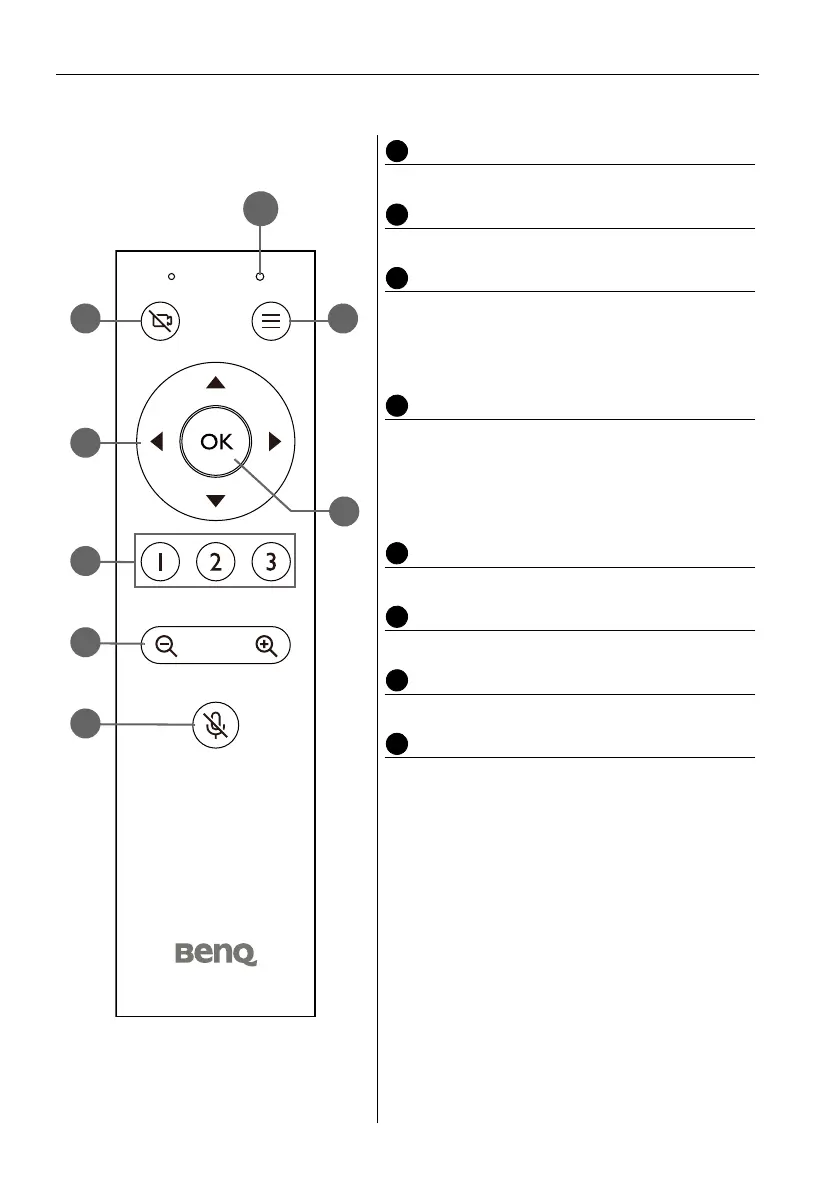
Remote control
Remote Control Indicator LED
Lights up anytime a button is pressed.
Disable Camera Key
Disables/Enables video from the camera.
Arrow Keys
• Allows you to navigate and select items in the
OSD settings menu.
• Pans and/or tilts the view of the camera when
zoomed in on a scene.
Preset Camera View Keys 1 / 2 / 3
• Press a key to have the camera switch to the view
that has been preset for the respective key.
• Press and hold any of the keys for 2 seconds to
set that the current camera view as the preset
view for that key.
Zoom In/Out Key
Press to zoom in or out on a specific scene
Mute Key
Mutes/Unmutes the microphone on the camera.
Menu Key
Opens or closes the camera’s OSD settings menu.
OK Key
Confirms any selection made in the camera’s OSD
settings menu.


 To Next Page