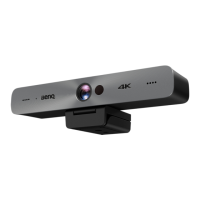
The DVY22 4K AI Camera is a sophisticated video conferencing device designed for clear and vivid communication. It integrates advanced AI functions, superior performance, and user-friendly features, making it suitable for personal and enterprise video conferencing, as well as unified collaboration.
Function Description
The DVY22 is a 4K ePTZ video conference camera equipped with AI capabilities that enable automatic framing of all participants in a meeting, positioning them centrally within the scene. It utilizes advanced ISP processing algorithms to deliver vivid images with consistent brightness, strong color layering, high resolution, and accurate color rendition. The camera supports dual stream output via its USB 3.0 port, allowing for simultaneous main and sub-stream output.
Important Technical Specifications
- Image Sensor: 1/2.5 Inch High Quality 4K CMOS Sensor.
- Effective Pixels: 8.28MP (16:9 aspect ratio).
- Video Output Port: 1 × USB 3.0, Type B, with audio output over USB 3.0.
- Audio Input: 2 built-in omnidirectional microphones.
- View Angle: 126° (Diagonal), 120° (Horizontal), 85° (Vertical).
- Video Format:
- Main Stream: Up to 3840×2160@30fps, also supports 1920×1080P@30fps/25fps, 1280×720P@30fps/25fps, etc.
- Sub-stream: Up to 1280×720P@30fps/25fps, also supports 640×480P@30fps/25fps, 320×172P@30fps/25fps, etc.
- Minimum Illumination: 0.1Lux (F1.8, AGC ON).
- Lens: f=2.72mm, F2.5 aperture.
- Digital Zoom: 4X.
- DNR (Digital Noise Reduction): 2D & 3D DNR.
- Ultra-low Illumination: On/off.
- White Balance: Auto, Manual, One Push, 3000K, 3500K, 4000K, 4500K, 5000K, 5500K, 6000K, 6500K, 7000K.
- Focus: Auto/Manual.
- Exposure: Auto/Manual.
- Auto Framing: On/off/sensitivity.
- Backlight Compensation: On/off.
- Dual Stream: On/off.
- SNR (Signal-to-Noise Ratio): >55dB.
- Operation Systems: Windows 7 (1080p max), Windows 8.1, Windows 10; macOS™ 10.10 or higher; Linux (requires UVC support).
- Video Compression Format: YUY2, MJPG, H.264, H.265.
- Audio over USB 3.0: Supported.
- USB Communication Protocol: UVC, UAC.
- PTZ Control: Supports EPTZ.
- Hardware Requirement: 2.4 GHz Intel® Core 2 Duo processor or higher, 2GB RAM or more, USB 2.0/USB3.0 port (USB 3.0 is needed for 4K).
- Input Voltage: 5V.
- Input Current: 1A (Max.).
- Power Consumption: 5W (Max.).
- Store Temperature: -10°C ~ 60°C.
- Store Humidity: 20% ~ 90%.
- Working Temperature: -10°C ~ 50°C.
- Working Humidity: 20% ~ 80%.
- Dimensions (WHD): 222mm × 93.25mm × 56.5mm.
- Weight: 0.53kg.
- Application: Indoor.
- Accessories: Wireless remote control (1 piece), USB 3.0 cable (1 piece).
Usage Features
The DVY22 camera is designed for ease of installation and use. It can be fixed on top of a display, placed on a desk, or mounted on a tripod or wall. Connection to a display, video conference terminal, or other USB input device is straightforward via a USB cable. Once connected, users can select the camera as a video device within their video conference software.
Key features include:
- Auto Framing: Utilizes an excellent facial detection algorithm to automatically adjust the zoom based on the number of people in the meeting, ensuring all participants are visible and centered.
- Wide View Angle: Offers a 120° super wide view angle lens without distortion.
- Low Noise and High SNR: Low Noise CMOS technology ensures high SNR of video, maintaining clear images even in low light conditions.
- Multiple Installations: Comes with a standard mold clamp for easy installation on various devices.
- Plug and Play: No driver download is required, offering simple USB plug and play functionality.
- EPTZ and 4X Digital Zoom: Provides electronic pan, tilt, and zoom capabilities.
- Built-in Omnidirectional Microphones: Features two omnidirectional microphones with an antique noise suppression algorithm, ensuring clear voice pickup up to 5 meters.
- Remote Control: A wireless remote control allows for comprehensive camera operation, including:
- Standby Key: Long press for three seconds to enter/exit standby mode.
- Number Keys (0-9): For setting and recalling up to 10 preset positions.
- Key Combinations: For pairing/unpairing the remote control with the camera.
- Focus Control Key: Switches between auto and manual focus, and adjusts focus in manual mode.
- Zoom Control Key: Adjusts zoom in/out.
- Set/Clear Preset Key: For managing preset positions.
- Electronic Pan/Tilt Control Key: For adjusting the camera's pan and tilt, and returning to the home position.
- BLC Control Key: Turns backlight compensation on/off.
- Menu Setting: Opens/closes the OSD menu and navigates through settings.
- OSD Menu Settings: Provides access to various camera parameters, including:
- Language: Selection of display language.
- Setup: Image style (Default, Meeting, Clarity, Bright, Soft), Dual Stream on/off, Auto Framing (Open 1-7 or Close).
- Exposure: Mode (Auto, Manual, Shutter priority, Iris priority, Brightness priority), EV (On/Off), Compensation Level, BLC (On/Off, Dynamic range 1-8), Anti-Flicker (OFF/50Hz/60Hz), Gain Limit (0-15), DRC (Close, 1-8).
- Color: WB Mode (Auto, Manual, One Push, 3, VAR), RG Tuning (-10-10), BG Tuning (-10-10), Red Gain (0-255), Blue Gain (0-255), Color Temp (2400K-7100K), Saturation (60%-200%), Hue (0-14), AWB Sensitivity (High/Middle/Low).
- Image: Brightness (0-14), Contrast (0-14), Sharpness (0-15), Flip-H (On/Off), Flip-V (On/Off), B&W Mode (Color, Black/White), Gamma (Default, 0.45, 0.50, 0.55, 0.63), DCI (Off, 1-8), Low-Light Mode (Close/Open).
- Noise Reduction: 2D Noise Reduction (Auto, close, 1-7), 3D Noise Reduction (Close, 1-8), Dynamic Hot Pixel (Close, 1-5).
- Version: Displays camera firmware version.
- Restore Default: Resets camera settings to factory defaults (video format and color style are not restored).
Maintenance Features
Proper maintenance ensures the longevity and optimal performance of the DVY22 camera:
- Disconnection: Disconnect the camera if it will not be used for an extended period.
- Cleaning:
- Use a soft cloth or tissue to clean the camera cover.
- For the camera lens, use a soft, dry cloth. If needed, a mild detergent can be applied gently. Avoid strong or corrosive detergents to prevent scratching the lens or affecting image quality.
- Troubleshooting: The manual provides guidance for common issues:
- No video output: Check USB cable connection, power indicator light, self-check function after restart, display recognition, and camera recognition by the display.
- No image: Verify USB cable quality and connection.
- Image dithering during zoom: Ensure stable camera installation and absence of shaking objects nearby.
- Remote control not working: Re-pair the remote control, set camera address to 1 (default), check battery level and installation, ensure the camera is in normal operating mode, and exit the menu (menu is only displayed under MJPG/H.264/H.265 compression format).
The DVY22 4K AI Camera is a robust and intelligent solution for high-quality video conferencing, offering a blend of advanced technology and user-friendly design.

 Need help?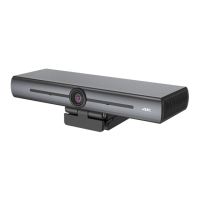

 To Next Page
 General