Application instructions 7
Application instructions
Remote control
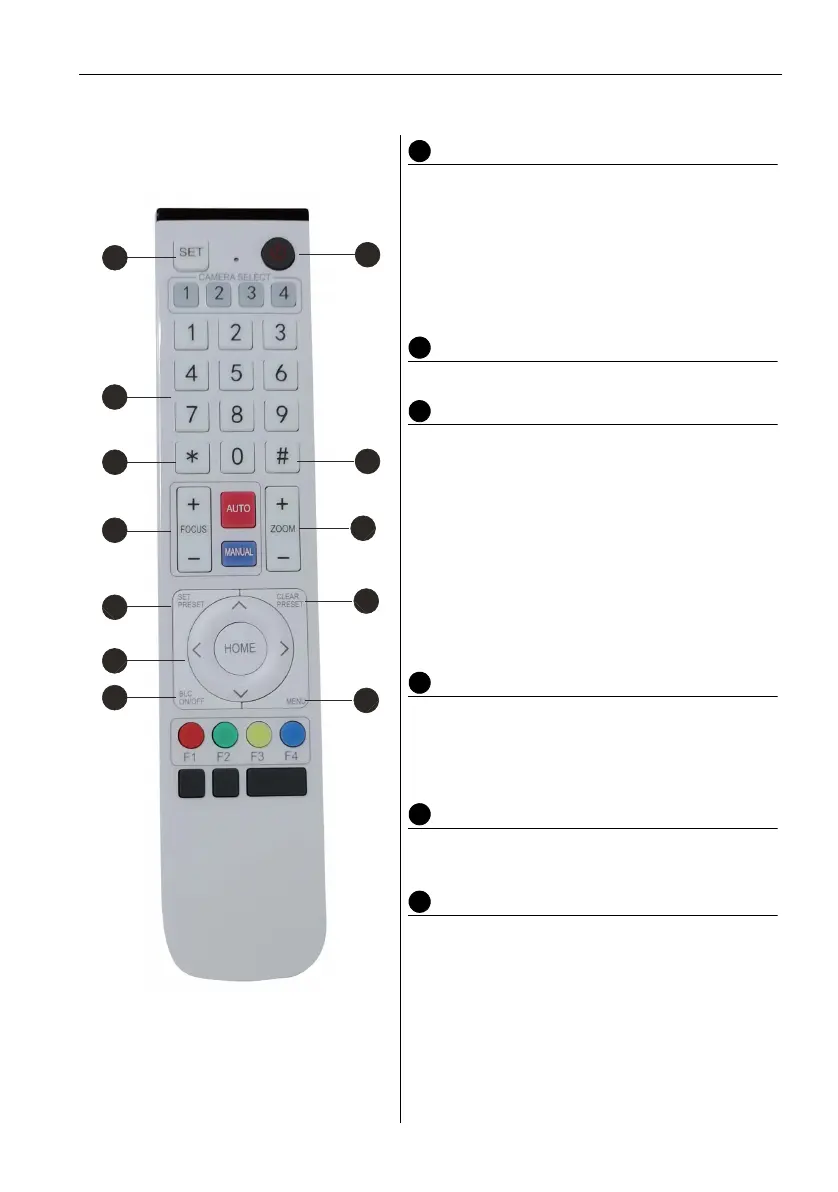
Standby Key
• After long press for three seconds, the camera
will be in standby mode.
• Long press for three seconds again, and the
camera will self-test again and back to HOME
position.
Note: If preset 0 is set and there is no operation within 12
seconds, the camera head will automatically point to the
specified preset 0 position.
Number Key
Set or call 0-9 presets.
*, # Key
Key combination use
• Long press “SET” + “*” at the same time for five
seconds. When the light of the wireless remote
control is on, release your hands. Power on the
camera again, then it will successfully pair with
the wireless remote control.
• Long Press “SET” + “
#” at the same time for five
seconds. When the light of the wireless remote
control is on, release your hands. Power on the
camera again, then it will cancel the pairing with
the wireless remote control.
Focus Control Key
Auto Focus: Enter into auto focus mode.
Manual Focus: The camera focus mode is manual.
Switch the camera focus mode to manual focus by
pressing [focus +] or [focus -] to adjust.
Zoom Control Key
Zoom+: Lens near
Zoom-: Lens far
Set or Clear Preset key
Set Preset: Set preset key + 0-9 number key
Clear Preset key: Clear preset key + 0-9 number
key.
2
3
4
7
3
6
8
1
5
3
6
9


 To Next Page