Application instructions 13
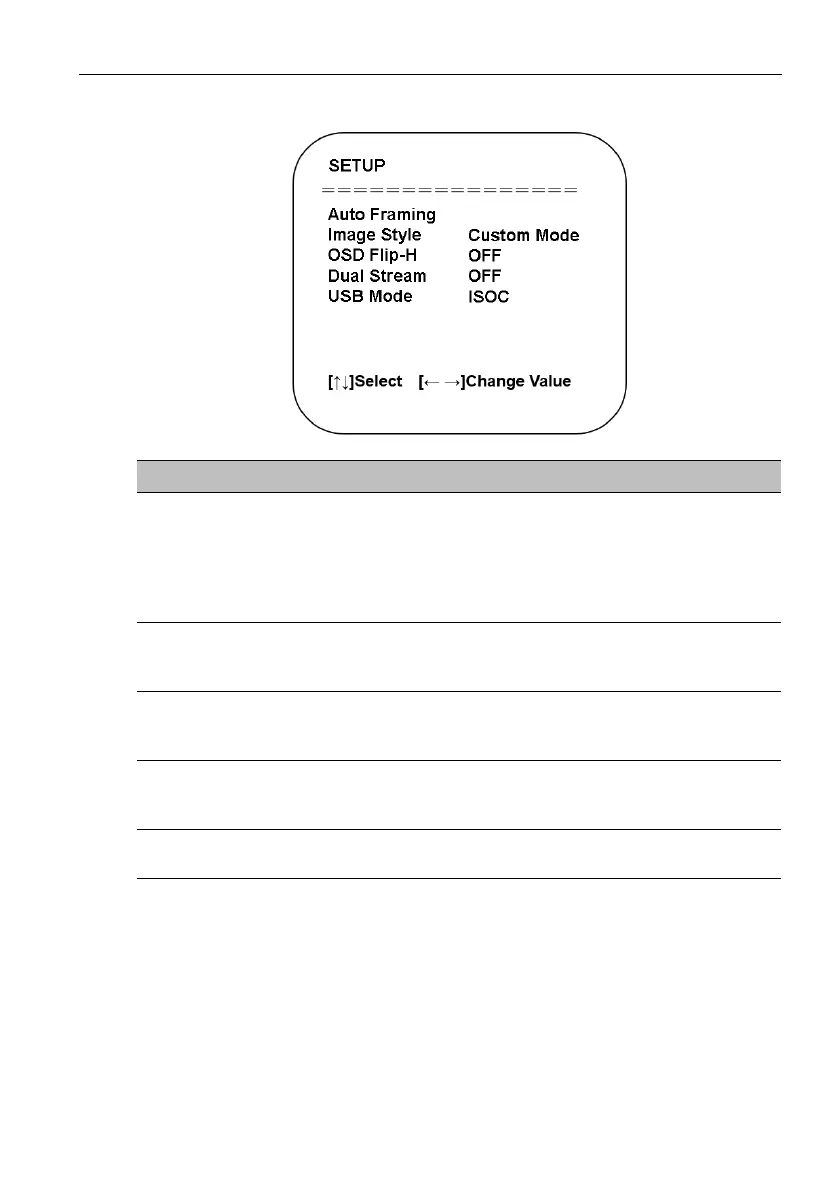
Setup
Setting Descriptions
Auto Framing
• Enables the facial detection algorithm automatically adjust
the zoom level according to the number of people in the
meeting as well as centering them within the frame.
The options include: ON / OFF
• When set to ON you can also set the level of sensitivity
of the algorithm.
Image Style
Changes the look of the image to preset styles.
The options include: BenQ Color (Default) / Low Light
Source / Zoom Optimized / Custom.
OSD Flip-H
Flips the OSD menu if the image is not presented in a
mirrored orientation.
The options include: ON / OFF
Dual Stream
Enables/Disables a second image stream for a second
application.
The options include: ON / OFF
USB Mode
Sets the mode for the camera’s USB interface.
The options include: ISOC / BULK


 To Next Page