25 How to adjust your monitor
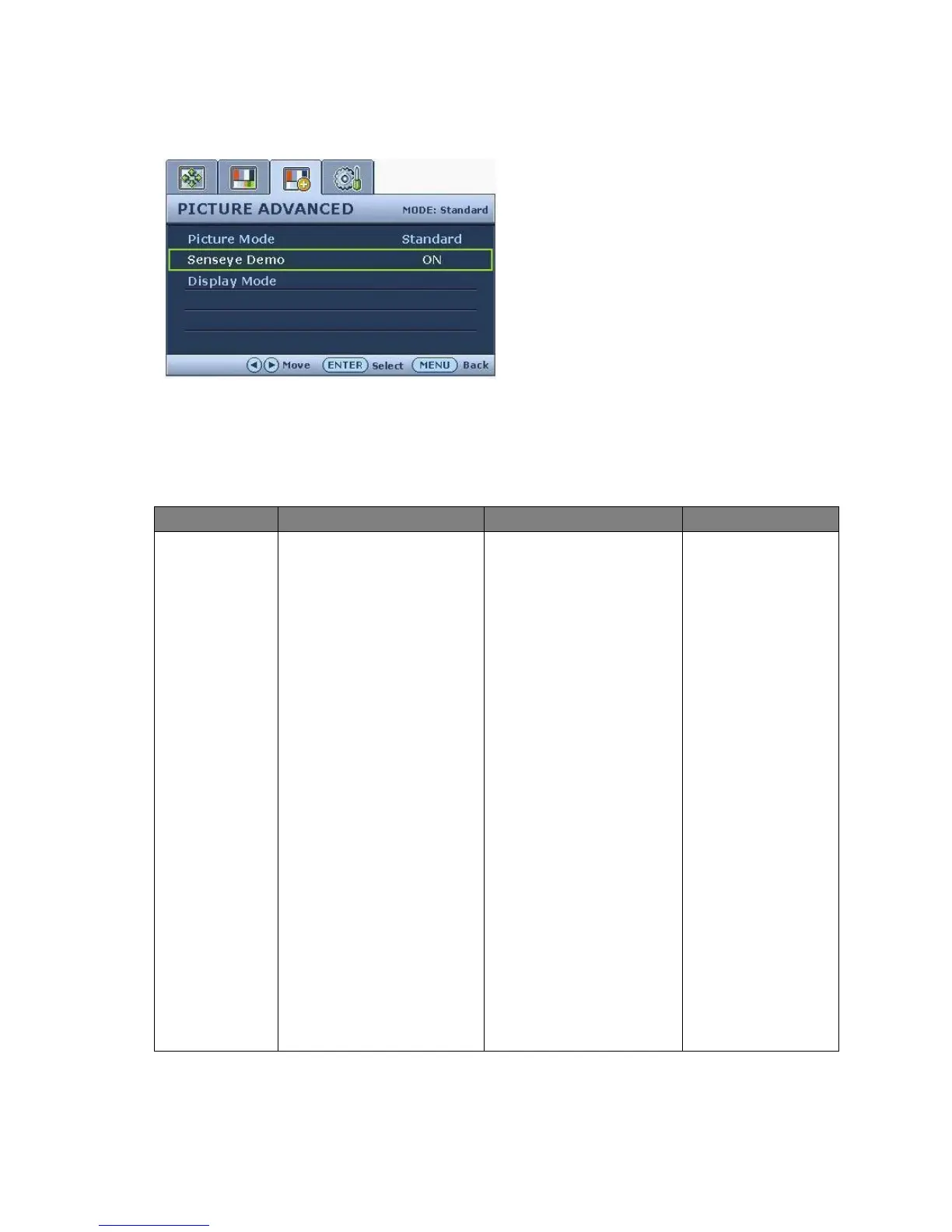
Picture Advanced menu
1. Press the MENU key to display the main
menu.
2. Press the W or X keys to select PICTURE
ADVANCED and then press the ENTER
key to enter the menu.
3. Press the W or X keys to move the
highlight to a menu item and then press
the ENTER key to select that item.
4. Press the W or X keys to make
adjustments or selections.
5. To return to the previous menu, press the
MENU key.
Item Function Operation Range
Picture Mode Selects a picture mode that
best suits the type of
images shown on the
screen.
• Standard - for basic PC
application.
• Movie - for viewing
videos.
• Game - for playing video
games
• Photo - for viewing still
images.
• sRGB - for better color
matching representation
with the peripheral
devices, such as printers,
DSCs, etc.
• Eco - for saving
electricity with low
power consumption by
providing minimum
brightness for all
running programs.
Press the W or X keys to
change the settings.
• Standard
• Movie
• Game
• Photo
• sRGB
• Eco



 To Next Page
 Loading...