EasyManua.ls Logo

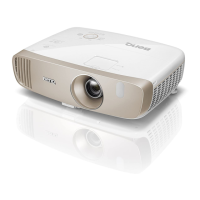
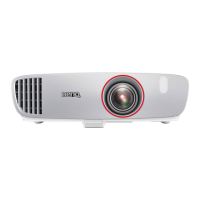
BenQ Home Cinema W1110 - User Manual

BenQ Home Cinema W1110
63 pages
Print Icon
To Next Page IconTo Next Page
Loading...
W1110
Digital Projector
Home Cinema Series
User Manual

Table of Contents

Questions and Answers

  • K
    Kathryn YangJul 28, 2025
    How to fix BenQ Projector when it does not turn on?
    • I
      Isaac MossJul 28, 2025
      If your BenQ Projector isn't turning on, here are a few things to check: * **Power Cable:** Ensure the power cable is securely plugged into both the AC inlet on the projector's rear and a functioning power outlet. If the outlet has a switch, make sure it's on. * **Cooling Process:** If you've recently turned the projector off, wait for the cooling process to complete before attempting to turn it on again. * **Lamp Cover:** Verify that the lamp cover is correctly and securely attached.
  • M
    Mary SmithAug 2, 2025
    What to do if my BenQ Projector has no picture?
    • A
      Andrea SmithAug 2, 2025
      If your BenQ Projector is not displaying a picture, consider the following: * **Video Source:** Ensure that the video source is turned on and that the signal cable is correctly connected. * **Connection:** Verify the projector is correctly connected to the input source device. * **Input Source:** Use the SOURCE key on the projector or remote control to select the correct input source.
  • K
    Kelly WashingtonAug 7, 2025
    Why is my BenQ Home Cinema W1110 Projector remote control not working?
    • A
      Angel NicholsAug 7, 2025
      If your BenQ Projector's remote control isn't working correctly, here are some things to try: * **Batteries:** Replace both batteries in the remote with new ones. * **Obstacles:** Make sure there are no obstructions between the remote control and the projector. * **Distance:** Ensure you are within 8 meters (26.2 feet) of the projector.
  • A
    Andrew DillonAug 12, 2025
    How to fix a blurred picture on my BenQ Projector?
    • W
      Wendy MurphyAug 12, 2025
      If the picture on your BenQ Projector is blurred, try these solutions: * **Focus:** Adjust the focus of the lens using the focus ring. * **Alignment:** Adjust the projection angle, direction, and height of the projector to properly align it with the screen. * **Lens Cover:** Remove the lens cover.
  • J
    James FisherAug 17, 2025
    What to do if 3D content doesn't display correctly on BenQ Projector?
    • A
      Allison FisherAug 17, 2025
      If 3D content isn't displaying correctly on your BenQ Projector, check the following: * **3D Glasses:** Recharge the 3D glasses. * **3D Menu Settings:** Ensure the settings in the 3D menu are correctly configured. * **Blu-ray Disc Format:** Use a 3D Blu-ray Disc. * **Input Source:** Select the correct source using the SOURCE key on the projector or remote control.
  • K
    Kendra BryantAug 22, 2025
    Why is the image unstable on my BenQ Home Cinema W1110 Projector?
    • S
      Sandra FritzAug 22, 2025
      If the image on your BenQ Projector is unstable, it might be due to loose connection cables. Ensure that the cables are correctly connected to the appropriate terminals on both the projector and the signal source.

Summary

Important safety instructions

Safety Warnings

General safety precautions and warnings for projector operation and placement.

Controls and functions

Control panel

Details the buttons and indicators on the projector's control panel.

Remote control

Remote control operation

Explains the operation of each button on the remote control.

Installation

Choosing a location

Guides on selecting the best placement for the projector.

Obtaining a preferred projected image size

Projection dimensions

Provides a table for determining projection distances based on screen size.

Connection

Connecting AV sources

Illustrates how to connect various audio-visual devices to the projector.

Operation

Starting up the projector

Step-by-step instructions for powering on the projector.

Adjusting the projected image

Adjusting projection angle

Guide on adjusting the projector's physical position for optimal image display.

Fine-tuning image quality

Details on adjusting zoom, focus, and image clarity.

Correcting keystone

Keystone correction guide

Instructions for correcting trapezoidal image distortion.

Using the Basic OSD menu

Basic OSD menu features

Explains the functions available in the basic OSD menu.

Using the Advanced OSD menu

Advanced OSD menu overview

Introduction to the comprehensive Advanced OSD menu functions.

Picture menu

System Setup: Advanced menu

Maintenance

Lamp information

Timing of replacing the lamp

Lamp replacement warnings

Messages indicating when the projector lamp needs replacement.

Replacing the lamp

Lamp replacement procedure

Step-by-step guide for safely replacing the projector lamp.

Indicators

Troubleshooting

Common projector problems

Solutions for common issues like no power, no picture, or unstable image.

Warranty and Copyright information

BenQ Home Cinema W1110 Specifications

General IconGeneral
Brightness2200 ANSI lumens
Contrast Ratio10000:1
Projection SystemDLP
LensF=2.59-2.87, f=16.88-21.88 mm
Aspect Ratio16:9
Zoom Ratio1.3x
Speaker10W x 1
Weight3.6 kg
Lens ShiftNo
Dimensions380.5 x 121.7 x 277 mm
Resolution1920x1080 (Full HD)
InputsHDMI x 2, USB (Type A) x1, USB (Type mini B) x1, RS232 (D-sub 9pin) x1
Throw Ratio1.15-1.5 (100"@3m)
Lamp Life3500/5000/6000 hours (Normal/Economic/SmartEco mode)
Keystone CorrectionVertical ± 40 degrees

Related product manuals