23 Operation
Calibrating LumiExpert
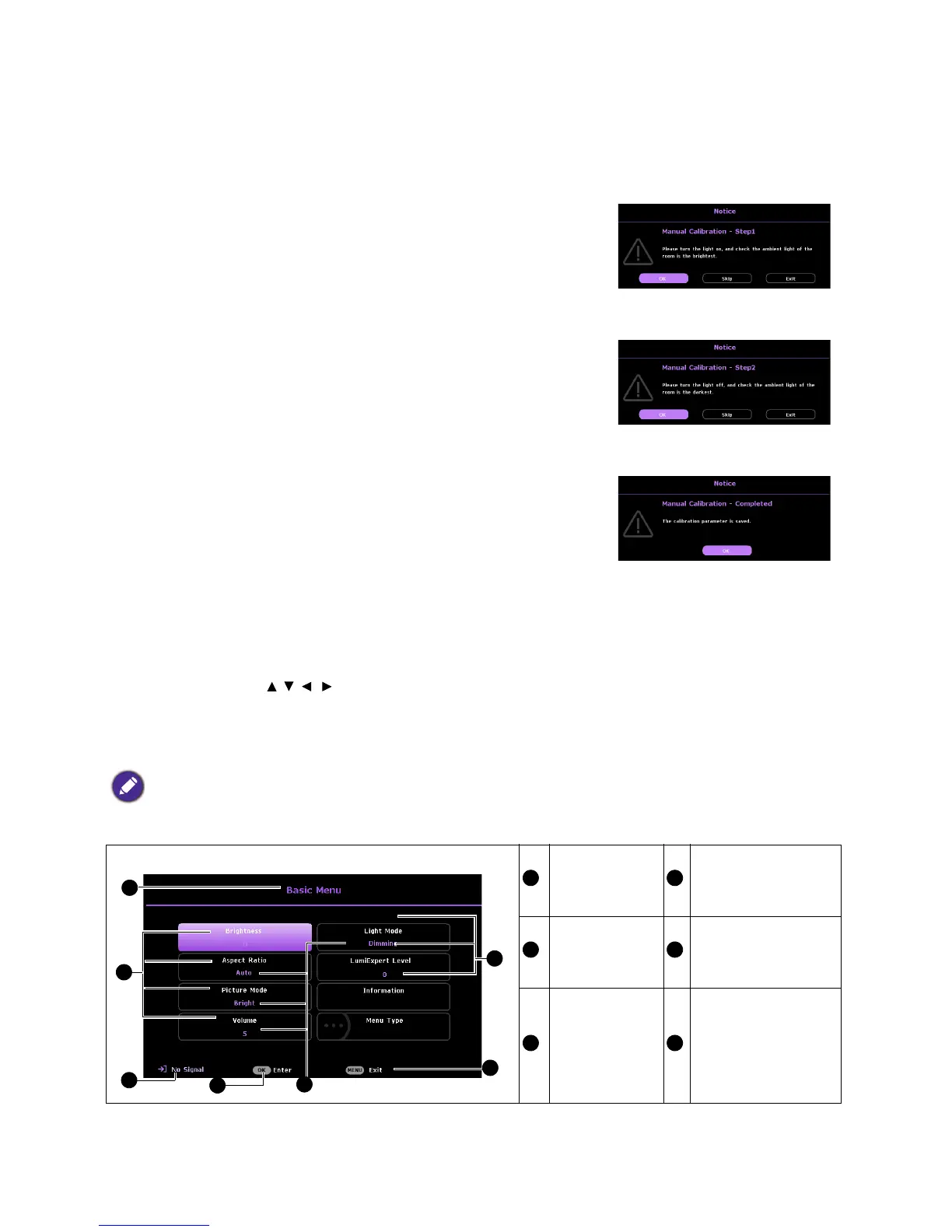
When the LumiExpert is activated for the first time, follow the steps below to calibrate LumiExpert.
1. Go to Advanced Menu > Picture > LumiExpert and press OK.
2. Select Manual Calibration and press OK.
3. The 1st message will remind user to check if the ambient light of
the room is under the brightest condition. Press OK to enter
the next step.
4. The 2nd message will remind user to check if the ambient light of
the room is under the darkest condition.
5. Press OK to show the completed condition.
Using the menus
The projector is equipped with 2 types of On-Screen Display (OSD)
menus for making various adjustments and settings.
• Basic OSD menu: provides primary menu functions. (See Basic
menu on page 32)
• Advanced OSD menu: provides full menu functions. (See Advanced menu on page 34)
To access the OSD menu, press MENU on the projector or remote control.
• Use the arrow keys ( / / / ) on the projector or remote control to move through the menu items.
• Use OK on the projector or remote control to confirm the selected menu item.
The first time you use the projector (after finishing the initial setup), Basic OSD menu displays.
Below is the overview of the Basic OSD menu.
The OSD screenshots below are for reference only, and may differ from the actual design.
Menu Type
Press OK to enter
the menu.
Main menu Status
Current input
signal
Press MENU to go
to the previous page
or to exit.


 To Next Page