8 Introduction
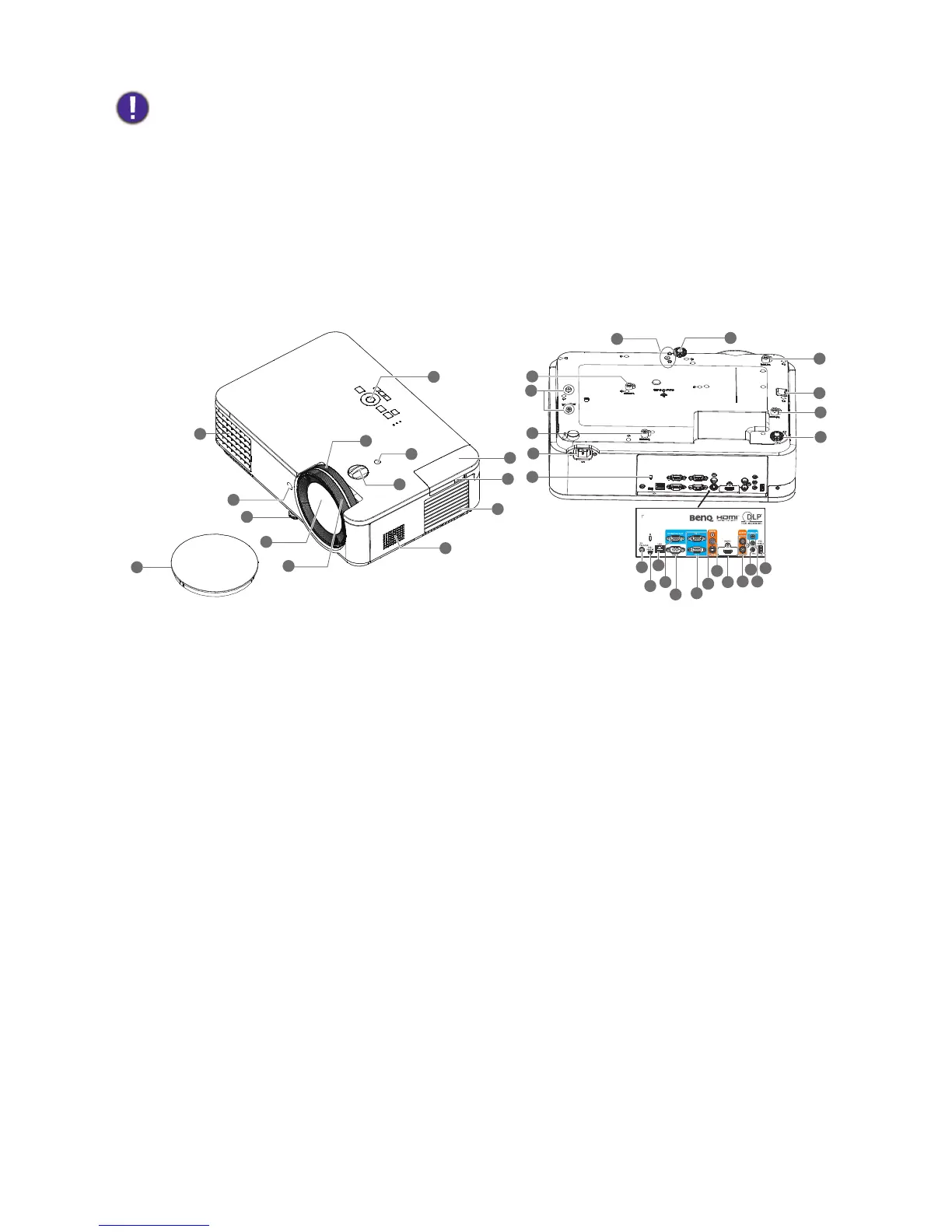
Projector exterior view
• Avoid leaving the remote control and batteries in an excessive heat or humid environment like the kitchen,
bathroom, sauna, sunroom or in a closed car.
• Replace only with the same or equivalent type recommended by the battery manufacturer.
• Dispose of the used batteries according to the manufacturer's instructions and local environment regulations for
your region.
• Never throw the batteries into a fire. There may be danger of an explosion.
• If the batteries are dead or if you will not be using the remote control for an extended period of time, remove the
batteries to avoid damage to the remote control from possible battery leakage.
1. Lens cover
2. Vent (air exhaust)
3. IR remote sensor
4. Adjuster feet
5. Projection lens
6. Focus ring
7. Zoom ring
8. Light sensor
9. Lens shift adjustment knob
10. External control panel
(See Controls and functions on page 9.)
11. QCast (HDMI 2/MHL-input port for HDMI
dongle)
12. USB cable (A to Micro B type) connect to the
power port of HDMI wireless dongle
13. Vent (air inlet)
14. Speaker
15. Wall mount holes
16. Security bar
17. AC power jack
18. Kensington anti-theft lock slot
19. USB Type A port
20. Audio input jack
Audio output jac
21. Microphone
22. Audio (L/R) input jack
23. HDMI 1 input port
24. Video input jack
25. S-Video input jack
26. RGB (PC) signal input jack
27. RS-232 control port
28. RGB (PC) signal output jack
29. RJ-45 LAN input jack
30. USB Mini-B port
31. 12V trigger
32. PW02 mount holes
33. InstaShow mount holes



 To Next Page