Introduction 11
Remote control
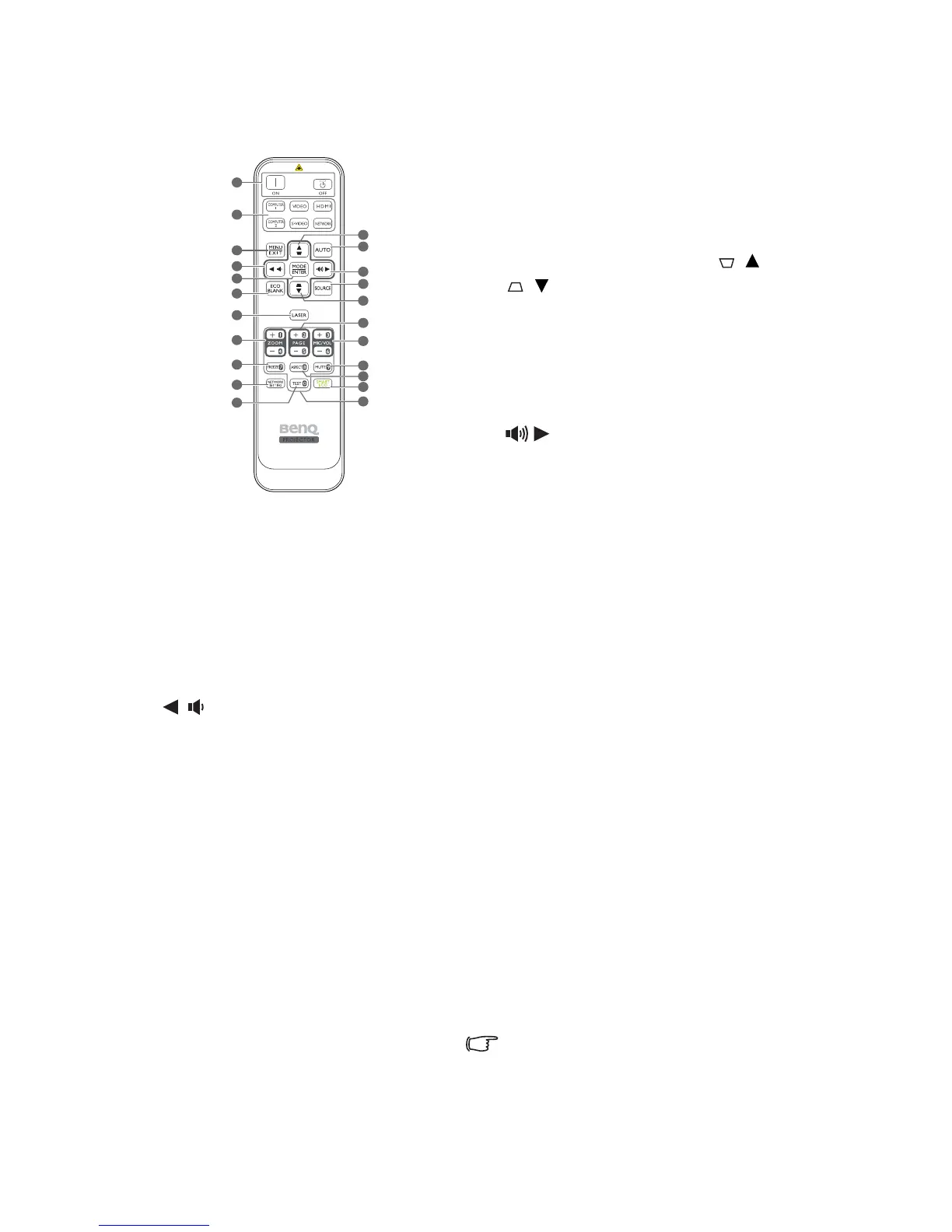
1. Power ON/OFF
Turns the projector on/off.
2. Source selection buttons
Selects an input source for display.
3. MENU/EXIT
Turns on the On-Screen Display (OSD)
menu. Goes back to previous OSD menu,
exits and saves menu settings.
4. Left/Volume -
Decreases the projector volume.
5. MODE/ENTER
Selects an available picture setup mode.
Activates the selected On-Screen Display
(OSD) menu item.
6. ECO BLANK
Used to hide the screen image.
7. LASER
Emits visible laser pointer light for
presentation purposes.
8. ZOOM+/ZOOM-
Magnifies or reduces the projected image
size.
9. FREEZE
Freezes the projected image.
10. NETWORK SETTING
Enters network setting directly.
11. TEST
Displays the test pattern.
12. Keystone/Arrow buttons ( / Up,
/Down)
Manually corrects distorted images resulting
from an angled projection.
13. AUTO
Automatically determines the best picture
timings for the displayed image.
14. Right/Volume +
Increases the projector volume.
When the On-Screen Display (OSD) menu
is activated, the #4, #12 and #14 buttons
are used as directional arrows to select the
desired menu items and to make
adjustments.
15. SOURCE
Displays the source selection bar.
16. PAGE +/ -
Operates your display software program (on
a connected PC) which responds to page up/
down commands (like Microsoft
PowerPoint).
17. MIC/VOL +/-
Adjusts the microphone sound level.
18. MUTE
Toggles projector audio between on and off.
19. ASPECT
Selects the display aspect ratio.
20. SmartEco
Swithces the lamp mode between Eco/
Normal and SmartEco.
21. Numeric buttons
Enters numbers in network settings.
Numeric buttons 1, 2, 3, 4 cannot be pressed
when asked to enter password.



 To Next Page