19 Operation
Operation
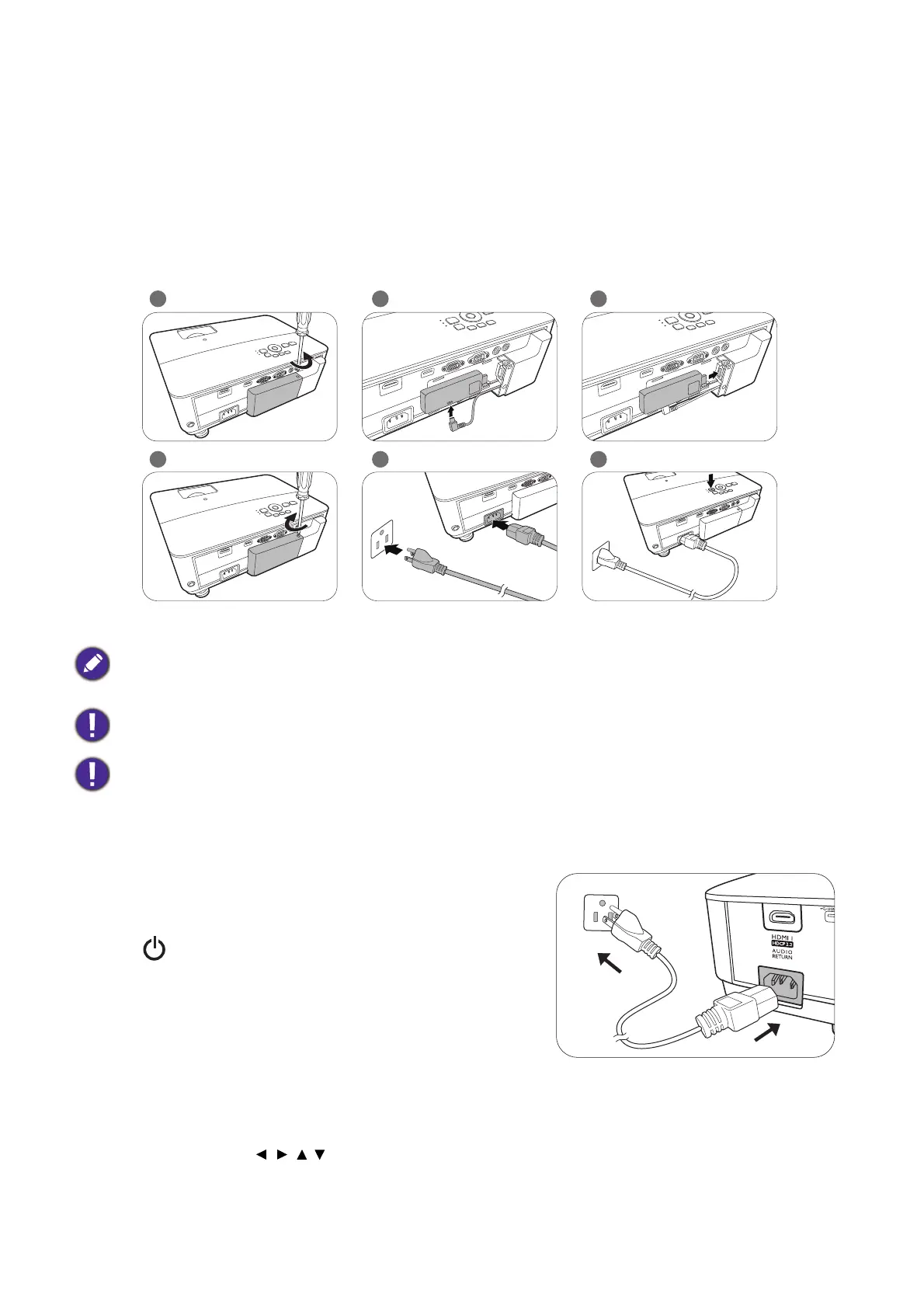
Installing the QS01 Android TV dongle
Follow the illustrations below to install QS01 Android TV dongle before use. Make sure that the dongle
cover is installed back correctly after the dongle is plugged. Do not turn the power on with the dongle
cover open.
Starting up the projector
1. Plug the power cord. Turn on the power outlet switch
(where fitted). The power indicator on the projector
lights orange after power has been applied.
2. Press to start the projector. The power indicator
flashes green and stays green when the projector is on.
The start up procedure takes about 30 seconds. In the
later stage of start up, a startup logo is projected.
(If necessary) Rotate the focus ring to adjust the image
clearness.
3. If this is the first time you turn on the projector, the setup wizard appears to guide you through
setting up the projector. If you have already done this, skip this step and move on to step 5.
• Use the arrow keys ( ///) on the projector or remote control to move through the menu items.
• Use OK to confirm the selected menu item.
This port is for connecting QS01 Android TV dongle only.
Unplug the power cord before unscrewing and removing the dongle cover.
Do not plug the power cord until the dongle cover is in place and screwed tight.



 To Next Page