>> Maintenance
Reset to factory settings
If you want to remove all your
personal settings, you can reset
BeoPlayA8 to factory settings.
Make a factory reset...
> Press the network button shortly
and wait until it becomes solid
white, orange or ashes orange
continuously.
> Remove the back cover on
BeoPlayA8.
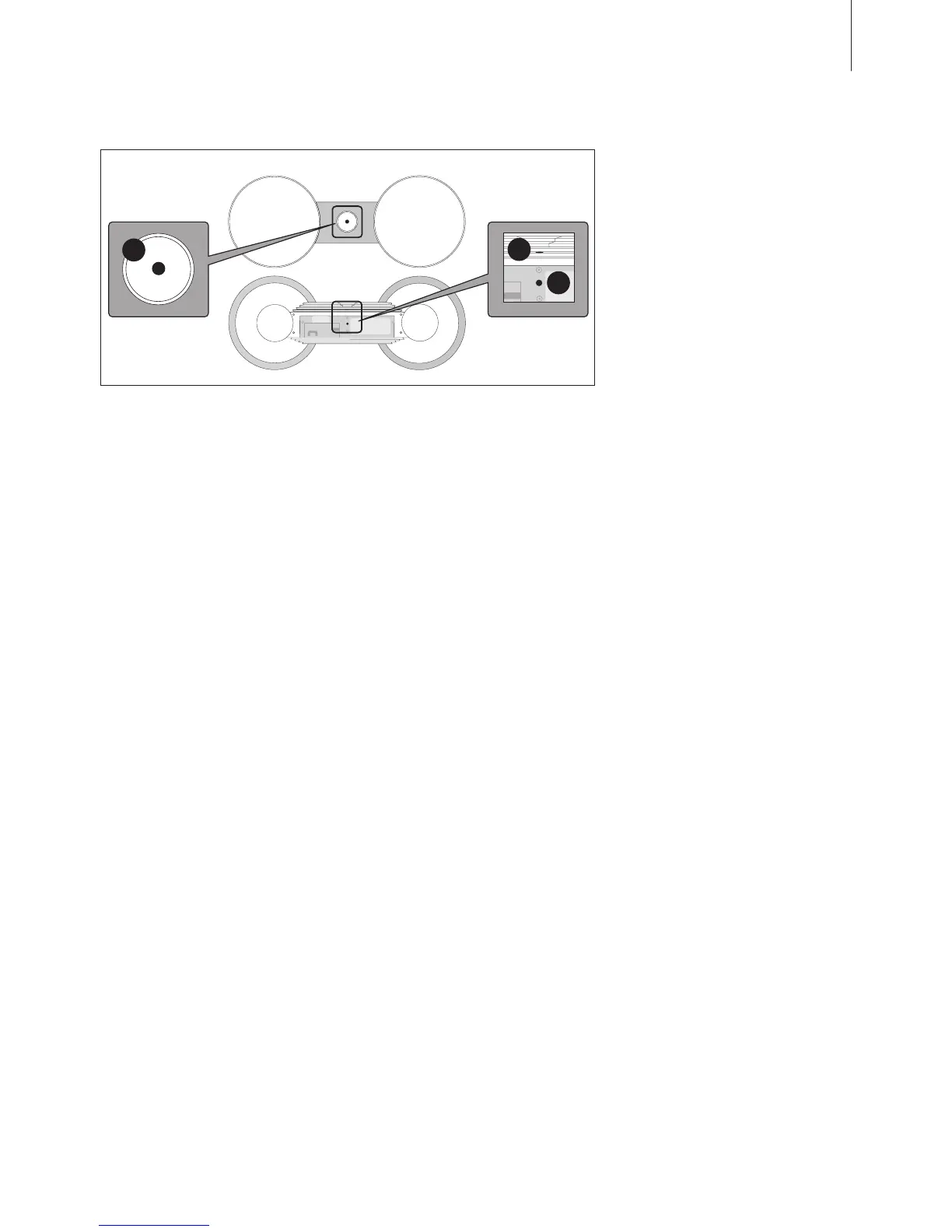
> Press and hold the three buttons
within 3 seconds, in the order
indicated on the illustration
above.
> When the network button
becomes solid red, let go of all
three buttons.
> After approx. 15 seconds,
BeoPlayA8 restarts
automatically.
> Wait approx. 2 minutes.
> When the network button
ashes orange continuously, your
BeoPlayA8 is reset.
What is reset…
– All network proles are deleted
and you must set up BeoPlayA8
again to set it up in a wireless
network.
– The network name is reset to
‘BeoPlayA8 XXXXXXXX*
(*corresponds to the serial
number).
– The prole name is reset
– A stored volume level is removed
(set via S.STORE on Beo4).
Important!
– Warning! Prolonged listening at
high volume levels may cause
hearing damage.
– Avoid placing the product in
direct sunlight or direct articial
light, such as a spotlight.
– Make sure that the product is set
up, placed and connected in
accordance with the instructions.
– Place your product on a rm
surface or stand where you want
it placed permanently. Use
Bang & Olufsen approved stands
and wall brackets only!
– Do not subject the product to
high humidity, rain or sources of
heat.
– The product is intended for
indoor use in dry, domestic
environments only. Use within a
temperature range of 10–40°C
(50–105°F).
– If the product has been exposed
to temperatures below 5°C
(40°F), leave it at room
temperature and wait until the
product has regained normal
room temperature before it is
connected to the mains and
switched on.
– Leave enough space around the
product for adequate ventilation.
– Do not attempt to open the
product. Leave such operations
to qualied service personnel.
– The supplied plug and mains
cord are specially designed for
the product. Do not change the
plug and if the mains cord is
damaged, you must buy a new
one from your Bang& Olufsen
retailer.
1
2
3
13
To reset BeoPlayA8, use one hand to press button number 1, and the
other hand to press button number 2 and 3.



 To Next Page