GB
COOLING
BATTERY
MONITOR
MAX
ECO
TEMPERATURE
COOLING
RIGHT ZONE TEMP
MAX
BATTERY
MONITOR
ECO
OPERATING INSTRUCTIONS
1. Switch on
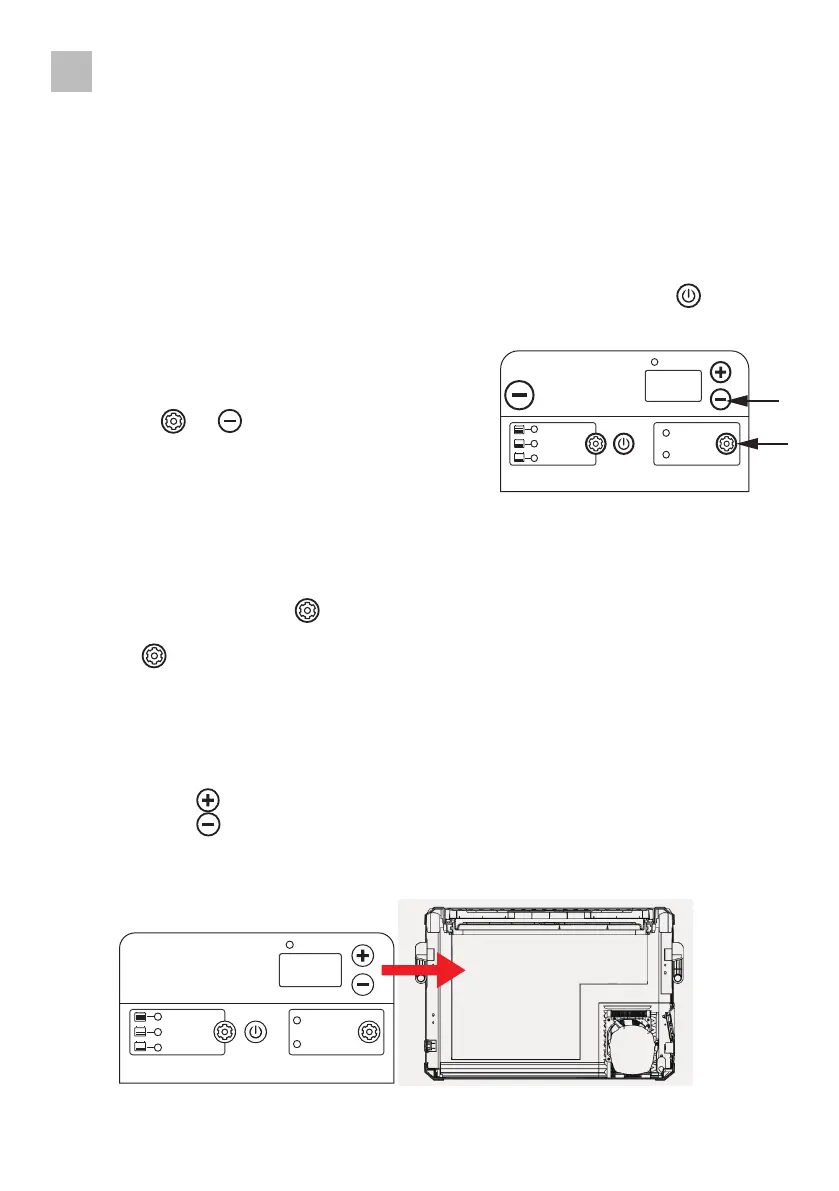
• Connect the cooler to the desired input voltage and press and hold the button for 2-3
seconds to switch on the appliance�
2. Temperature setting
• When the appliance is switched on, press
the buttons and (on the right-hand
side of the control panel) simultaneously to access the
Celsius and Fahrenheit functions menu�
3. Max / Eco function
• With this function, the compressor speed can be slowed down to increase operating
efficiency (ECO) or the compressor speed can be increased to achieve a "fast" cooling time
(MAX)�
• To operate, press the button , to start the "economy" operating mode� The ECO indica-
tor lights up�
• Press the button again to select MAX operating mode� The red MAX indicator lights up�
4. Temperature setting
Single zone
• When your appliance is connected to the AC or DC input for the first time, the digital dis-
play shows the current temperature�
• Press the button to increase the temperature�
• Press the button to lower the temperature�
• The set temperature appears as a flashing number and once the temperature has been set,
the display shows the current internal temperature of the cooler again�
26



 To Next Page