-9-
www.Berner.com/intelliswitch
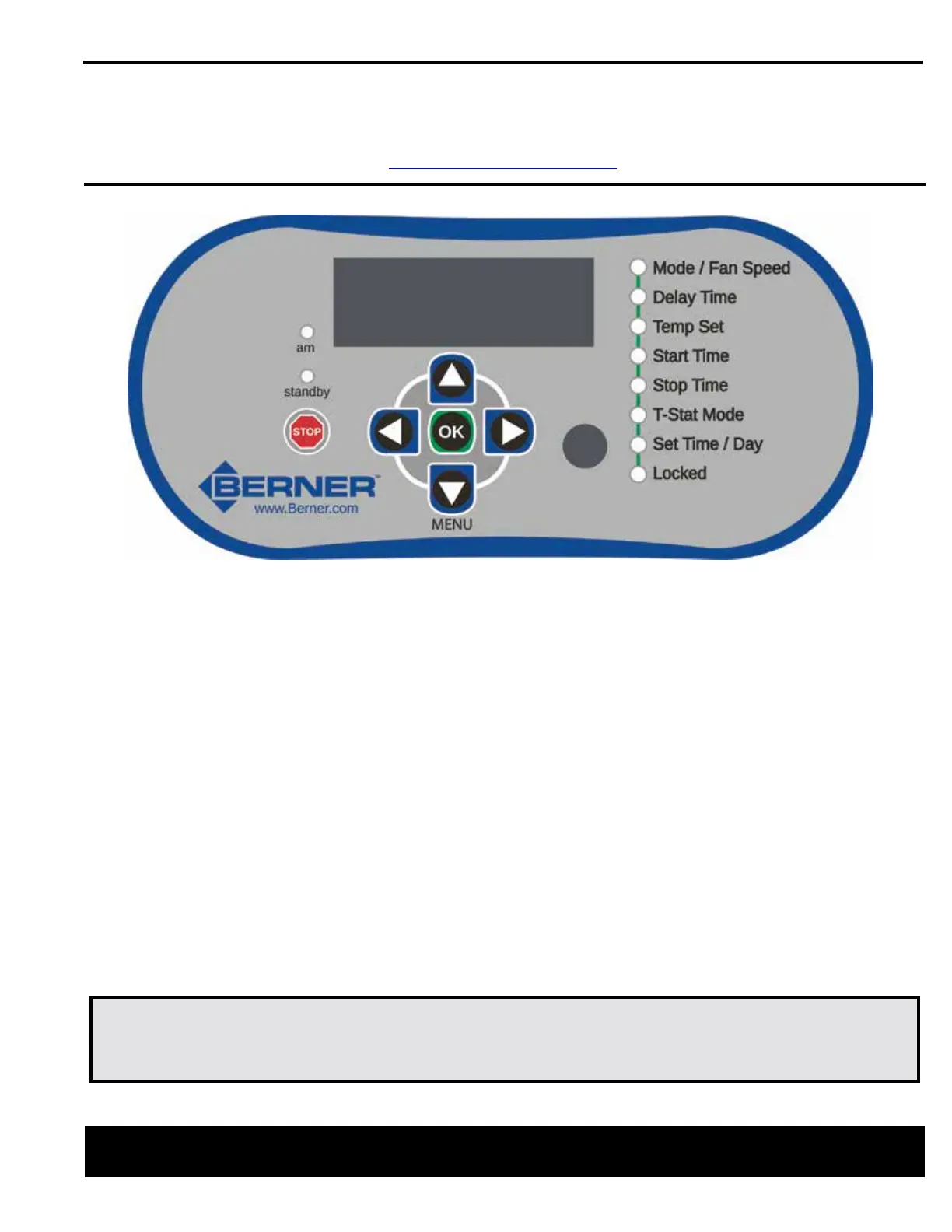
NOTE – to navigate use up/down to select setting and left/right to change setting
Mode/Fan Speed:
Mode: Select your mode of operation (see steps on page 2)
Fan Speed: Sets the speed of the fan
Delay Time: Amount of time the air curtain is to run after the door closes
Temp Set: Amount of heat and time the air curtain is to run after the door closes
Start Time: Programmable time of day air curtain becomes active
Stop Time: Programmable time of day air curtain stops running
T-Stat Mode: Set only heat or heat & fan
Set Time/Day: Programmable clock
QUICK START INSTRUCTIONS
For your Berner Air Curtain with Intelliswitch™
IMPORTANT NOTE!
If your air curtain unit is in “Locked” mode when you receive it:
Press and hold the left and right arrows simultaneously for 5 seconds to unlock.
www.berner.com Berner International 800.245.4455
111 Progress Ave. / New Castle / PA / 16101 / USA



 To Next Page