18
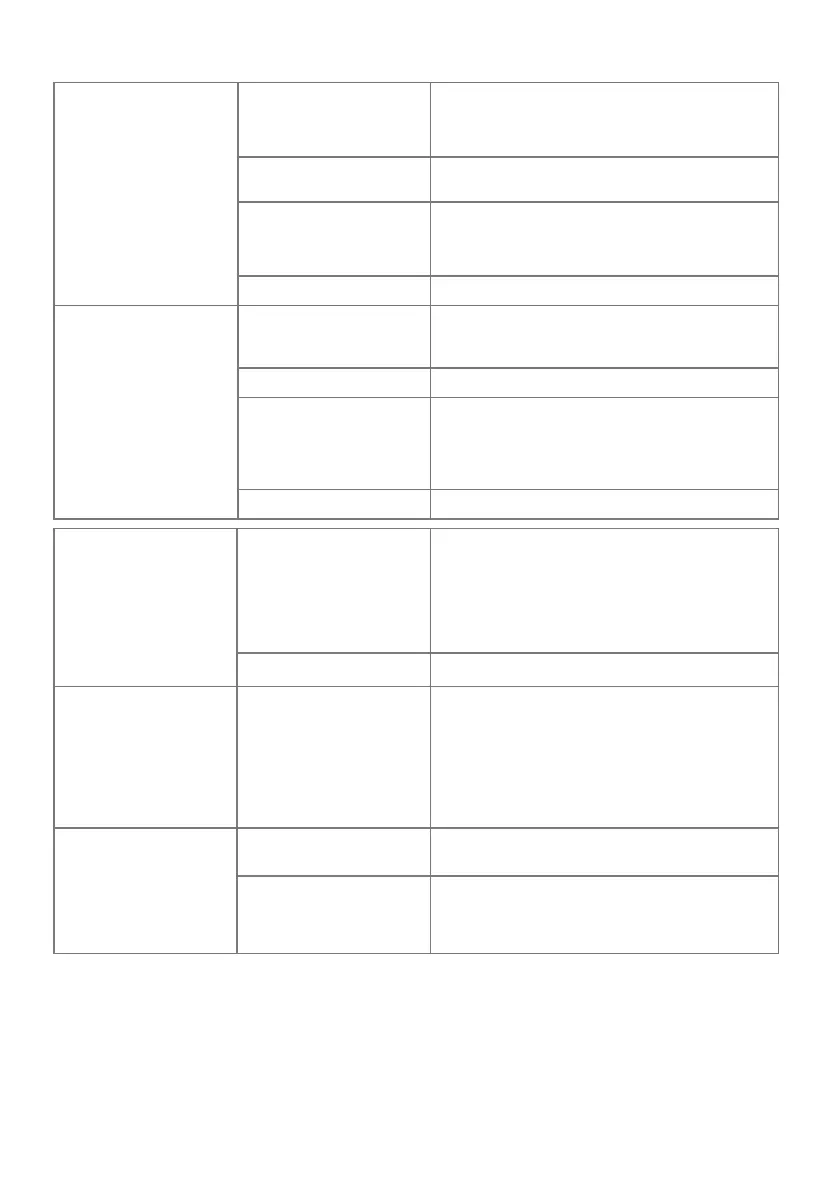
Lower Thread Breaks
The bobbin is not insert-
ed correctly.
- Remove and reinsert the bobbin and pull on
the thread.
→ The thread should run easily.
The bobbin is wound
incorrectly.
- Check bobbin and thread correctly.
The stitch hole in the
stitch plate is damaged.
- Contact a specialized bernette dealer to
have the damages repaired.
- Replace the stitch plate.
Needle blunt or bent. - Replace the needle.
Needle Breaks
The needle is incorrectly
inserted.
- Insert the needle with the at side to the
back as far up as it will go into the needle
holder and tighten the screw.
Fabric has been pulled. - Feed the fabric evenly.
Thick fabric has been
pushed.
- Use the appropriate presser foot, e.g. Jeans
foot, for thick material.
- Use the height compensating tool when
sewing over a thick seam.
Knotted thread. - Use quality thread.
Display is Inactive
Incorrect calibrating data. - Switch o the machine.
- Switch on the machine, and simultaneously
press and hold the buttons «Needle Position
Right/Left».
- Recalibrate the display.
The eco Mode is active. - Tap «Eco Mode».
Stitch Width Not Adjust-
able
The selected needle and
stitch plate cannot be
used in combination.
- Replace the needle.
- Replace the stitch plate.
Speed Too Low
Unfavorable room tem-
perature.
- Place the machine in a warm room one hour
before use.
Settings in the Setup
Program.
- Adjust the sewing/embroidery speed in the
Setup Program.
- Adjust the slide.



 To Next Page