EasyManua.ls Logo

BestCode Next 8 Series - Printer Operation; Power On and Off; Start and Stop Jet; Selecting Print Messages

BestCode Next 8 Series
8 pages
Print Icon
To Next Page IconTo Next Page
To Previous Page IconTo Previous Page
Loading...
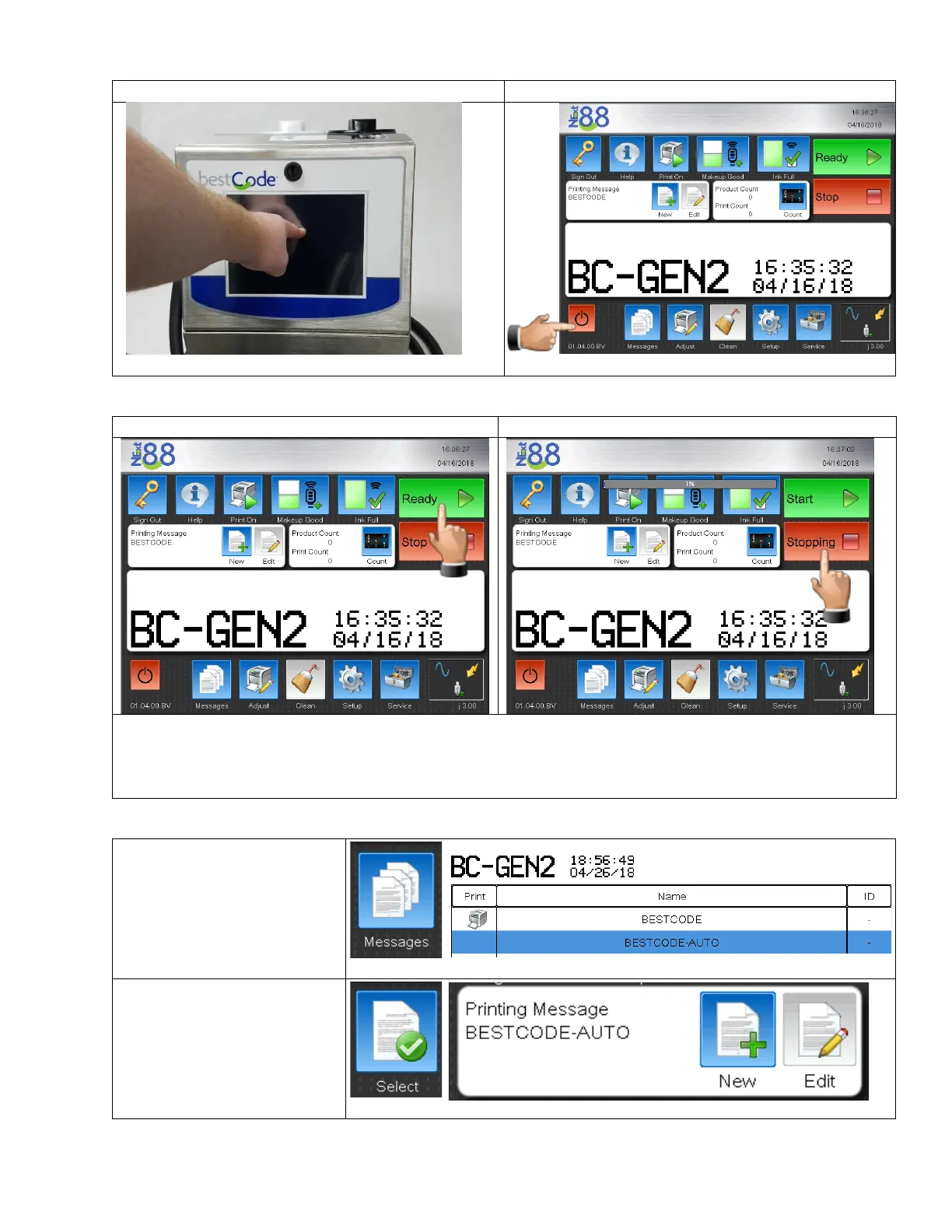
Power On / Off
Power On
Start / Stop Jet
Start Jet
Stop Jet
Clean Start & Clean Stop are the normal production starts and stops. These use a small amount of makeup per
routine. The software will automatically protect the operator from adding too much makeup. When the
operator is logged in using the Technician Level Password, all Starts & Stops from the Home screen will be clean
stops. This is to help diagnose Cleam Start and Clean Stop problems.
Selecting a message for print
1. Press the Messages
Button.
2. Select the desire message.
3. Press the Select button.
4. The selected message will
now be the actively
printed message.

Other manuals for BestCode Next 8 Series

Related product manuals