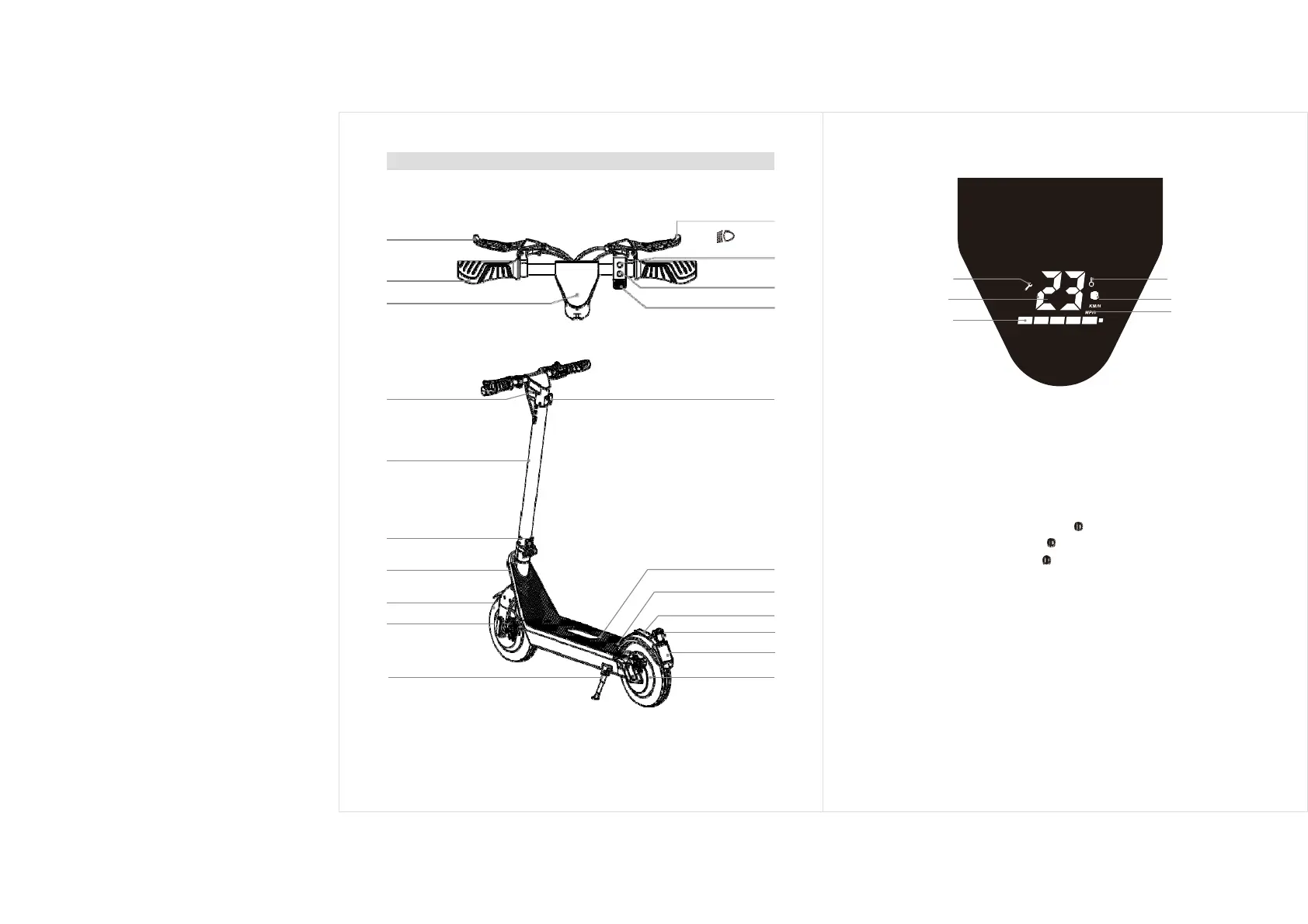
Product introduction
Rear wheel brake
Handlebar
LED Display
Front wheel brake
Light &
Function button
Power button
Throttle button
Fault display
Multifunction
Speed
Gear
Speed unit
Power
Headlight
Pole
Folding clasp
Frame
Front Wheel
Reflector
Kickstand
Hook
Anti-slip pedal
Battery unlock screw
Fender
Tail lights
Plate
Motor
LED display
Instructions of buttons
1.
Power Switch: Long press the power button to turn on/off.
2.
Function Button:
A: Short press function button: Cycle to switch gears.
Beginner mode: NO gear indicator . Normal
mode: Gear indicator shows white.
Sports mode: Gear indicator shows red.
B: Shortly press the function key twice to turn on/off the headlights, and the
taillights will on or off Synchronously.
3.
Accelerator: Press the acceleration button to start and accelerate.
4.
Brake: Hold the brake handlebar to brake.
5.
Cruise mode: Keep the current speed(≥6KM/h) for 6 seconds to enter
the cruise mode. Exit the cruise mode when pressing the accelerator
again or the brake.
Note: When the brake is active, pressing the throttle button to
accelerate is invalid!
-03- -04-


 To Next Page