3
PARA SET
R
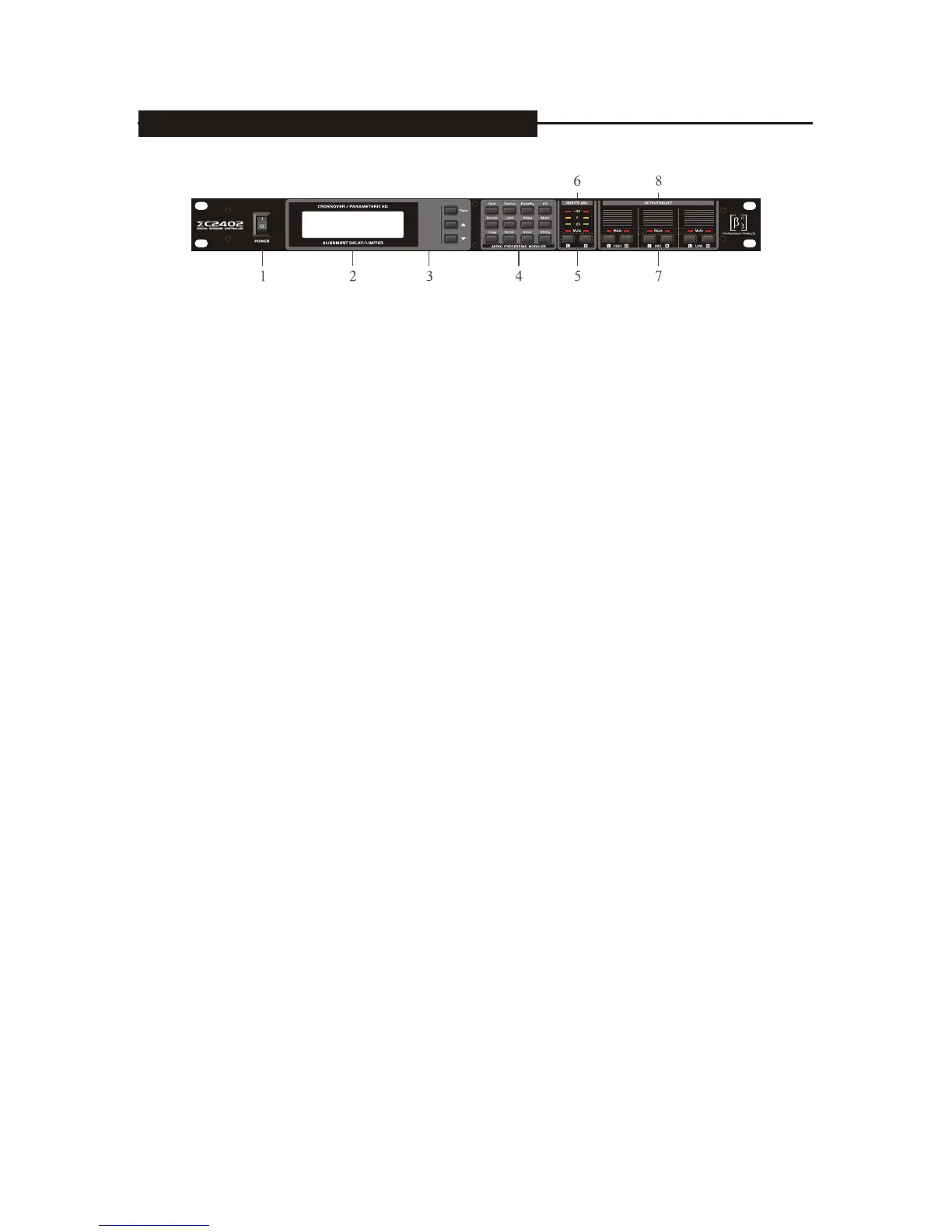
1.Power switch: put the 1 means open and 0 means close
2.LCD display: display the operate situation, e.g. the channel's module's set for the digit
3.Parameter set: choose the parameter need to be adjusted and set the +/- key when the Para
Is more than two
4.Function key and assistant key on the module:
Gain: input/output channel signal gain control
Source: choose the voice source on the output channel(only for the woofer)
Polarity: choose the signal polarity on the output channel
EQ: input/output channel parameter realization
Xover: output channel crossover
Limit: output channel signal limit
Delay: input/output channel signal delay
Mute: input/output signal mute
Copy: the copy for the channel or the same parameter(only for the same group channel)
Recall: process's adjustment
Store: process's saving
Utility: assistant function including the system lock switch and LCD contrast
5.Input channel's choose: choose the related input channel under the module for function of L/R
6.Input channel signal indicator: peak indicator,-20db(green),+15db(yellow),+20db(red)
7.Output channel choose key: L-High-R, L-Mid-R,L-Low-R, under the function module,
choose the related key to adjust the related output channel
8.Channel mute indicator: on means output mute, off means normal output
5. FRONT PANEL CONTROL FEATURES


 To Next Page