7
7.8 Mute
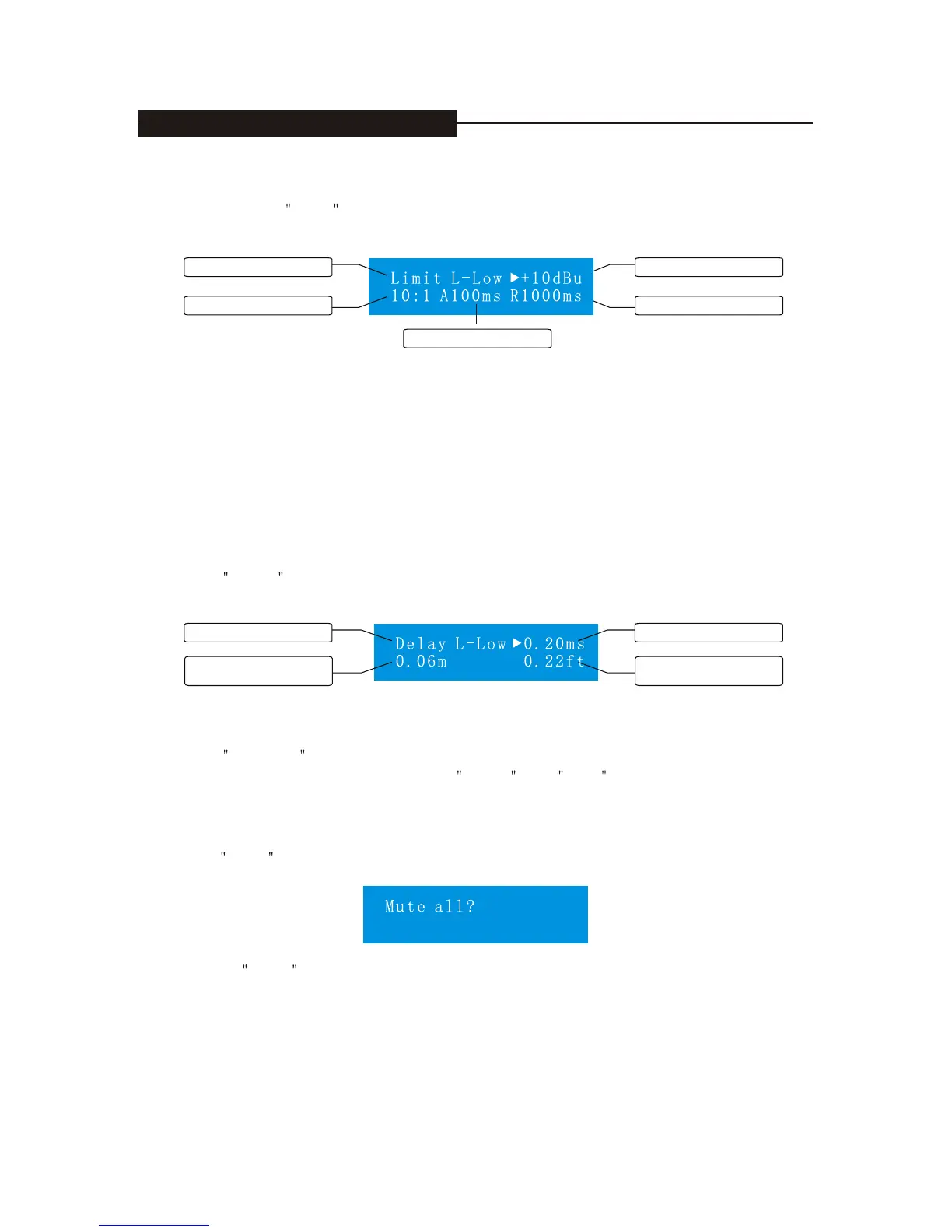
Press Mute and then enter input, the mute screen of output channel signal, see the following:
Repress Mute , all the channels are mute, press the choosing channel and then control
corresponding mute of the channel to open or close.
7.7 Delay
Press Delay and enter input, output channel signal delays the adjusted screen, see the
following:
All the channels of this equipment share the delaying line, therefore we can distribute the
delaying time dynamically, every channel can delay at most 40ms.
Press Chooses , choose corresponding adjustable channel, and press +/- to adjust time
of signal delaying, at the same time, use meter and inch as the delaying distance.
Output channel L-Low
Distance of delaying
(meter)
delaying time (ms)
distance of delaying
(inch)
7.6 Limitations
When pressing Limit button, you will enter the adjusted screen of limitation function of
output signal, see the following:
Press channel, choose corresponding adjustable channel, and press Para button and then
choose parameter, +/- to change the parameter value.
The limitation range is:-20dBu--+20dBu
Compression ratio range: 1:1~INF:1, 1:1 expresses direct channel for limitation
equipment, 1NF expresses limitation equipment.
Range of starting time: 0.010ms ~820ms
Range of releasing time: 100ms ~4700ms
time of startup
value of door limit
time of release
Output channel-low
Ratio of compression
7. DISPLAYS AND OPERATION


 To Next Page