41
7.4 Components of the user interface
The work area is made up of the following components:
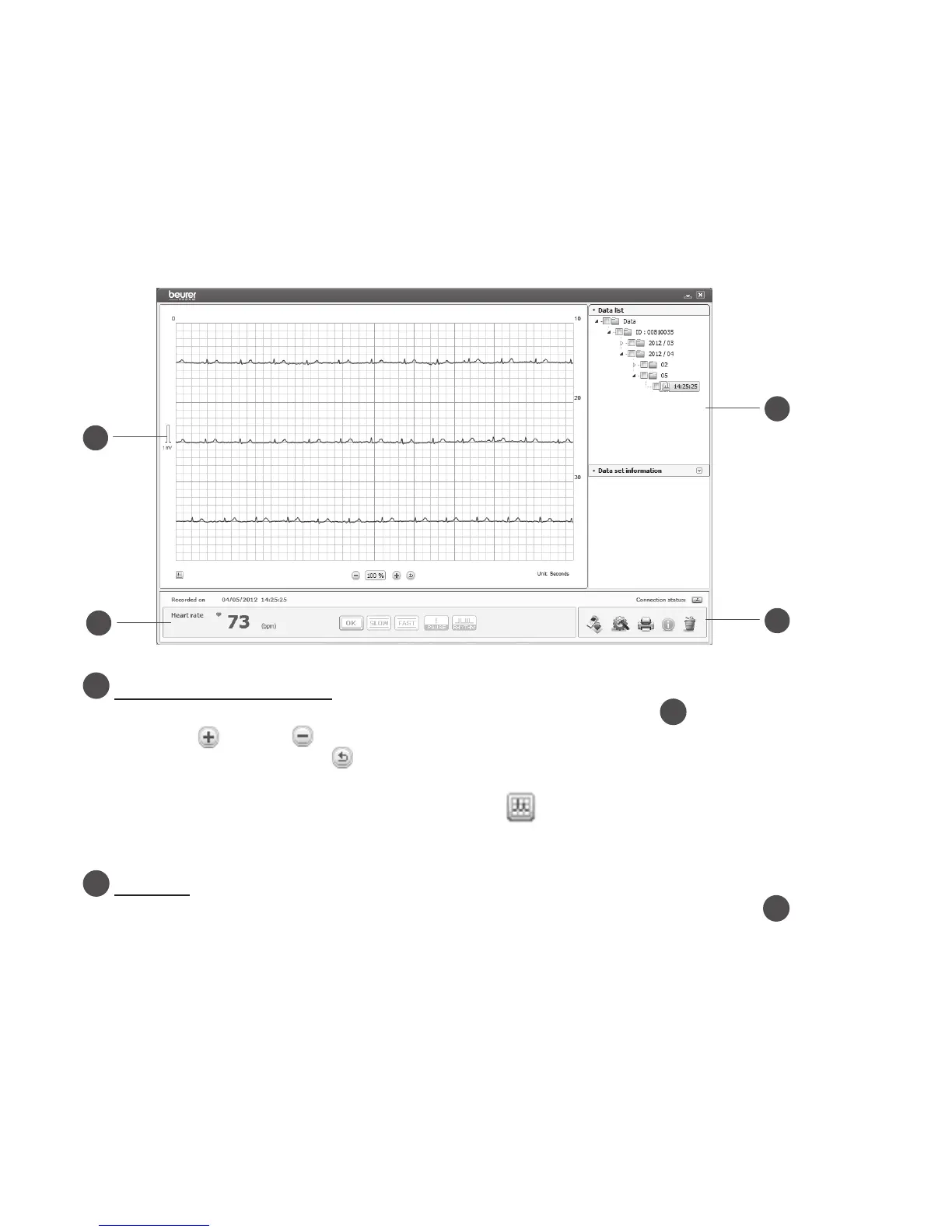
Your electrocardiogram
The electrocardiogram you have selected from the data list (see item
) is shown here. You
can zoom in (
VergrößernVerkleinern Zurücksetzen
VergrößernVerkleinern Zurücksetzen
) of the display using the relevant buttons. The zoom factor is
shown as a number. Clicking
VergrößernVerkleinern Zurücksetzen
resets the zoom factor to 100%.
Your electrocardiogram can be displayed in 2 various colours. The default setting is to display
the ECG line in black on red graph paper. Clicking
displays the ECG line in blue on green
graph paper.
Data list
Double-click a measurement from the data list (structure tree) to display it in area
. If you
wish to delete or print one or more measurements, tick the relevant box(es) in front of the
measurement(s) in the data list.


 To Next Page