20
2.
Connect the sup-
plied USB-C cable
to the Deep Tis-
sue Massager. The
connection for the
USB-C cable
6
is located on the un-
derside of the handle.
3. Connect the USB-C cable to a USB-C
mains plug (not included in delivery).
Insert the USB-C mains plug into a
suitable socket. The battery level in
-
dicator
7
shows the current battery
level.
Battery level indicator
7
flashes white
=
battery
charging
Battery level indicator
7
lights up white
=
battery
is fully
charged
4.
As soon as the battery level indicator
7
lights up white, remove the USB-C
mains plug (not included in delivery)
from the socket. The battery is now fully
charged. The battery will last for approx.
3 hours of operation when fully charged.
As soon as the battery level indicator
7
starts to flash red, you must recharge the
Deep Tissue Massager; otherwise it will
automatically switch o.
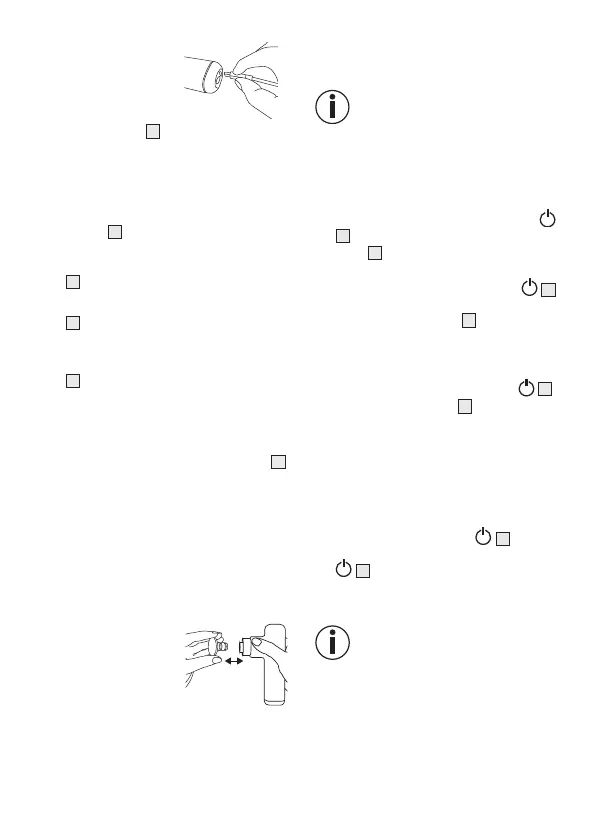
6.2 Selecting/changing the
attachment
Select the appropriate attachment before
starting the massage. To change an attach
-
ment, proceed as follows:
1. Pull the existing at
-
tachment horizon-
tally o the Deep
Tissue Massager.
2.
Slide your desired attachment firmly into
the Deep Tissue Massager until you feel
it click securely into place.
6.3 Switching on the device/
selecting the intensity level
The Deep Tissue Massag-
er comes with an automatic
switch-o function. This means
that the Deep Tissue Massag
-
er automatically switches o
after a period of use of approx.
10minutes.
1.
Press and hold the ON/OFF button
5
for 3 seconds. The battery level indi-
cator
7
starts to light up. The device is
now in standby mode.
2. Briefly press the ON/OFF button
5
to switch on the device. The left LED of
the intensity indicator
4
starts to light
up. The massage starts at intensity lev-
el 1.
3.
To switch between the intensity levels,
briefly press the ON/OFF button
5
.
The intensity indicator
4
shows the cur-
rent intensity level.
Intensity level 1 (1700 rpm) →
Intensity level 2 (2450 rpm) →
Intensity level 3 (3200 rpm) →
Standby.
4.
You can switch o the device at any
time during use by pressing and hold-
ing the ON/OFF button
5
(3 sec-
onds). If you press the ON/OFF button
5
again at the third intensity level,
the device switches o. The device is in
standby mode.
If the device stops during use,
this may be due to excessive
pressure. Make sure that you do
not exert too much pressure on
the Deep Tissue Massager when
using it.


 To Next Page
 Loading...