Lagoon ANC – Bluetooth® Headphones
10
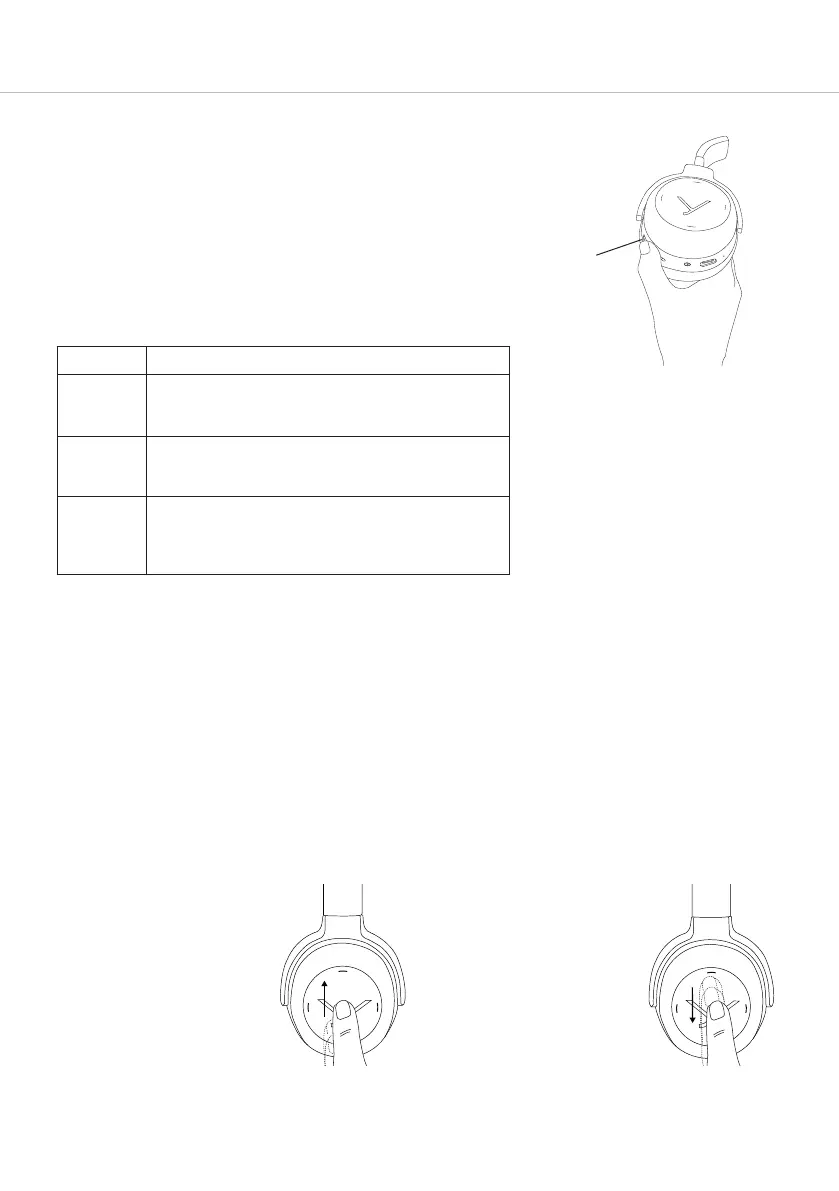
How to use the Active Noise Cancellation (ANC)
Active Noise Cancellation (ANC) only works when the head-
phones are switched on.
Y
ou can adju the Active Noise Cancellation (ANC) to two
dierent levels according to your personal liening preferences
and environment.
Generally speaking, when increasing the noise cancelling level,
unwanted external noise is reduced accordingly. When
decreasing the noise cancelling level, more external noise is
h
eard. We made sure, that even with ANC switched o the
Lagoon ANC provides significant attenuation due to its
thoroughly implemented closed-back design.
Please note: that the perceived quality of noise cancellation
highly depends on the level and type of surrounding noise.
Normally, ANC level 2 brings the ronge results, but under
ceain outside conditions (little low-frequency noise) ANC level 1
can produce better results.
A ceain level of audible background noise created by the
electronics is normal for ANC levels 1 and 2.
How to set the volume
• Increase volume
Drag your finger upwards
on the touch pad.
When you drag your
finger upwards and hold
it, the volume gradually
increases until the maxi-
mum is achieved.
An audible signal
indicates the achieved
maximum level.
• Reduce volume
Drag your finger down-
wards on the touch pad.
When you drag your
finger downwards and
hold it, the volume
gradually reduces until
the minimum is achieved.
An audible signal
indicates the achieved
minimum level.
Setting Description
OFF Active Noise Cancellation is deactivated. Only the
passive attenuation of the headphones remains.
The be setting for quiet environments.
Level 1 Moderate noise cancellation. Outside sounds can
ill be heard. The be setting, when there is little
external noise, i.e. in the household or oice use.
Level 2 Strong noise cancellation in very noisy environ-
ments. External sounds can hardly be heard. The
mo eicient attenuation when there is much low
frequency noise, i.e. on aircra or trains.














 To Next Page