Lagoon ANC – Bluetooth® Headphones
11
english
Media playback
Please note that the following functions depend on the player and the player soware and may not
be available. The headphones only transmit control signals that comply with the Bluetooth® andard.
I
mpoant: To avoid malfunction, use only one finger when you use the touch pad.
•
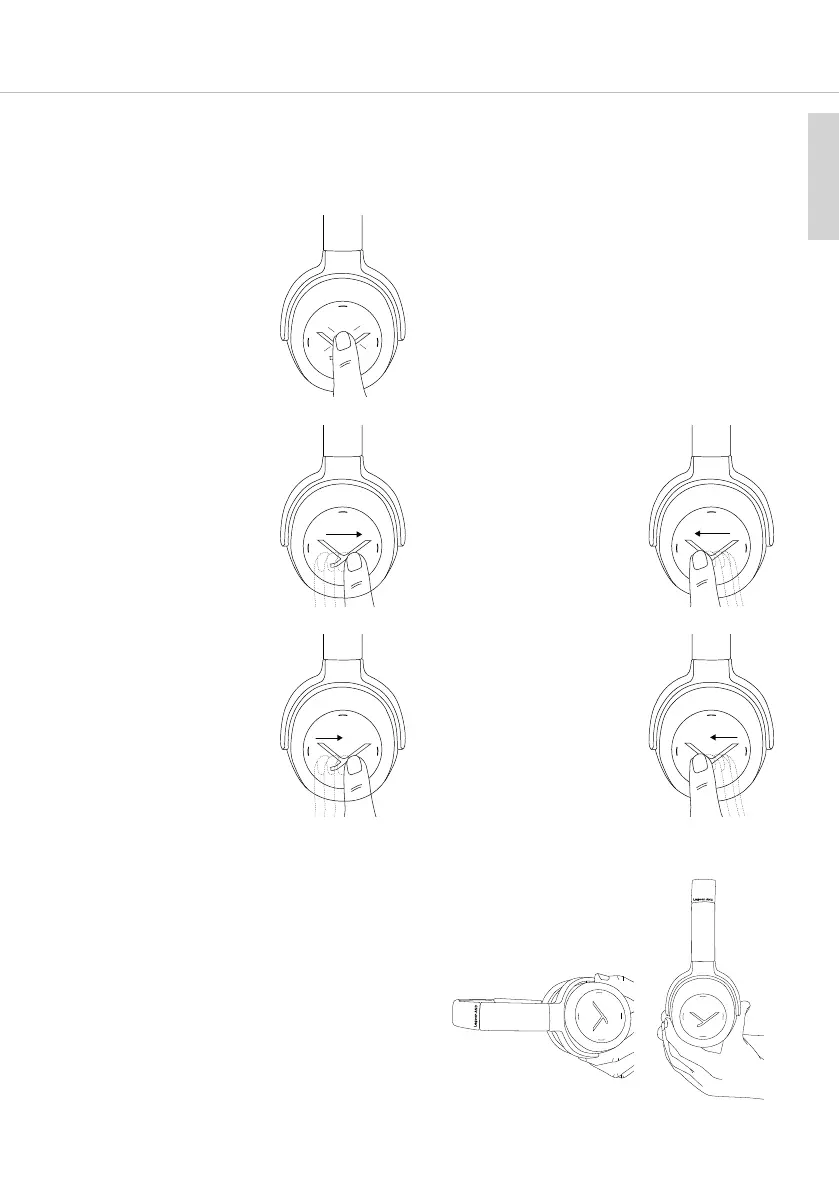
Sta / Stop:
Briefly tap the touch pad
twice.
• Play next track:
Drag your finger forwards
on the touch pad.
• Play previous track:
Drag your finger back-
wards on the touch pad.
2
x
• Fa forward:
Drag your finger forwards
on the touch pad and
hold it for at lea 1
second.
• Rewind:
Drag your finger back-
wards on the touch pad
and hold it for at lea 1
second.
Hold
Hold
• Automatic pause and resume function:
Audio will pause automatically when the
Lagoon ANC is tilted forward almo
completely.
As soon as the Lagoon ANC is brought back to
an upright position, audio will resume.
This applies, when wearing the headphones or
when taking them o.
You can bypass this pause behaviour by
aing the audio via the normal a
command on the touch pad.
Audio will op Audio will resume














 To Next Page