11/20
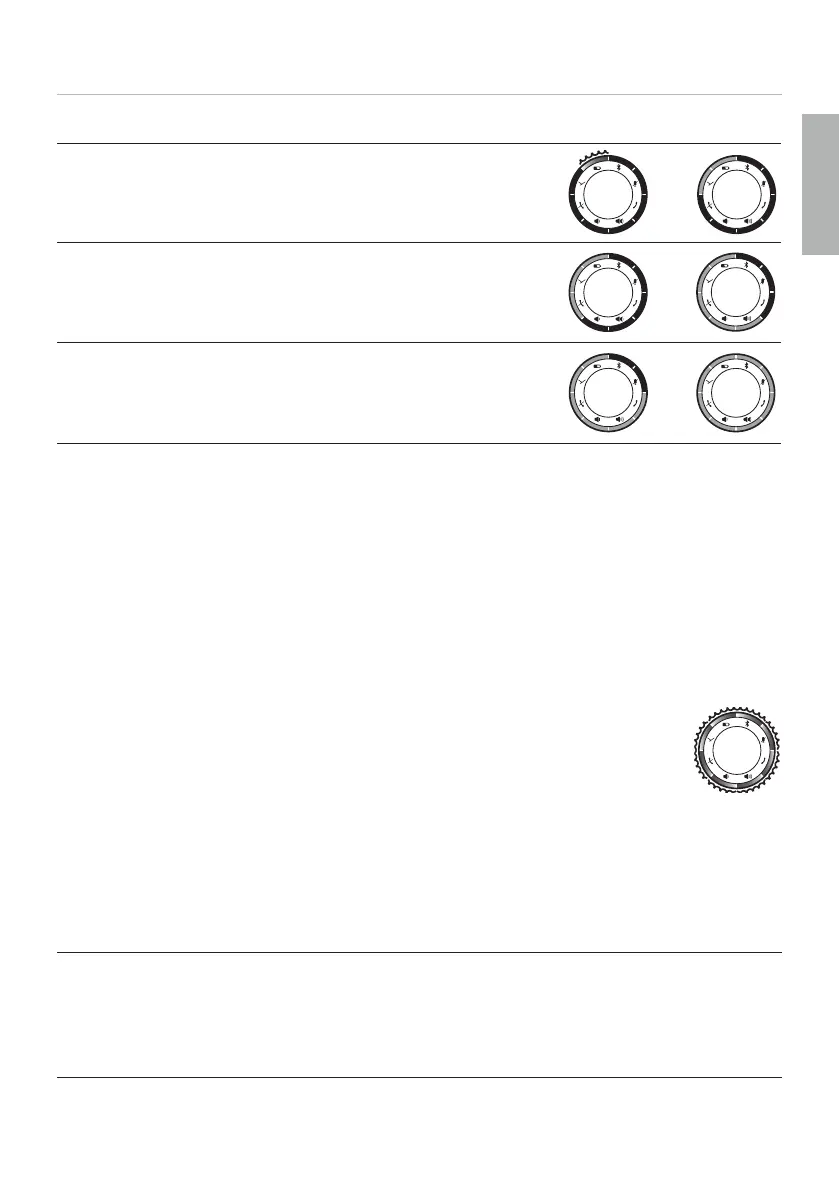
LED display of charge level:
Red*: Battery 0–25 % full
–
Yellow: Battery 25–62.5 % full
–
Green: Battery 62.5–100 % full
–
*) When the charge level is close to zero, the LED flashes
Using the product with Bluetooth
®
connection
You can operate the product via Bluetooth
®
with a sma phone or PC. For this, the
Bluetooth
®
function mu be active and the product mu be paired with the output
device. You can find in ructions on how to operate the product under “Operation” on
page 11.
SOFTWARE UPDATE
Firmware updates are carried out via USB-HID using the beyerdynamic
Update Hub: https://byr.li/firmwareupdate
The unit has a firmware update function (DFU) via USB connection to a PC
(Windows and Mac OS).
During the update process, the LED ring flashes magenta.
OPERATION
Switching on and o
Switching on:
► Press on/o button for 1 to 3 s.
Switching o :
► Press on/o button again for 1 to 3 s.
English


 To Next Page