16/20
Settings for be sound
To achieve the be possible Bluetooth
®
sound with your product, please observe the
following practical tips:
1. Set the volume to minimum on the product and to maximum on the playback device.
2. Then adju the volume only on the product, not on the playback device.
This applies only to playback devices that do not automatically synchronise the volume.
On playback devices that automatically synchronise the volume (e.g. iPhone, iPad and
various Android sma phones), the volume on the product is always identical to the
volume of the playback device.
3. Deactivate any audio e ects that may be present in the so ware of the playback
device.
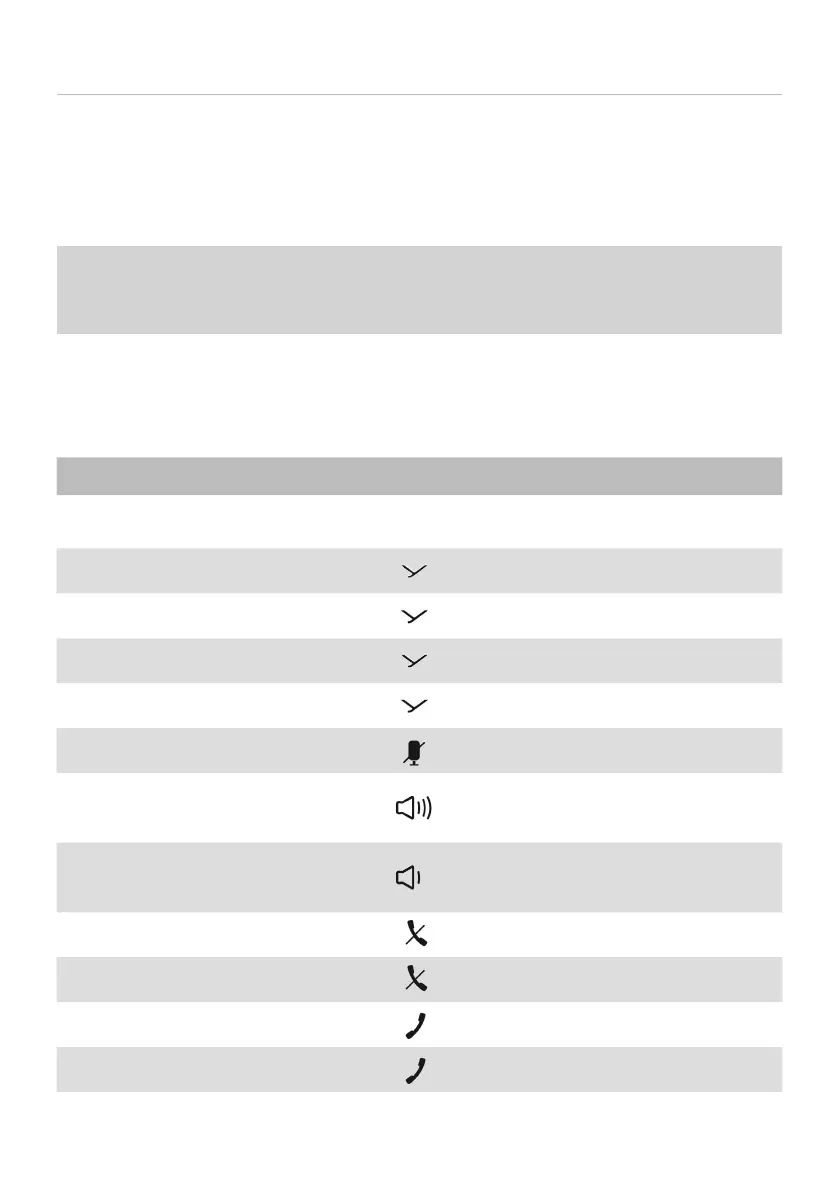
Overview of operating functions
Function Operation
To switch on and o ► Press the on/o button for 1 to 3
sec.
To a / op playback
► Press briefly
Next track
► Briefly press twice
Previous track
► Briefly press three times
To call up the personal assi ant
► Press for 1 to 3sec
To mute/unmute
► Press briefly
To increase volume
► Tap to increase in ages
► Hold to increase continuously
To decrease volume
► Tap to decrease in ages
► Hold to decrease continuously
To end a call ► Press briefly
To reject a call
► Press briefly
To answer a call
► Press briefly
To switch calls
► Briefly press twice


 To Next Page