17/20
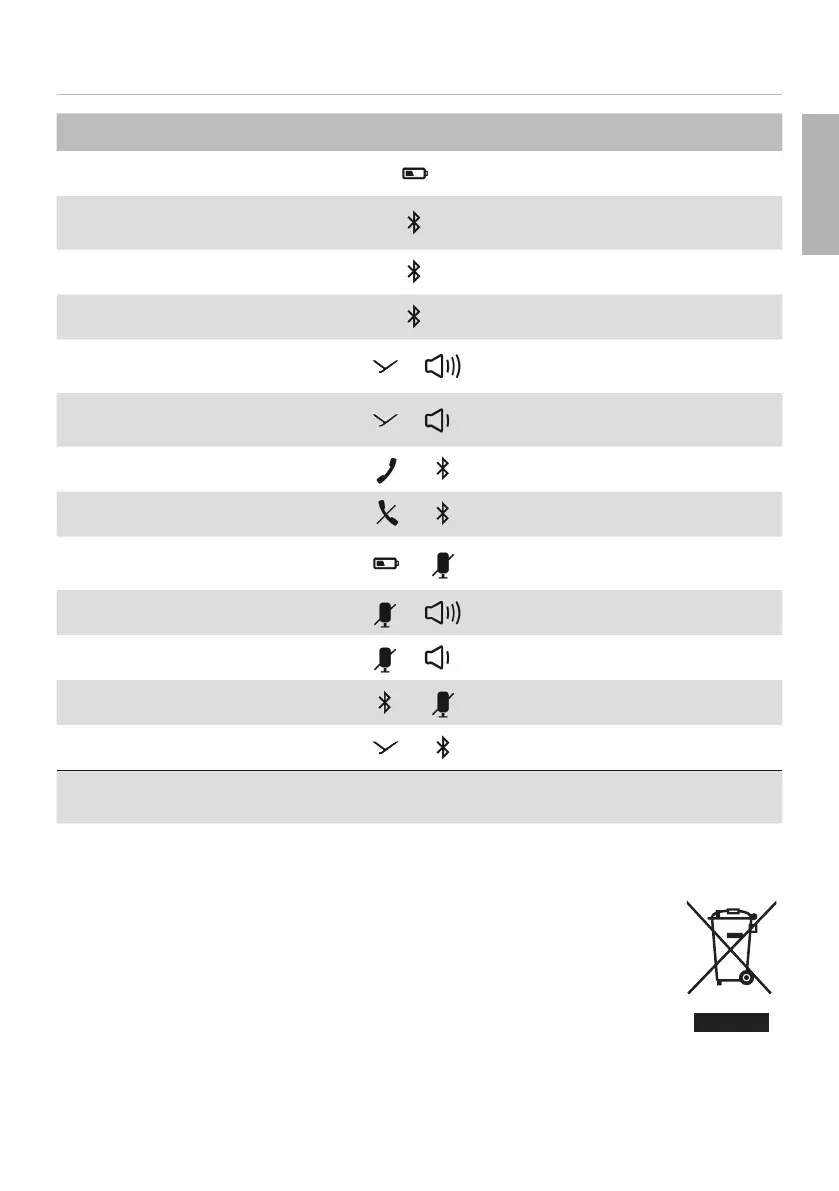
Function Operation
To display the battery atus ► Press briefly
Activate/deactivate Bluetooth®
► twice, holding it down the second
time
To pair
► Press for 1 to 3sec
To delete pairing and pairing li
► Press and hold for at lea 10sec
To switch on Sound-Activated
Lighting Mode
+
► Press simultaneously for 1 to 3sec
To switch o Sound-Activated
Lighting Mode
+
► Press simultaneously for 1 to 3sec
To switch on Business Mode
+
► Press simultaneously for 1 to 3sec
To switch o Business Mode
+
► Press simultaneously for 1 to 3sec
To activate/deactivate
Stealth Mode
+
► Press simultaneously for 1 to 3sec
To switch on voice messages
+
► Press simultaneously for 1 to 3sec
To switch o voice messages
+
► Press simultaneously for 1 to 3sec
To reset to factory settings
+
► Press simultaneously for 3 to 5sec
To activate/deactivate cascading
1)
+
► Press simultaneously for 1 to 3sec
1)
Can only be used if the second device is detected within 5 m range and indicated by
the Bluetooth®-LEDs.
DISPOSAL
This symbol on the product, in the operating in ructions or on the pack-
aging means that the electrical and electronic devices mu be disposed
of separately from household wa e at the end of their life cycle.
► Always dispose of used devices in accordance with the regulations in force.
► For fu her information, please contact your local authority or the dealer from whom
the product was purchased.
English


 To Next Page