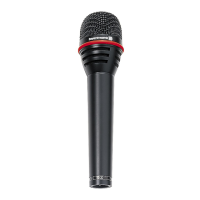
Thank you for selecting the TG-X 80/81 dynamic
microphone. Please take some time to read carefully through
this product information before setting up the equipment.
Applications
The TG-X 80/81 is designed for miking vocals and
instruments. If the microphone is used at greater distances
e.g. miking of choirs it may be necessary to enhance the low
and high frequencies on the mixing console to obtain the
best sound. The TG-X 80/81 can be used handheld or on a
stand with the supplied microphone clamp.
Setting up
• Around the basket is a shock absorbing coloured rubber
ring, which can be exchanged by unscrewing the grille
basket. Once unscrewed, you have access to the foam pop
filter which can be removed for cleaning or replacement.
• In order to avoid “pop” sounds hold the microphone
below the mouth at a slight angle. Do not use the
microphone without its pop filter.
• Due to the close-talking effect, the miking distance
between the microphone and your mouth can make a
difference in sound and volume.
• The TG-X 80/81 features a hypercardioid polar pattern and
a high-gain-before feedback. In order to achieve maximum
gain-before-feedback, the monitor box should be at an
angle of 110° to the longitudinal axis of the microphone.
• Supply of the TG-X 80/81 includes the MKV 8 microphone
clamp for stands with 3/8" thread. For stands with 5/8"
thread unscrew the 3/8"-thread insertion piece.
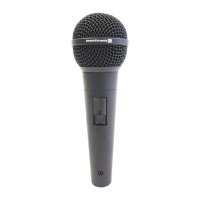
• The TG-X 81 is available with an on/off switch that can be
locked in position if required.
Connection
The TG-X 80/81 is equipped with a 3-pin XLR-plug. The
microphone can be connected to any microphone input. For
best results we recommend the use of balanced microphone
cables into a balanced microphone input.
Service
Servicing must be carried out by qualified service
personnel only. Dismantling the microphone yourself will
invalidate the guarantee.



 To Next Page