56
1.7 ZAS 800 Antenna Splitter
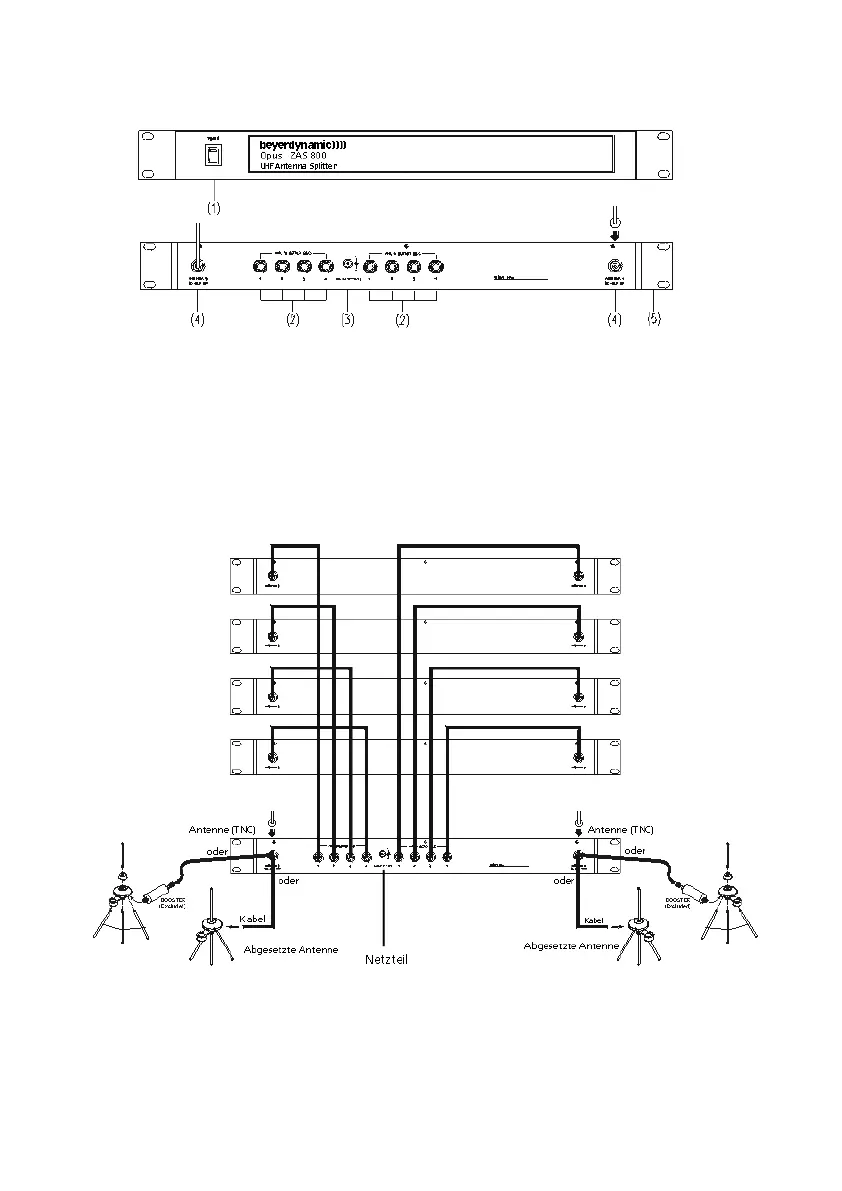
1.7.1 Controls and Indicators
(1) On/Off switch and power on LED. When the antenna splitter is switched on, the red
LED will illuminate.
(2) RF outputs to connect the receivers
(3) DC-connection to connect the DC power supply unit (12 V)
(4) Antenna sockets A/B. The antenna sockets provide a DC supply for antenna amplifiers.
(DC-Out: 8 V / 170 mA)
(5) Mounting brackets for 19" rack mounting
1.7.2 Installation
1. Mount the ZAS 800 antenna splitter and the receivers into a 19" rack by using the mounting
brackets.
2. Connect the supplied antennae to the antenna sockets A/B (4). You can also use optional remote
antennae. For mounting the antennae on the front use the supplied FB-30 mounting bracket.
3. Connect the NE 900 receivers to the ZAS 800 antenna splitter with the supplied cables.
4. Connect the power supply unit to the DC-connection (3) and to AC power.
(Attention: Make sure that the indicated voltage corresponds to the local voltage.)
5. Switch on the ZAS 800 antenna splitter (1).
First receiver
Second receiver
Third receiver
Fourth receiver



 To Next Page