ENGLISH
INSTALLATION MANUAL
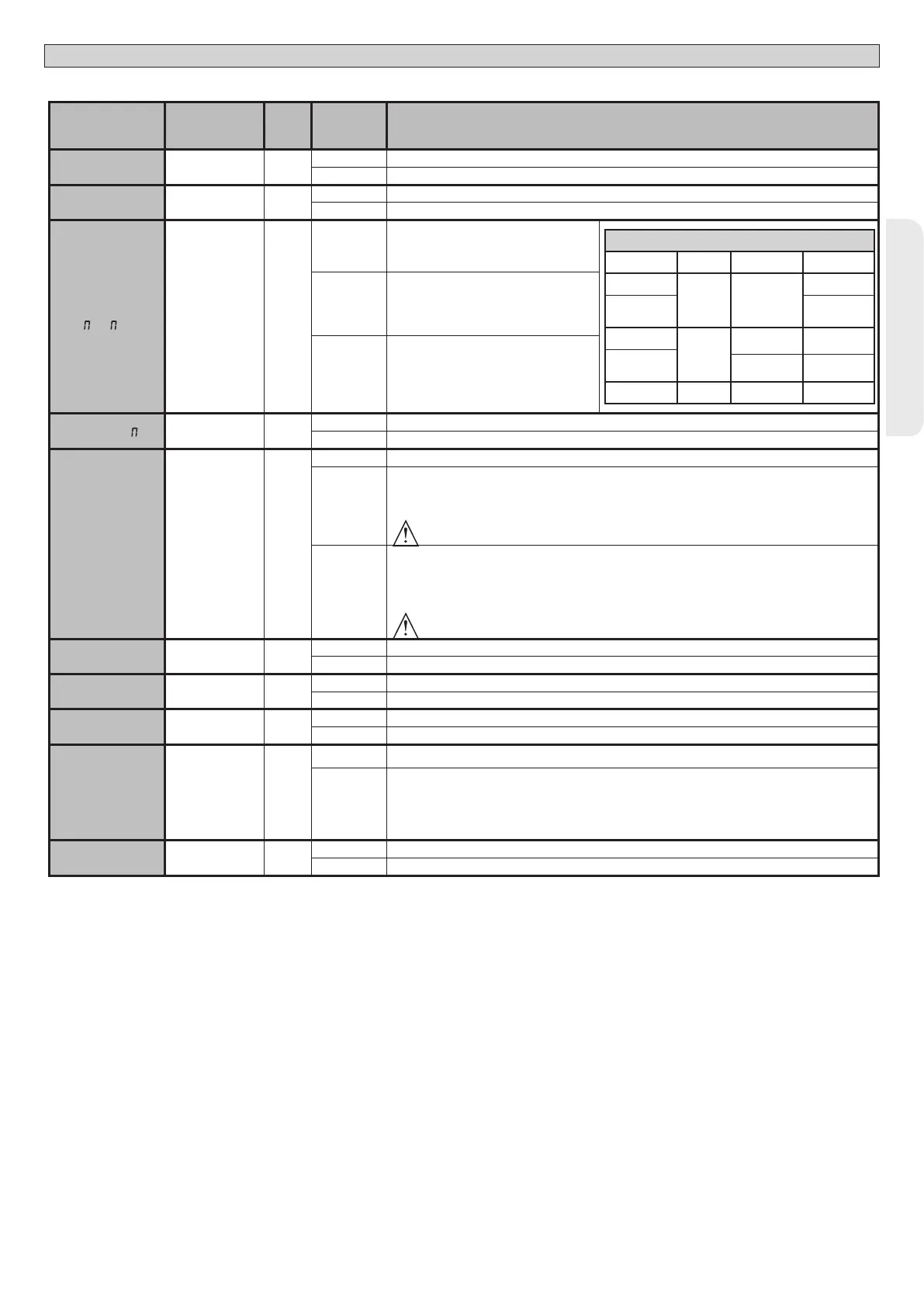
TABLE “B” LOGIC MENU - logic
Logic Denition
De-
fault
Cross out
setting
used
Optional extras
TCA
Automatic Clo-
sing Time
0
0 Logic not enabled
1 Switches automatic closing on
FAST CLS.
Fast closing 0
0 Logic not enabled
1 Closes 3 seconds after the photocells are cleared before waiting for the set TCA to elapse.
STEP-BY-STEP
OVE NT
Step-by-step
movement
0
0
Inputs congured as Start E, Start I, Ped
operate with 4-step logic.
step-by-step mov.
2 STEP 3 STEP 4 STEP
CLOSED
OPENS OPENS
OPENS
DURING
CLOSING
STOPS
OPEN
CLOSES
CLOSES CLOSES
DURING
OPENING
STOP + TCA
STOP + TCA
AFTER STOP
OPENS OPENS OPENS
1
Inputs congured as Start E, Start I, Ped op-
erate with 3-step logic. Pulse during closing
reverses movement.
2
Inputs congured as Start E, Start I, Ped op-
erate with 2-step logic. Movement reverses
with each pulse.
PRE-ALAR
Pre-alarm 0
0 The ashing light comes on at the same time as the motor(s) start.
1 The ashing light comes on approx. 3 seconds before the motor(s) start.
HOLD-TO-RUN
Deadman 0
0 Pulse operation.
1
Deadman mode.
Input 61 is congured as OPEN UP.
Input 62 is congured as CLOSE UP.
Operation continues as long as the OPEN UP or CLOSE UP keys are held down.
WARNING: safety devices are not enabled.
2
Emergency Deadman mode. Usually pulse operation.
If the board fails the safety device tests (photocell or safety edge, Er0x) 3 times in a row, Deadman mode is
enabled which will stay active for 1 minute after the OPEN UP - CLOSE UP keys are released.
Input 61 is congured as OPEN UP.
Input 62 is congured as CLOSE UP.
WARNING: with the device set to Emergency Deadman mode, safety devices are not enabled.
IBL OPEN
Block pulses
during opening
0
0 Pulse from inputs congured as Start E, Start I, Ped has eect during opening.
1 Pulse from inputs congured as Start E, Start I, Ped has no eect during opening.
*IBL TCA
Block pulses
during TCA
0
0 Pulse from inputs congured as Start E, Start I, Ped has eect during TCA pause.
1 Pulse from inputs congured as Start E, Start I, Ped has no eect during TCA pause.
IBL CLOSE
Block pulses
during closing
0
0 Pulse from inputs congured as Start E, Start I, Ped has eect during closing.
1 Pulse from inputs congured as Start E, Start I, Ped has no eect during closing.
ICE
Ice feature 0
0 The Amperostop safety trip threshold stays at the same set value.
1
The controller automatically adjusts the obstacle alarm trip threshold at each start up.
Check that the force of impact measured at the points provided for by standard EN 12445 is lower than the
value laid down by standard EN 12453. If in doubt, use auxiliary safety devices.
This feature is useful when dealing with installations running at low temperatures.
WARNING: once this feature has been activated, you will need to perform an autoset opening and closing cycle.
OPEN IN OTHER
DIRECT.
Open in other
direction
0
0 Standard operating mode (See Fig.Q Ref. 1).
1 Opens in other direction to standard operating mode (See Fig. Q Ref.2)
ARES ULTRA BT A 1000 - ARES ULTRA BT A 1500 - 29
D812201 00100_09


 To Next Page
 Loading...