INSTALLATION MANUAL
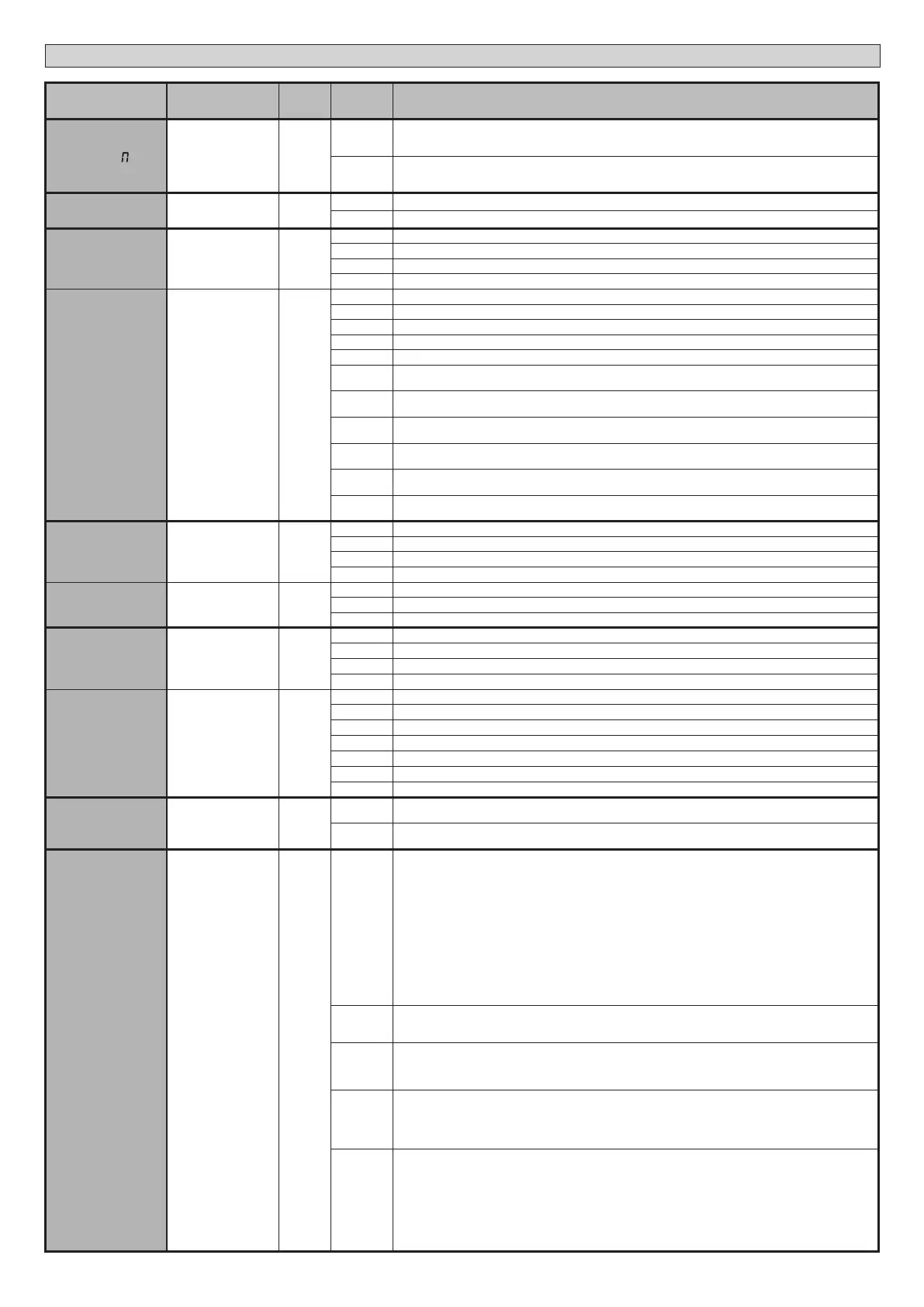
Logic Denition
Default
Cross out
setting
used
Optional extras
change ot
Inversion of the
motor’s phase shift
0
0
Open: M1 starts in advance compared to M2 (opening phase shift). (See Fig.E)
Closure: M2 starts in advance compared to M1 (closing phase shift). (See Fig.E)
Pedestrian manoeuvre is performed by M1
1
Open: M2 starts in advance compared to M1 (opening phase shift). (See Fig.E)
Closure: M1 starts in advance compared to M2 (closing phase shift). (See Fig.E)
Pedestrian manoeuvre is performed by M2
OPEN IN OTHER
DIRECT.
Open in other
direction
0
0 Standard operating mode (See Fig.E).
1 Opens in other direction to standard operating mode (See Fig. E)
SAFE 1
Conguration of
safety input SAFE 1.
72
0
0 Input congured as Phot (photocell).
1 Input congured as Phot test (tested photocell).
2 Input congured as Phot op (photocell active during opening only).
3 Input congured as Phot op test (tested photocell active during opening only).
SAFE 2
Conguration of
safety input SAFE 2.
74
6
4 Input congured as Phot cl (photocell active during closing only).
5 Input congured as Phot cl test (tested photocell active during closing only).
6 Input congured as Bar, safety edge.
7 Input congured as Bar, tested safety edge.
8 Input congured as Bar 8k2.
9
Input congured as Bar OP, safety edge with inversion active only while opening. If while closing, the
movement stops.
10
Input congured as Bar OP TEST, safety edge tested with inversion active only while opening. If while
closing, the movement stops.
11
Input congured as Bar OP 8k2, safety edge with inversion active only while opening. If while closing, the
movement stops.
12
Input congured as Bar CL, safety edge with inversion active only while closing. If while opening, the
movement stops.
13
Input congured as Bar CL TEST, safety edge tested with inversion active only while closing. If while opening,
the movement stops.
14
Input congured as Bar CL 8k2, safety edge with inversion active only while closing. If while opening, the
movement stops.
IC 1
Conguration of
command input IC 1.
61
0
0 Input congured as Start E.
1 Input congured as Start I.
2 Input congured as Open.
3 Input congured as Close.
IC 2
Conguration of
command input IC 2.
62
4
4 Input congured as Ped.
5 Input congured as Timer.
6 Input congured as Timer Pedestrian.
AUX 0
Conguration of
AUX 0 output. 20-21
6
0 Output congured as 2nd Radio Channel.
1 Output congured as SCA, gate open light.
2 Output congured as Courtesy Light command.
3 Output congured as Zone Light command.
AUX 3
Conguration of
AUX 3 output.
26-27
0
4 Output congured as Stair Light
5 Output congured as Alarm
6 Output congured as Flashing light
7 Output congured as Latch
8 Output congured as Magnetic lock
9 Output congured as Maintenance
10 Output congured as Flashing Light and Maintenance.
FIXED CODE
Fixed code
0 0
Receiver is congured for operation in rolling-code mode.
Fixed-Code Clones are not accepted.
1
Receiver is congured for operation in xed-code mode.
Fixed-Code Clones are accepted.
Protection
level
Setting the
protection level
0
0
A - The password is not required to access the programming menus
B - Enables wireless memorizing of transmitters.
Operations in this mode are carried out near the control panel and do not require access:
- Press in sequence the hidden key and normal key (T1-T2-T3-T4) of a transmitter that has already been
memorized in standard mode via the radio menu.
- Press within 10 sec. the hidden key and normal key (T1-T2-T3-T4) of a transmitter to be memorized.
The receiver exits programming mode after 10 sec.: you can use this time to enter other new transmitters
by repeating the previous step.
C - Enables wireless automatic addition of clones.
Enables clones generated with the universal programmer and programmed Replays to be added to the
receiver’s memory.
D - Enables wireless automatic addition of replays.
Enables programmed Replays to be added to the receiver’s memory.
E - The board’s parameters can be edited via the U-link network
1
A - You are prompted to enter the password to access the programming menus
The default password is 1234.
No change in behaviour of functions B - C - D - E from 0 logic setting
2
A - You are prompted to enter the password to access the programming menus
The default password is 1234.
B - Wireless memorizing of transmitters is disabled.
C - Wireless automatic addition of clones is disabled. No change in behaviour of functions D - E from 0 logic setting
3
A - You are prompted to enter the password to access the programming menus
The default password is 1234.
B - Wireless memorizing of transmitters is disabled.
D - Wireless automatic addition of Replays is disabled.
No change in behaviour of functions C - E from 0 logic setting
4
A - You are prompted to enter the password to access the programming menus
The default password is 1234.
B - Wireless memorizing of transmitters is disabled.
C - Wireless automatic addition of clones is disabled.
D - Wireless automatic addition of Replays is disabled.
E - The option of editing the board’s parameters via the U-link network is disabled.
Transmitters are memorized only using the relevant Radio menu.
IMPORTANT: This high level of security stops unwanted clones from gaining access and also stops radio
interference, if any.
36 - THALIA
D814123 0AA00_01


 To Next Page
 Loading...