Country Choose country
4. Registration
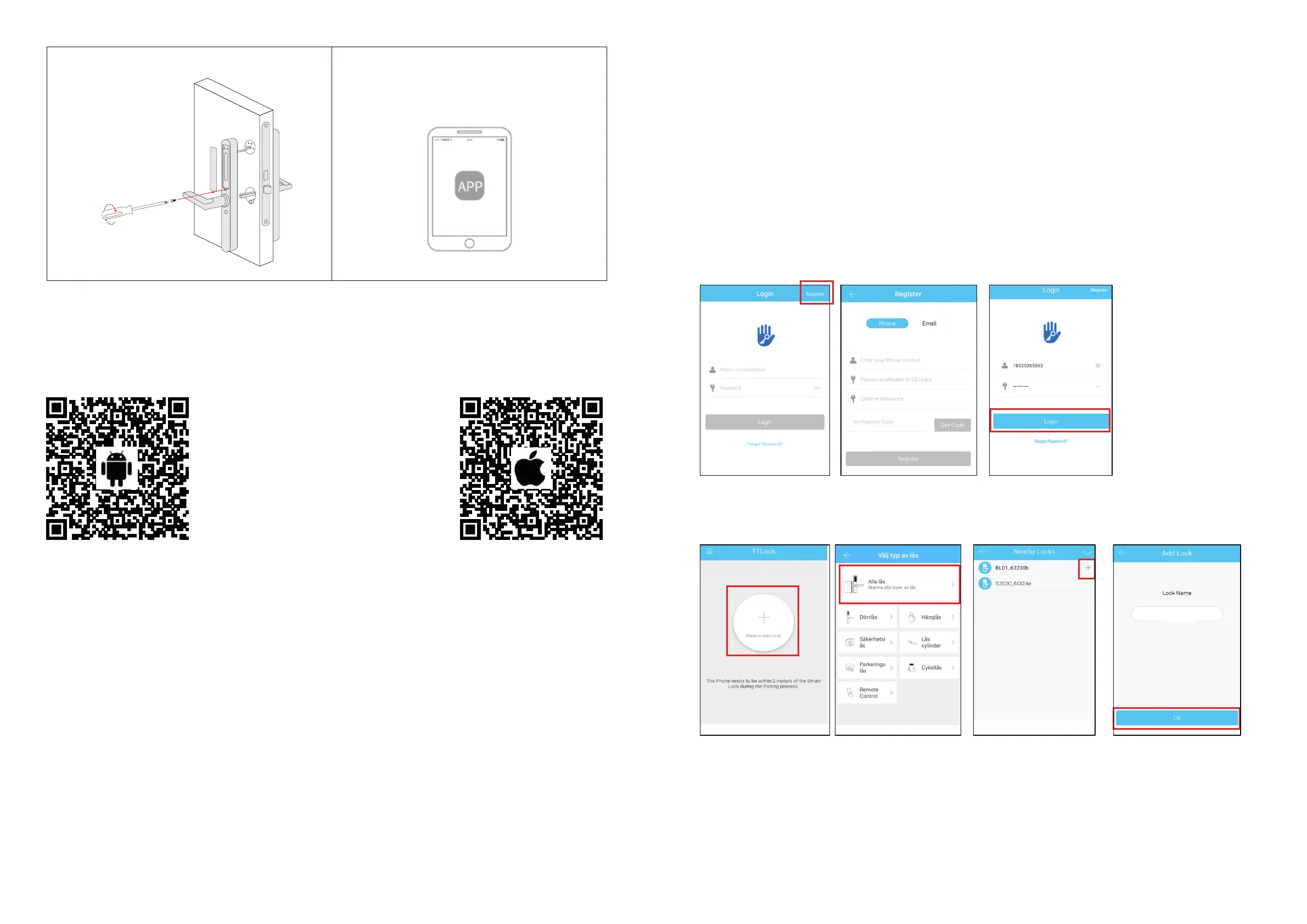
5.1 Connect APP and phone
1) Android – scan the left QR code.
2) Apple – scan the right QR code.
3) Alternatively search for TTLock in Google Play or App Store.
4) Register new account (mobile number (without rst zero) or email) or log in with existing account.
5) Touch the lock screen to light, click "+ Add lock”
6) Nearby lock(s) will appear on the phone screen, klick "+"
7) Re-name the lock
8) The lock has now been added.
Lock type
NOTE: The TTLock app can control several dierent lock types. You must rst select type of lock.
The lock must be added to the app. Normally, locks that have not been added before can be
added after the lock panel has been activated. Locks that have previously been added to TTLock
must rst be removed by its owner, then added again.
1-1 1-2 1-3
6 7
Demo mode
Note: The lock can be opened with the code: 123456 followed by # in demonstration mode
1-4 1-5 1-6
S31B
1-7
6 - APP
Now start connecting the APP
5 - Insert batteries
4 AAA batteries
must be used.
High quality or
lithium.
Rechargeable
batteries must
never be used.



 To Next Page