5.4 Trouble shooting
5.4.1
1 How to read operation methods? In the ”records” of the main interface / or web
interface TTLock
2 For what reason are you able to upload
ngerprints?
What is uploaded is not ngerprints but the number of
ngerprints. Because some locks do not need the
APP to add ngerprints, they can not be seen in the
APP until they have been uploaded
3 How many e-Keys can be added? Unlimited
4 Why does ”pending” show when sending
an e-Key?
Before receiver has opened App for receiving the e-
Key “pending” is showing.
5 Why do I not receive a one time
passcode?
This may be due to a problem with the operator or the
SMS server, or it may be due to an incorrect
parameter. Remember to enter the mobile number
without the rst zero.
Otherwise contact the support service in the APP.
6 Can users use their account
simultaneously on two devices?
No, that does not work. But you can authorize Admin,
which is on another device.
7 Can I download records/history? With Bluetooth: Yes, otherwise No.
8 Why does Passage mode not work
immediately?
You have to verify Passage mode by performing one
veried opening rst.
9 What is “Automatic lock”? Set the length of time before the lock returns to the
locked position.
10 Why can I not send e-Key? Check if the account you are sending to is registered /
already received.
11 How many locks can be added in the
APP?
Unlimited
12 Is it possible to add Passcodes and
Fingerprints remotely?
A) Auto-genererated Passcode: Can be sent
Custom Passcod: Can be sent if Ghateway is
connected
B) Fingerprint: Not possible to add remotely
C) Adding tag/card is possible only through Android
with NFC activated.
13 The lock display is ickering. This can be due to the protection plastic lm has not
been removed from the display. Try removing the lm.
Water may also be the cause, so try wiping the display
with a dry cloth.
16 17
1 After insallation the display does not light
up.
a) Check that batteries are correctly inserted and that
they have enough power.
b) Check cable between front and back parts is
connected correctly.
2 I can not add ngerprint Finger must be dry and clean. The sensor must also
be dry and clean.
3 Fingerprint verication works well, but
lock can not be opened
Fingerprint lock has two important components: one is
the ngerprint module and the other is the electrical
lock. If the verication succeeds with the lock not
opening, you can listen carefully when the ngerprint
is veried if you can hear the engine sounding inside
the lock. If it is heard, the error is often due to the
handle lock. If the motor is not heard, it is probably
because the circuit board is broken. The front panel
needs to be replaced.
If you have a valid guarantee, this can be invoked.
4 Batteries are draining fast. a) High use of the lock
b) Only use batteries of high quality. Consider the use
of lithium batteries.
5 Can volume be adjusted? Systems with Bluetooth can only turn volume on/o.
6 Nothing happens or the lock can always
be opened when you press the handle on
the outside.
Check that the assembly has been carried out
correctly with the arrow pointing in the same direction
as the handle direction.
Also ”Auto-lock” must be activated in lock settings.
7 Display is i not working and/or light is
weak
This probably due to weak battery power. Please
install new batteries and check.
8 How long is the lock closed after the
incorrect code has been entered 5 times?
As long as the alarm is sounding - appr. 30 sec.
Stop the alarm by performing a valid opening.
9 How many records can be stored in the
lock?
Bluetooth units: 500
10 On how many locks can a single RFID
tag/card be used?
Unlimited
11 Lock does not lock. Check that ”Auto lock” is activated in lock settings.
Front and back panels must be installed paralell to
each other. Adjust if needed. Also see p.6 above.
5.4.2 Trouble shooting Hardware
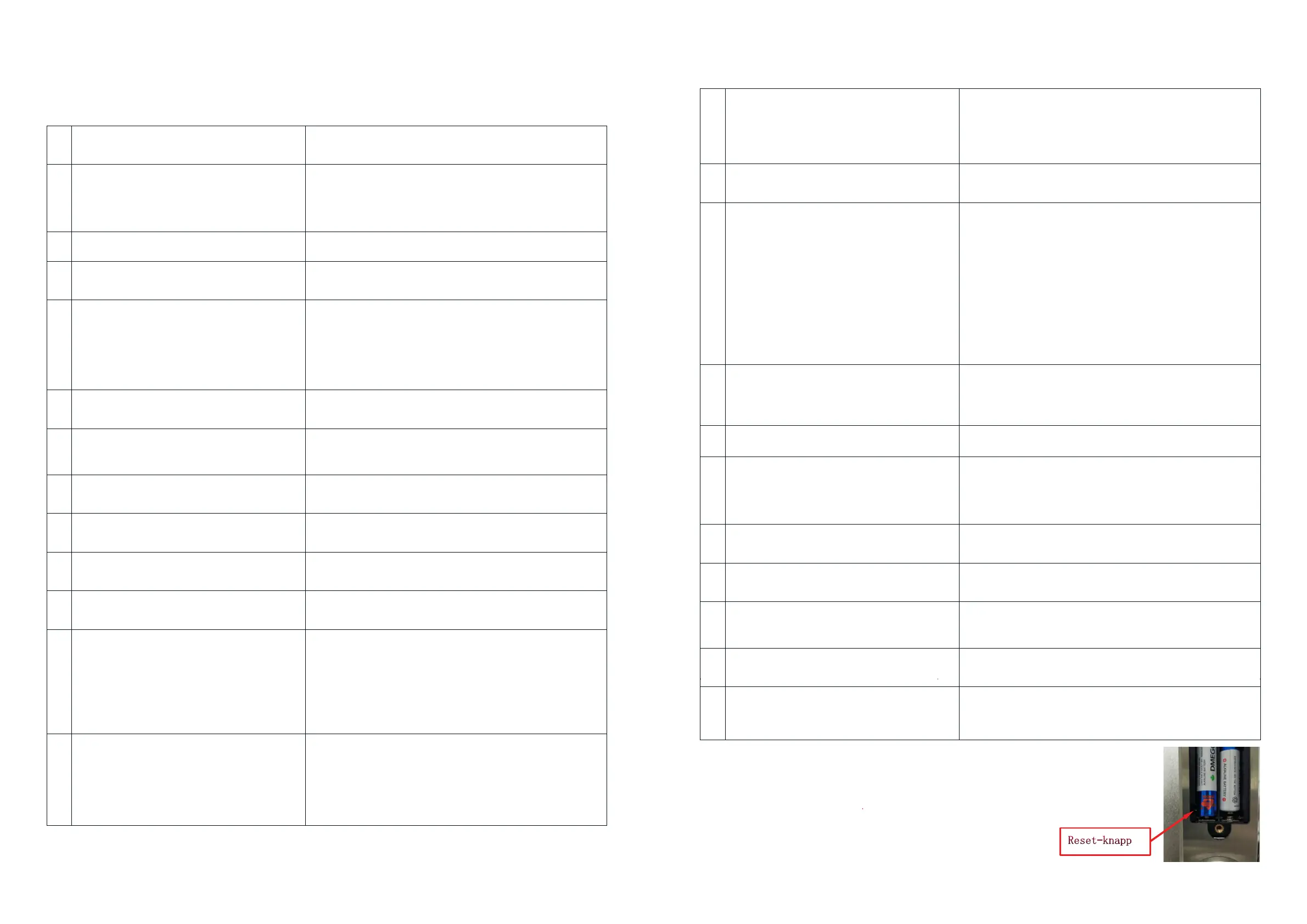
Factory reset (after unresolved software problems)
Open the battery cover and press the reset button, with a narrow
object, for 5 sec. (Ignore any messages before 5 sec.)
Immediately press “000#”. A verication will sound and the lock
has been reset. Now start initiation process by pairing the lock
with phone.
APP is being automatically updated regularily. Therefore some functions and features may
vary from above instructions


 To Next Page
 Loading...