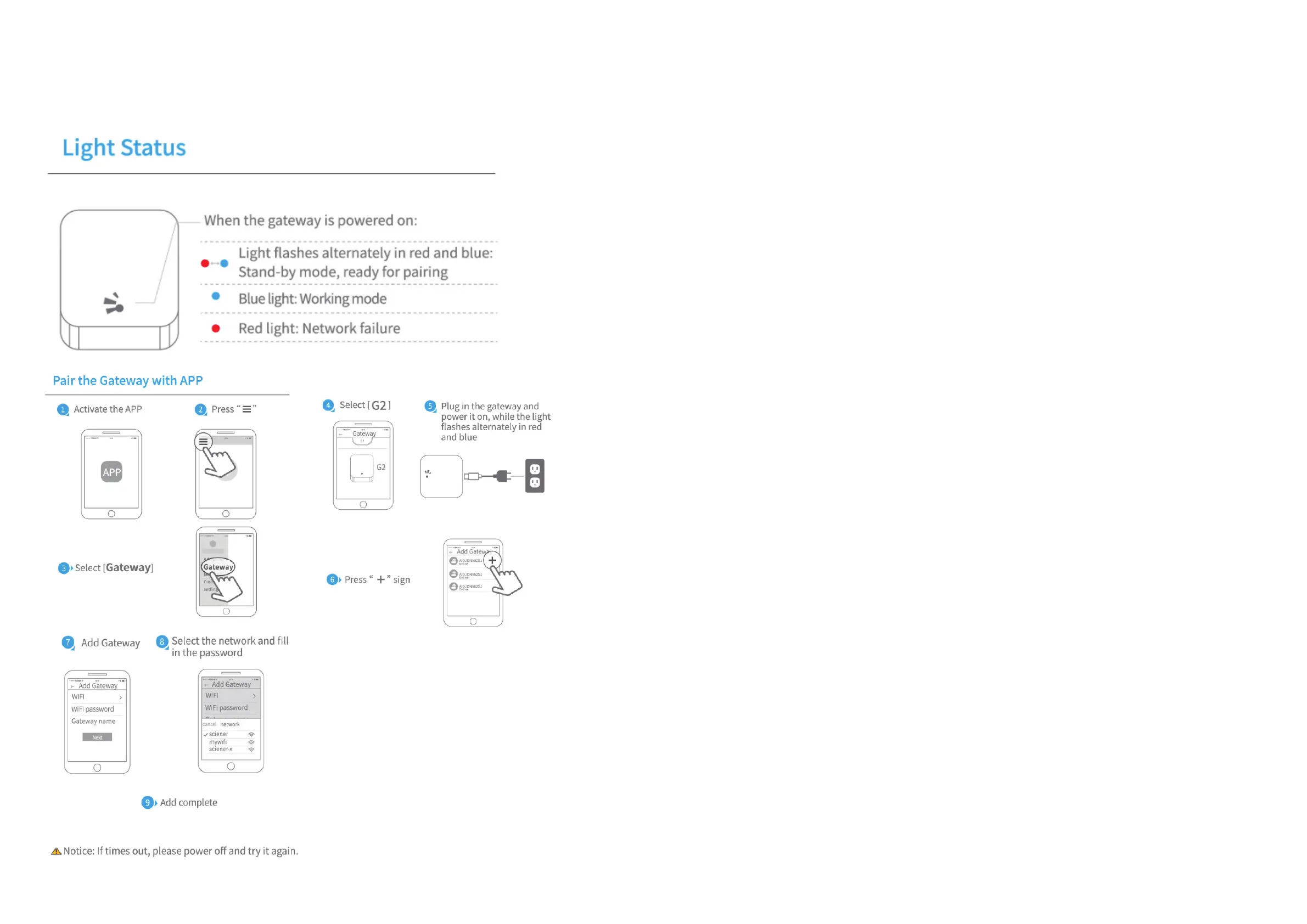
5.3 Adding Gateway (optional)
When connecting a new Gateway, your smartphone and your Gateway must be connected
on the same Wi-Fi network using the 2.4 GHz frequency only.
14 15
Please note:
1. Before inserting ngerprints, it is important that the sensor area is clean and dry. The nger must also
be clean and dry and free from e.g. water, grease, dirt etc.
2. The maximum number of ngerprints that can be added is 200 pcs. It is recommended that each
user enter at least 2 ngerprints to prevent problems if any nger is damaged or otherwise unable to be
used.
3. When adding ngerprints, the nger needs to be read several times. Place your nger on the sensor
at dierent angles each time and with a light push until your voice prompts you to lift and press again.
4. When the current is too low for the sensor, be reminded that it ashes blue when the Fingerprint
sensor is used. After the impression is veried, the light continues to ash blue quickly and the light is
slightly dim; in this case, replace the batteries as soon as possible to prevent the batteries from running
out.
Care advice:
The lock should be cleaned regularly, with a mild detergent and sweet water, to remove dirt and salt.
This can prevent the material from discoloring.
This is especially important if the lock is mounted outdoors where rain does not reach or in coastal and
oxidizing environments.



 To Next Page