4 5
GETTING TO KNOW YOUR TOASTER OVEN
Product may vary slightly from illustrations.
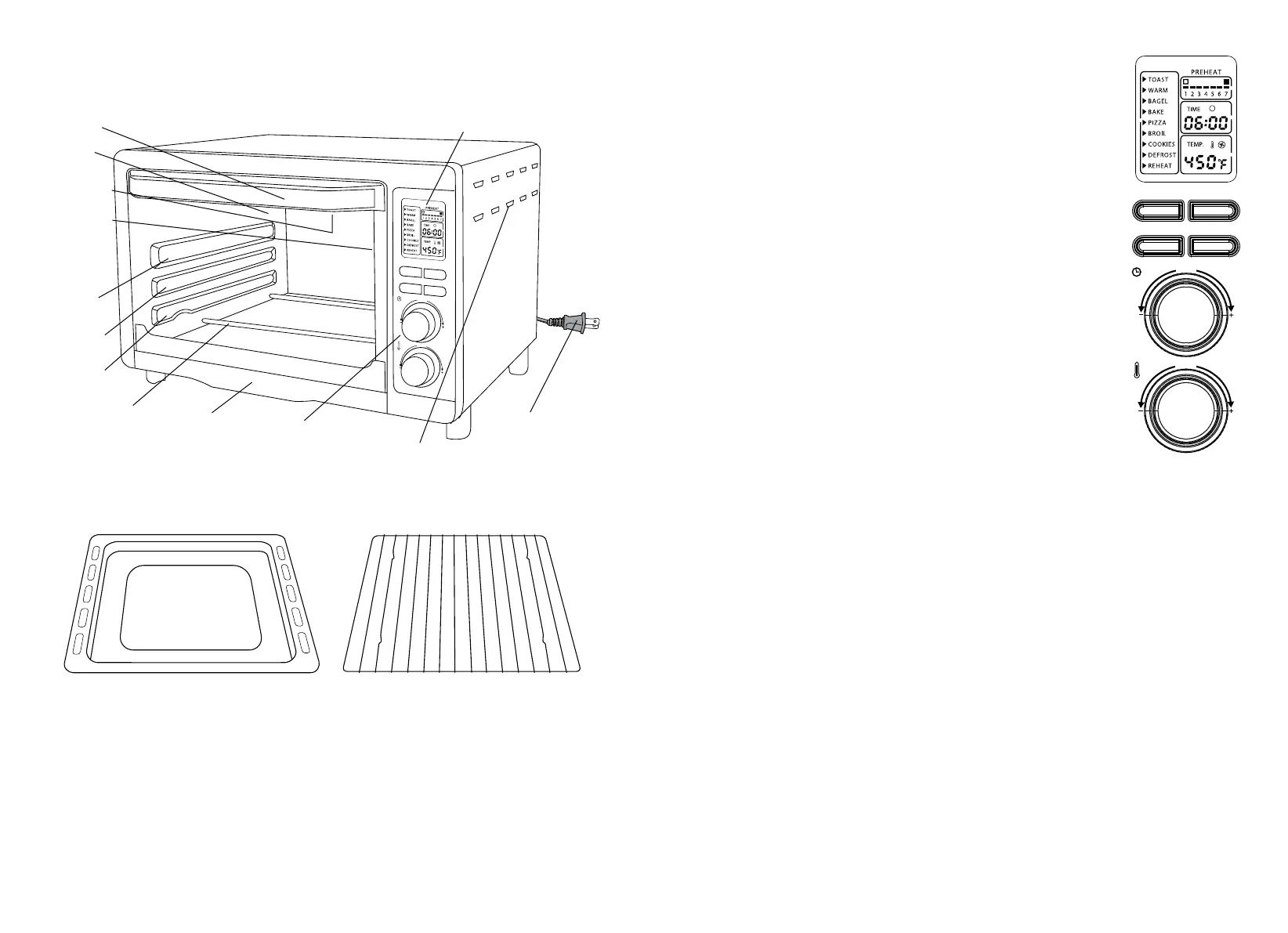
Figure 1
FUNCTION
START / CANCEL
TEMP
TIME
A LITTLE EXTRA
CONVECTION
ºF
Upper Shelf
Position
Center Shelf
Position
Lower Shelf
Position
Glass Door
Upper Heating
Elements
Convection Fan
(not shown)
Door Handle
White Backlit
Digital Display
Control Panel
Oven Vents
Polarized Plug
Lower Heating
Elements
Crumb Tray
ACCESSORIES
Figure 2
Bake Pan
Wire Rack
CONTROL PANEL
1. DIGITAL DISPLAY. When the unit is plugged in, an audible beep will sound
andthe blue backlighted screen will show active FUNCTION, toast color (1-7),
cooking TIME remaining and TEMP (Temperature).
2. FUNCTION Button. Press once to advance the arrow to 10 pre-programmed
cook cycles. An audible beep can be heard and the active cycle will flash,
theFUNCTION button will illuminate blue every time it is pressed.
3. START/CANCEL Button. Press to START the selected function or CANCEL.
Thebutton will illuminate red to indicate the unit is ON. When the START/
CANCELbutton is pressed again, the unit will turn OFF and the red lighted
buttonwill flash.
4. A LITTLE EXTRA Button extends cook time after cooking cycle is completed.
Ifyouopen the glass door and check for brownness, for a bit more time, press
theALITTLE EXTRA button. An audible beep can be heard as the button
illuminates blue and additional TIME will be added on the digital display.
5. CONVECTION Button illuminates blue to indicate the convection fan is
operating.Press the CONVECTION button to turn the fan ON or OFF.
6. TIME Control Dial. Turn to manually change times from 01:00 minute
minimumto99:00 minutes maximum. An audible beep can be heard as
theTIMEis changed.
NOTE: Some functions are preprogrammed and can only be changed
withinpreset limits.
7. TEMP Control Dial. Turn to manually change temperature from 150ºF minimum
to450ºF maximum. An audible beep can be heard as the TEMP is changed.
NOTE: Some functions are preprogrammed and can only be changed
withinpreset limits
PREPROGRAMMED FUNCTIONS
1. TOAST: High heat sears and produces deliciously crisp results. Bread, muffins, frozen waffles,
frozentoaster pastries, prepared toaster foods, etc.
2. WARM: Maintains hot foods for up to 99:00 minutes.
3. BAGEL: High heat sears the topsides of bagels, while warming the insides.
The BAGEL function is ideal for toasting English muffins or thick sliced specialty breads.
4. CONVECTION BAKE: Use of the convection fan seals in juices, promotes browning and may
shortencooking time without turning and basting. Bake cakes, pies, cookies, poultry, beef, pork, etc.
NOTE: Press the CONVECTION button to turn the convection fan OFF.
5. CONVECTION PIZZA: This Toaster Oven accommodates any 12-inch (or smaller) freshorfrozen pizza.
Convection baking assures even pizza cooking and browning.
NOTE: Press the CONVECTION button to turn the convection fan OFF.
NOTE: Press the CONVECTION button to turn the convection fan OFF.
6. BROIL: Fish, steak, poultry, pork chops, etc.
7. COOKIES: Perfect for baking home made or prepared refrigerated cookies, biscuits,
cinnamonorcrescent rolls.
NOTE: Press the CONVECTION button to turn the convection fan OFF.
8. DEFROST: Low temperatures assist in thawing frozen foods to be cooked in the toaster oven
9. CONVECTION REHEAT: Reheat leftovers using convection fan for even warming without browning.
NOTE: Press the CONVECTION button to turn the convection fan OFF.
NOTE: This model is equipped with a cooling fan that runs during the cooking process to cool internal
electronic components. It is normal for this fan to continue to run for an extended period of time,
evenwhen the oven is off.
FUNCTION
START / CANCEL
TEMP
TIME
A LITTLE EXTRA
CONVECTION
ºF
Figure 3



 To Next Page