Battery and charging
Instructions on the bike operation
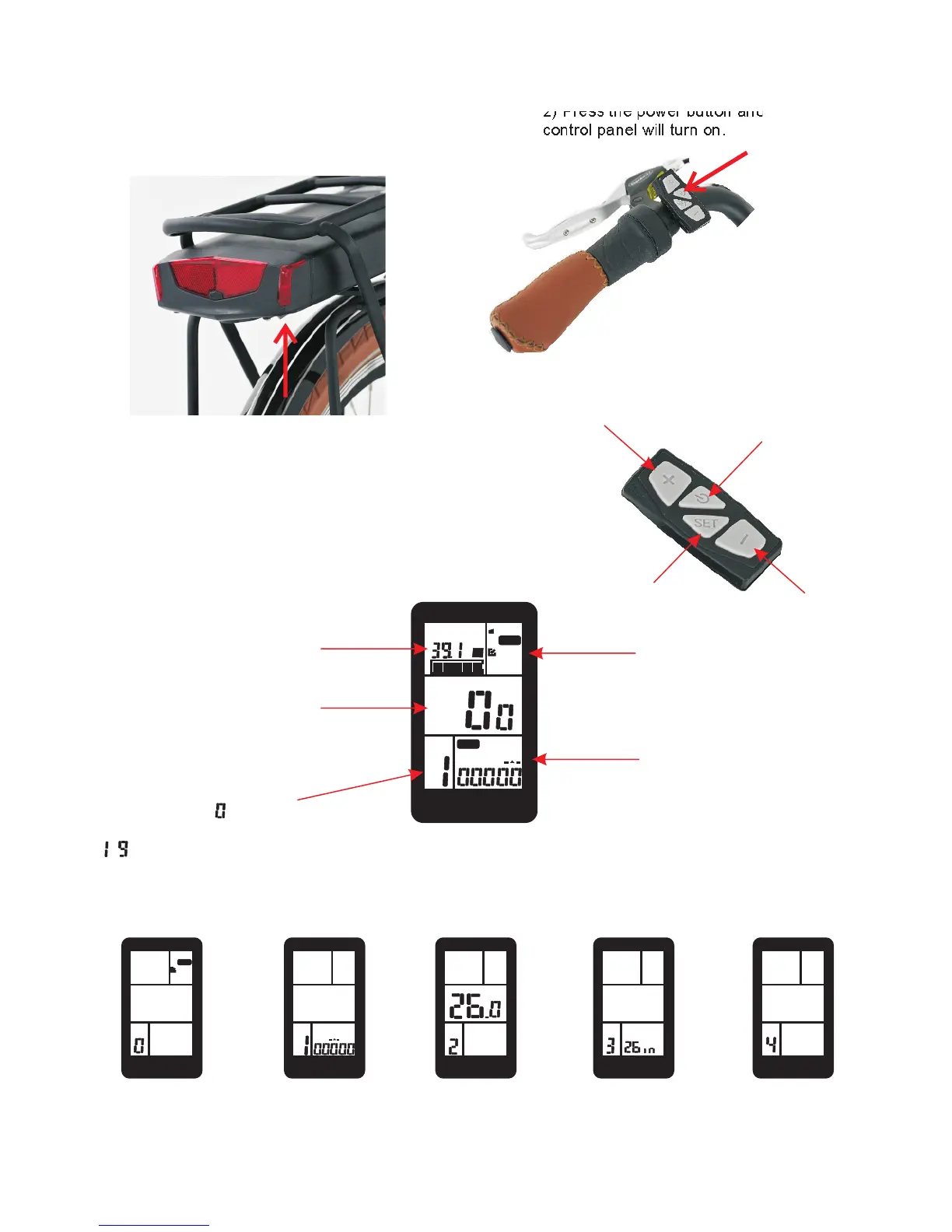
1) To turn the power ON and OFF
use the power button which is under
the battery.
2) Press the power button and the
control panel will turn on.
LCD display
BMS
MODE
POWER
NORMAL
ECO
v
TRIP 2
INFO
TRIP 1
ODO
TIME
PAS
KM/H
C600E
MODE
POWER
NORMAL
ECO
SET
C600E
TRIP 2
TRIP 1
SET
C600E
SET
C600E
KM/H
SET
C600E
SET
C600E
KM/H
Battery Voltage
Remaining Battery Capacity
Travelling speed in KM/H or
MPH (units can be changed)
Pedal Assist Mode (PAS)
If PAS is set to the PAS mode
is disabled = throttle mode only.
- defines level of PAS. Higher
the number the more PAS.
MODE
Power
Normal
Eco
INFO - trip computer
ODO - odometer, total KM or M
travelled since bikes was first used
(non-resettable).
TIME - time on bike.
TRIP 1 - first distance trip setting.
TRIP 2 - second distance trip setting.
Setting 0 (SET 0).
By pressing the set
button you can
toggle t hro u gh
Powe r, N or mal
and Eco mode.
Setting 1 (SET 1).
Here you can reset
your trips 1 and 2.
Setting 2 (SET 2).
Here you can set
maximum speed .
Setting 3 (SET 3).
Here you can set
tyre / rim type.
700C or 26/28in.
MPH
Setting 4 (SET 4).
Here you can set
the units - MPH or
KM/H.
Press to turn on LCD
Display.
Hold then press to toggle
through settings (0-4).
Press the positive
to go up the menu.
Press the negative
to go down the menu.
LCD Display Homepage
LCD Display Settings (0-4)



 To Next Page