VI. Appendix BigRep
Advanced
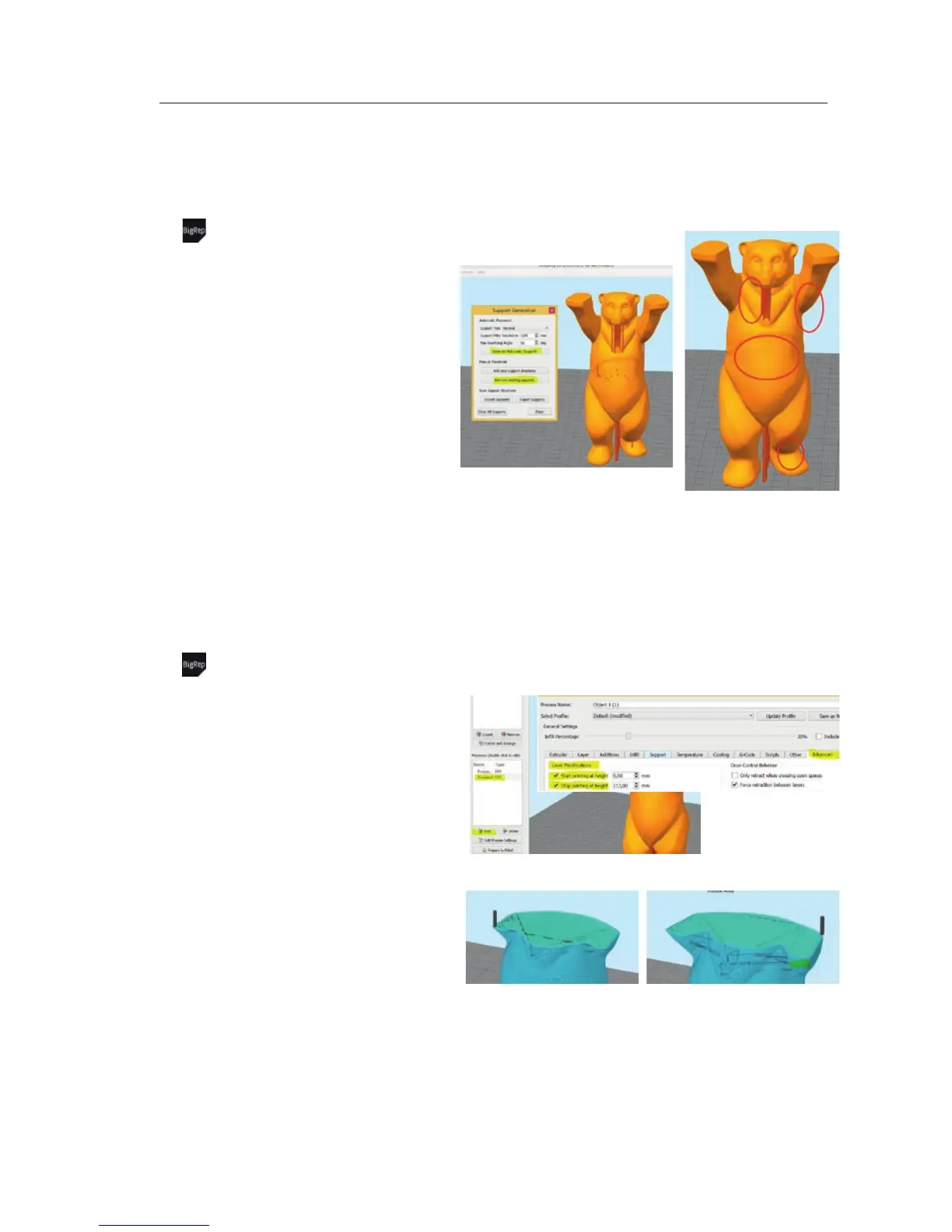
Advanced – Customized Support
before
after
Most important:
• Check automatic support
• Remove/add single structures
In detail:
• Activate = click at Tools/Custimze Support
Structure
• Support Pillar Resolution = determines the
resolution of each support pillar. 1.5mm is
recommended for small parts. Up to 5mm for
big prints.
• Generate Automatic Support = Generates
supports structure similar to the regular slicing
• Remove existing supports = remove single
support pillars
To use your customized support structures,
just click at Done and start slicing
Advanced – Using Multiple Processes
Process 1 – 15% infill & 0.8mm layer Process 2 – 40% infill & 0.6mm layer
Most important:
• You can create as many different processes
(settings) in z-direction or layers as you like to
• Use different extruders (materials or colours)
for different layers within one print
• Especially for different infill settings very useful
In detail:
• Add = create a new process. Settings will be
duplicated
• Layer Modification = click at Advanced within
your process settings. Determine the start- and
stop height of the selected process
• Prepare to Print = Make sure to Select All
processes after you clicked at prepare to print
VI-E 6/7


 To Next Page
 Loading...

