EasyManua.ls Logo

Biketec AG Flyer - Page 33

Default Icon
94 pages
Print Icon
To Next Page IconTo Next Page
To Previous Page IconTo Previous Page
Loading...
29
* For faster shifting, press the button for longer than 2 seconds
* button stands for the button in the support select
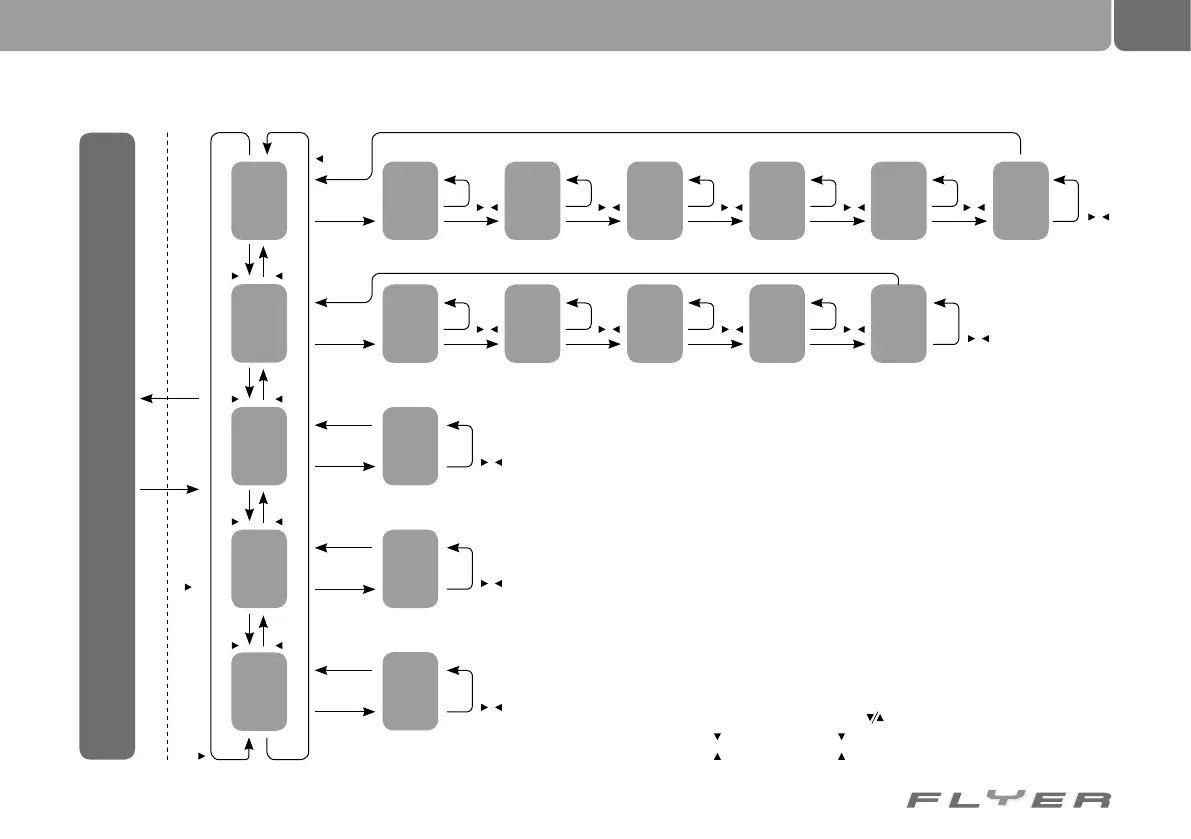
Trip setup
Total trip
setup
(6th position)
Wheel size
setup
(5th position)
km/h or mph
setup
LCD
contrast setup
mode
Language setup
mode
Total trip
setup
(4th position)
Wheel size
setup
(3rd position)
Total trip
setup
(2nd position)
Wheel size
setup
(1st position)
Total trip
setup
(5th position)
Wheel size
setup
(4th position)
Total trip
setup
(3rd position)
Wheel size
setup
(2nd position)
Total trip
setup
(1st position)
Wheel size
setup
km/h or mph
setup
LCD contrast
setup
Language
settings
Standard display
ESetup mode
button
button
button
button
button
button
button
button
button
button
Switch
button
display
Switch
button
display
Switch
button
display
Switch
button
display
Switch
button
display
Switch
button
display
Switch
button
display
Switch
button
display
Switch
button
display
Switch
button
display
Switch
button
display
Switch
button
display
Switch
button
display
Switch
button
display
button
button
button
button
button
button
button
button
button
button
button
button
button
button
button
button
button
button
button
button
button
button
button
button
button
button
button
button
Display mode
Light button confirms the settingsSwitch button display & button for 3 sec.

Table of Contents