45
tention device, open the axle nut further by
turning it anti-clockwise.
• Push the wheel retention devices so far
apart that they no longer touch the drop-
outs
• Now remove the front wheel from the fork
20.2.2 Removing the rear wheel
With quick release:
• Change to the smallest sprocket on the rear
if your FLYER has chain gears. This makes
removing the rear wheel much easier as
the chain and therefore the rear derailleur
are relaxed.
• If your rear wheel is held in position by a
quick release, loosen this (see chap. 7.2
“Using quick releases”).
• Now lift the rear part of your FLYER slightly
with your left hand in order to free up the
rear wheel.
• Then give the rear wheel a gentle jolt from
above and then lightly towards the front.
• The wheel is then released and can be
threaded out of the chain.
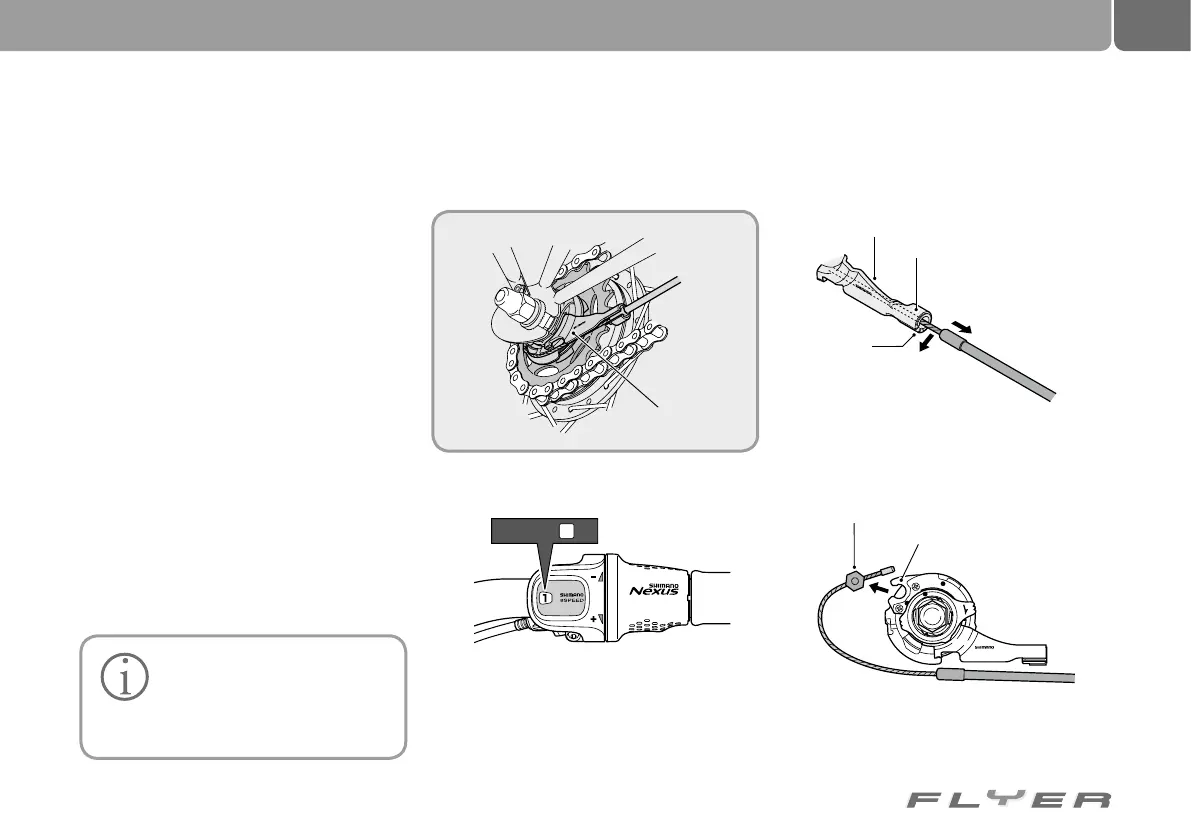
With gear hubs:
• In order to remove the rear wheel, the cable
has to be removed from the shifter unit:
Step 2: If you pull on the cable casing, you can
unthread the gear cable through the gap in the
counterholder of the gear unit.
Step 1: Change the gear lever to position “1”
Always lay your FLYER down on
the left hand side to ensure that
the gears are not subjected to
any weight. This is one of the most sen-
sitive components on a pedelec.
C
J
-
8
S
2
0
J
A
P
A
N
LOCK
1
C
J
-
8
S
2
0
J
A
P
A
N
2
1
Source: Shimano
®
techdocs
Shifter unit
Holder
Ratchet
Cable fastening screw
Slot
Cable casing holder
Pull out of the
cable casing
holder
Remove from
the slot
Switch to
CJ-8S20
JAPAN
L
O
C
K
Step 3: Remove the cable fastening screw from
the counterholder of the ratchet.



 To Next Page