32
Press mode select button & button for 3 sec.
The display panel
E3: Communication error
A cable is possibly jammed or damaged
E9: Motor defect
In case of E1, E9:
• “No assist” is displayed
• There is no support
• Light can be switched on
• The remaining battery charge is displayed
• It is possible to reset the displays
Deleting data
In order to delete all data including the total
distance ridden, press the Mode button on
the control panel and the Reset button on the
rear of the screen at the same time. This also
launches the Setup mode.
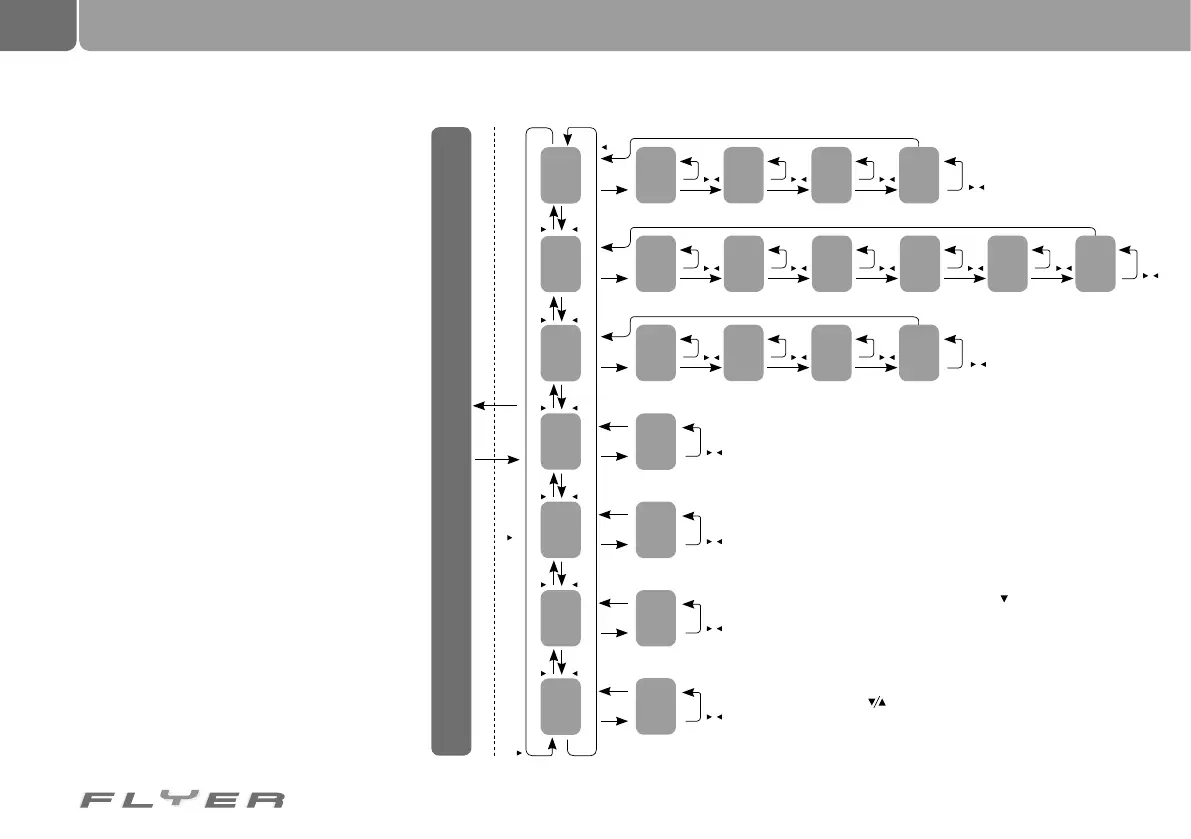
Programming the system/Setup
In order to set up or program the screen/dis-
play, press the “Downward arrow” button and
the “Mode” button on the control panel at the
same time for three seconds. The program-
ming/screen setting mode starts with setting
the desired language, while at the same time all
data (including the total distance ridden) is set
back to zero. The setup is structured as follows:
To switch between the setups, press the mode button for
3 seconds
While switching between setup options, the trip kilometre,
average speed, top speed, total trip displays are switched off
(as the display elements are being used for the setup)
Other displays are shown in normal mode.
By pressing the button for 2 seconds, you can switch
between the setup options
By pressing the Light button, setup mode is closed and the
changed settings are saved.
Set the
wheel size
Set the
total km
Set
the time
Set the
total km
(6
th
position)
Set the
wheel size
(4
th
position)
Set the
time
(4
th
position)
Background
lighting
Set up
contrast
Set the unit of
measurement
Set
language
Set the
total km
(4
th
position)
Set the
wheel size
(3
rd
position)
Set the
time
(3
rd
position)
Set the
total km
(2
nd
position)
Set the
wheel size
(1
st
position)
Set the
time
(1
st
position)
Set the
total km
(5
th
position)
Set the
total km
(3
rd
position)
Set the
wheel size
(2
nd
position)
Set the
time
(2
nd
position)
Set the
total km
(1
st
position)
Set the unit of
measurement
Background
lighting
Set up
contrast
Set
language
Normal mode
Setup mode
button
button
button
button
button
button
button
button
button
button
button
button
button
button
Mode
button
(Select the language) (Select the contrast) (Select the unit
of measurement)
(Select the wheel size)
(Select the time)
(Select the total km)
(Select the lighting)
Mode
button
Mode
button
Mode
button
Mode
button
Mode
button
Mode
button
Mode
button
Mode
button
Mode
button
Mode
button
Mode
button
Mode
button
Mode
button
Mode
button
Mode
button
Mode
button
button
button
button
button
button
button
button
button
button
button
button
button
button
button
button
button
button
button
button
button
button
button
button
button
button
button
button
button
button
button
button
button
button
button
button
button
Normal mode
Light button (for saving every setup option)



 To Next Page