F. USAGE RESPONSIBILITIES;
WORK SAFETY; continued …
MATERIAL SAFETY DATA SHEET - ITEMS; For Lead Acid Batteries, (see Manufacturer’s “Operation Manual”,
pages; 59-60). For Hydraulic Oil (Dextron III / Mercon Automatic Transmission Fluid, (see Manufacturer’s
“Operator’s Manual”, page; 61).
WEATHER; Do not operate this equipment when it is exposed to “high winds”, “thunderstorms”, “ice” or other
weather conditions that would compromise operator safety. Never operate lift in conditions where wind speeds
exceed 12.5 m/sec (28 mph). Winds at this speed or higher can affect the stability and boom operation.
Always be acutely aware of wind conditions when operating “any type” aerial lift equipment.
G. CONTROLS and THEIR FUNCTIONS;
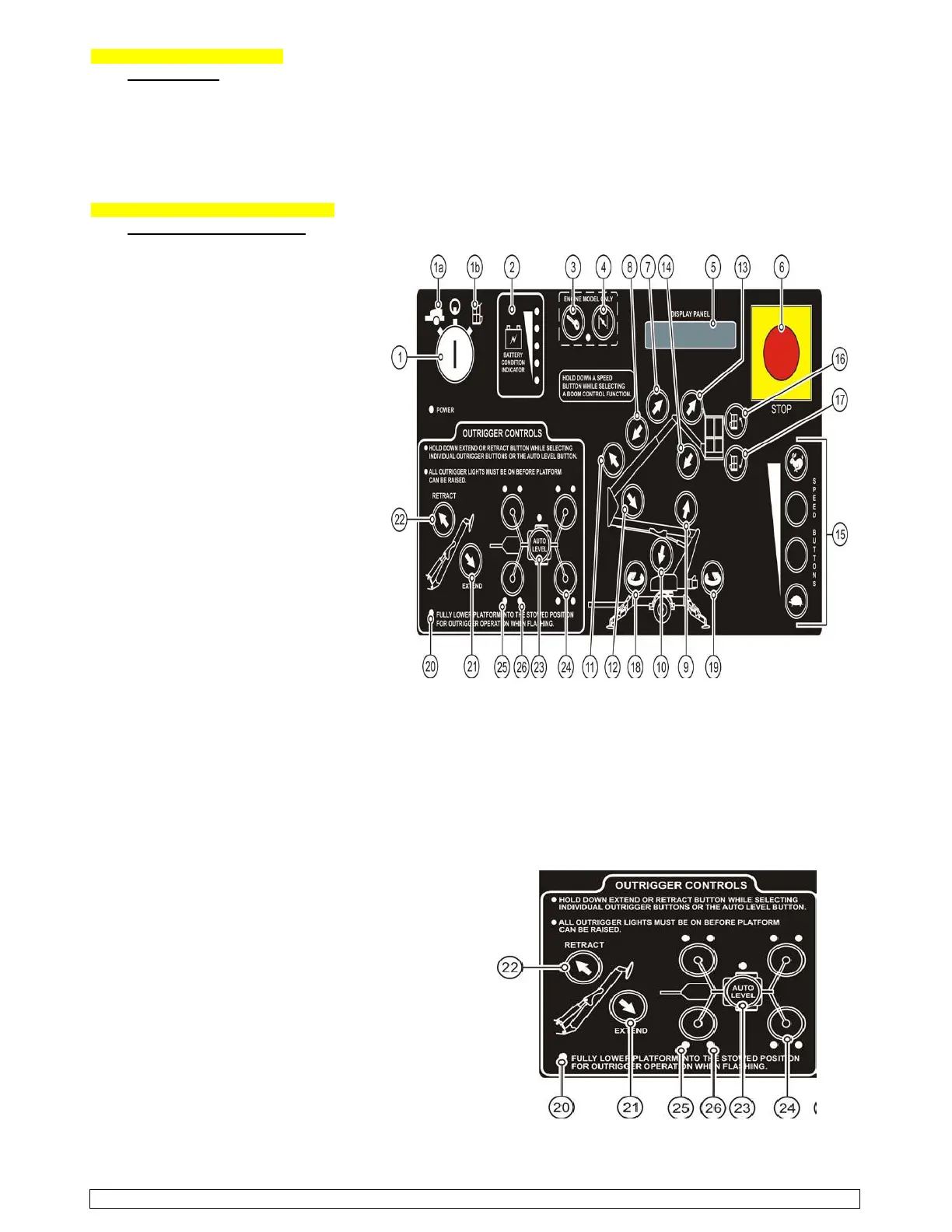
GROUND CONTROL STATION; (Figure; 3-1) Ground Control Station
(for further information, see the Manufacturer’s
“Operator’s Manual”, pages; 14-15).
The “Ground Control Station” is used to
operate outriggers and control boom
motion. To access the ground Control
Station, open the control panel access
cover found on the turnable. Turn the
key switch to the Ground Control Setting.
1. KEY SWITCH; Turning the key switch
to the PLATFORM (1a) icon selects
operation from the platform. Turning
the key switch to the GROUND (1b)
icon selects operation from the ground
Control panel. The center (power off)
position interrupts all electric and
hydraulic power operations except
emergency lowering. Remove the
key protects against unauthorized
persons. The key may be removed
with the key switch in any selected
position.
2. BATTERY CONDITION INDICATOR;
Indicator LEDs light up to indicate the
level charge remaining in the batteries.
A lighted green LED indicates an
adequate charge level. Lighted yellow
LEDs indicate the need for charging
soon. A lighted red LEDs warns the
battery charge is low; boom operations
should be halted until the batteries are recharged.
3 - 4. ENGINE START and CHOKE; does not apply to this model unit.
5. DISPLAY PANEL; The display panel is a lighted text window that displays the present operating status or an
existing error condition when the key switch is on.
6. EMERGENCY STOP BUTTON; When pushed in, the emergency STOP button disconnects electrical power to
the “Ground” and “Platform” control stations.
7 - 8. BOOM EXTEND/RETRACT BUTTONS; Pressing and holding a desired SPEED button and the BOOM EXTEND
button at the same time extends the telescopic boom. Pressing and holding a desired SPEED button and the
BOOM RETRACT button at the same time retract the boom. Boom motion continues until the buttons are
released or until the boom reaches a hard stop or
a safe travel limit.
9 - 14. BOOM RAISE/DOWN BUTTONS; Pressing and
holding a desired SPEED button and the UPPER/LOWER
/ JIB BOOM RAISE button at the same time will raise the
chosen boom. Pressing a desired SPEED button and
the UPPER/LOWER / JIB BOOM DOWN button at the
same time will lower the chosen boom. Boom motion
continues until the buttons are released or until the
boom reaches a hard stop or a safe travel limit.
15. SPEED BUTTONS; The SPEED buttons along the lower
right side of the control panel must be pressed and held
while selecting a boom function. Four speeds are
available to control positioning of the boom lift.
16 - 17. PLATFORM TILT BUTTONS; Press and hold and
hold any SPEED button and the desired PLATFORM TILT
button at the same time to level the work platform
(levels the platform only, not the boom lift).
2015 - BIL-JAX #4725A, “TOWABLE - ARTICULATE BOOM LIFT” - OPERATIONAL & SAFETY INFO… page 5 - 12


 To Next Page
 Loading...