G. CONTROLS and THEIR FUNCTIONS;
GROUND CONTROL STATION; continued …
18 - 19. BOOM ROTATION BUTTONS; Pressing
and holding a desired SPEED button and the
BOOM ROTATIONCLOCKWISE or
COUNTERCLOCKWISE button at the same
time enables the boom to rotate in the direction
selected. The boom will rotate through 700
degrees until the buttons are released or
the stop is reached.
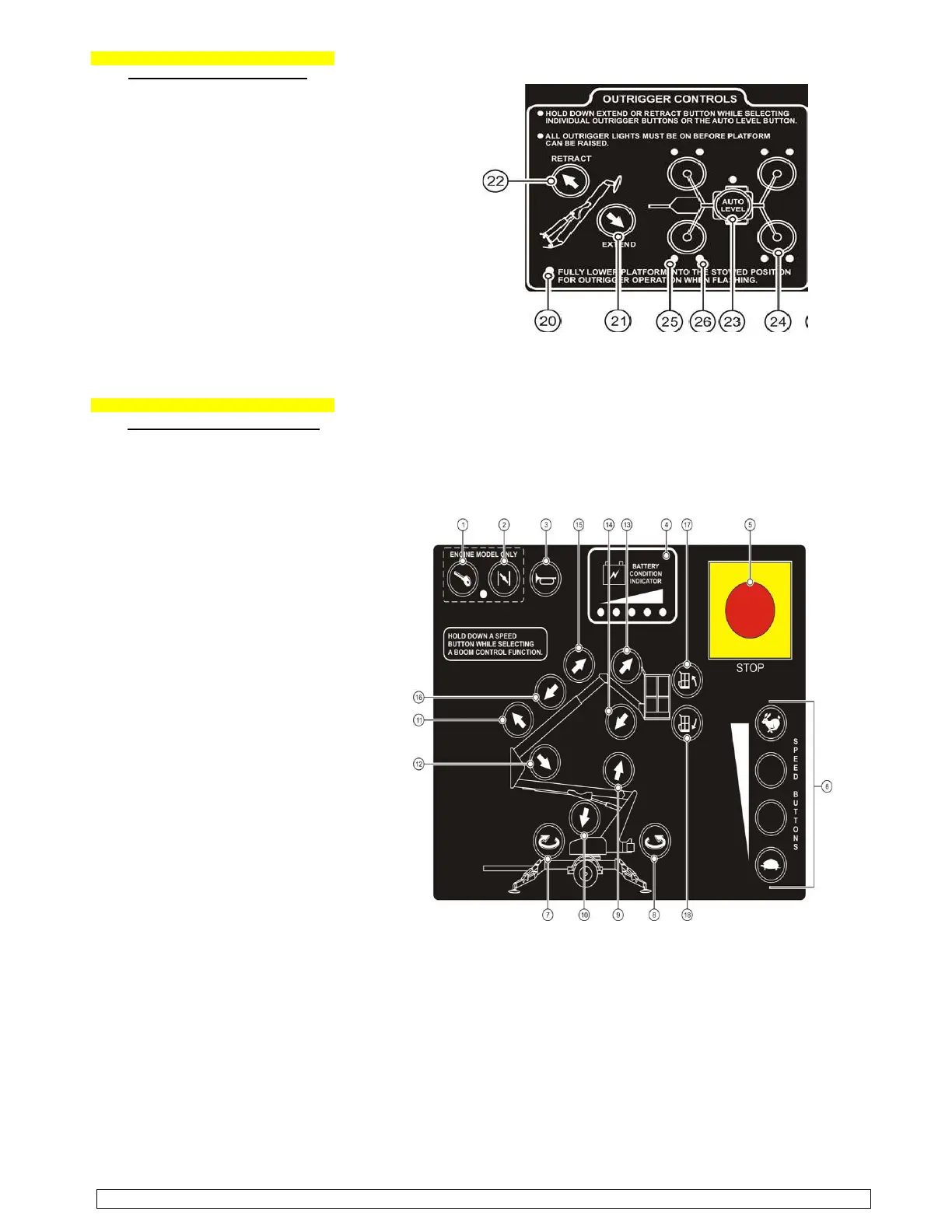
20 - 24. OUTRIGGER CONTROLS; (Figure; 3-3)
For automatic outrigger extension / retraction;
Select EXTEND or RETRACT outrigger button
and the AUTO LEVEL button at the same time.
To manually extend or retract the outriggers:
Select EXTEND or RETRACT outrigger button
and one of the OUTRIGGER buttons at the
same time. The outrigger indicator LEDs light
up when the outriggers are properly deployed
and the boom weight is on the outriggers. Each of the outer outrigger LEDs indicates load is on the
outrigger footpad. Each of the inner outrigger LED light up and a buzzer sounds when the boom is level.
G. CONTROLS and THEIR FUNCTIONS;
PLATFORM CONTROL STATION;
(see the Manufacturer’s “Operator’s Manual”, pages; 16-17).
The “Platform Control Station” is used
to control boom motion. To access the
Platform Control Station, turn the key (Figure; 3-2) Platform Control Station
switch at the ground control station to
the platform control setting and enter
the work cage.
1 - 2. ENGINE START and CHOKE; Not
applicable on this model.
3. HORN BUTTON; Pressing the button
will sound the horn. Use HORN button
to warn personnel in the area of a
falling object hazard, impending boom
motion or the need for assistance.
4. BATTERY CONDITION INDICATOR;
Indicator LEDs light up to indicate the
level of charge remaining in the
batteries… green - good charge level,
yellow - need for charge and red -
charge level is low; boom operations
should be halted until batteries are
recharged.
5. EMERGENCY STOP BUTTON; When
pushed in, the emergency STOP button
disconnects electrical power to the
“Ground” and “Platform” control stations.
The emergency STOP pushbutton should
only be pressed to immediately stop all
boom motions. To resume control, pull
out the emergency STOP button.
6. SPEED BUTTONS; The SPEED buttons
along the lower right side of the control
panel must be pressed and held while
selecting boom functions. Four speeds are available to control positioning of the boom lift.
7 - 8. BOOM EXTEND/RETRACT BUTTONS; Pressing and holding a desired SPEED button and the BOOM EXTEND
button at the same time extends the telescopic boom. Pressing and holding a desired SPEED button and the
BOOM RETRACT button at the same time retract the boom. Boom motion continues until the buttons are
released or until the boom reaches a hard stop or a safe travel limit.
9 - 14. BOOM RAISE/DOWN BUTTONS; Pressing and holding a desired SPEED button and the UPPER/LOWER / JIB
BOOM RAISE button at the same time will raise the chosen boom. Pressing a desired SPEED button and the
UPPER/LOWER / JIB BOOM DOWN button at the same time will lower the chosen boom. Boom motion continues
until the buttons are released or until the boom reaches a hard stop or a safe travel limit.
15. SPEED BUTTONS; The SPEED buttons along the lower right side of the control panel must be pressed and
held while selecting a boom function. Four speeds are available to control positioning of the boom lift.
2015 - BIL-JAX #4725A, “TOWABLE - ARTICULATE BOOM LIFT” - OPERATIONAL & SAFETY INFO… page 6 - 12


 To Next Page
 Loading...