Patient Monitor User’s manual
14-4
14.2.2 Sidestream AG module
Preparation for Monitoring:
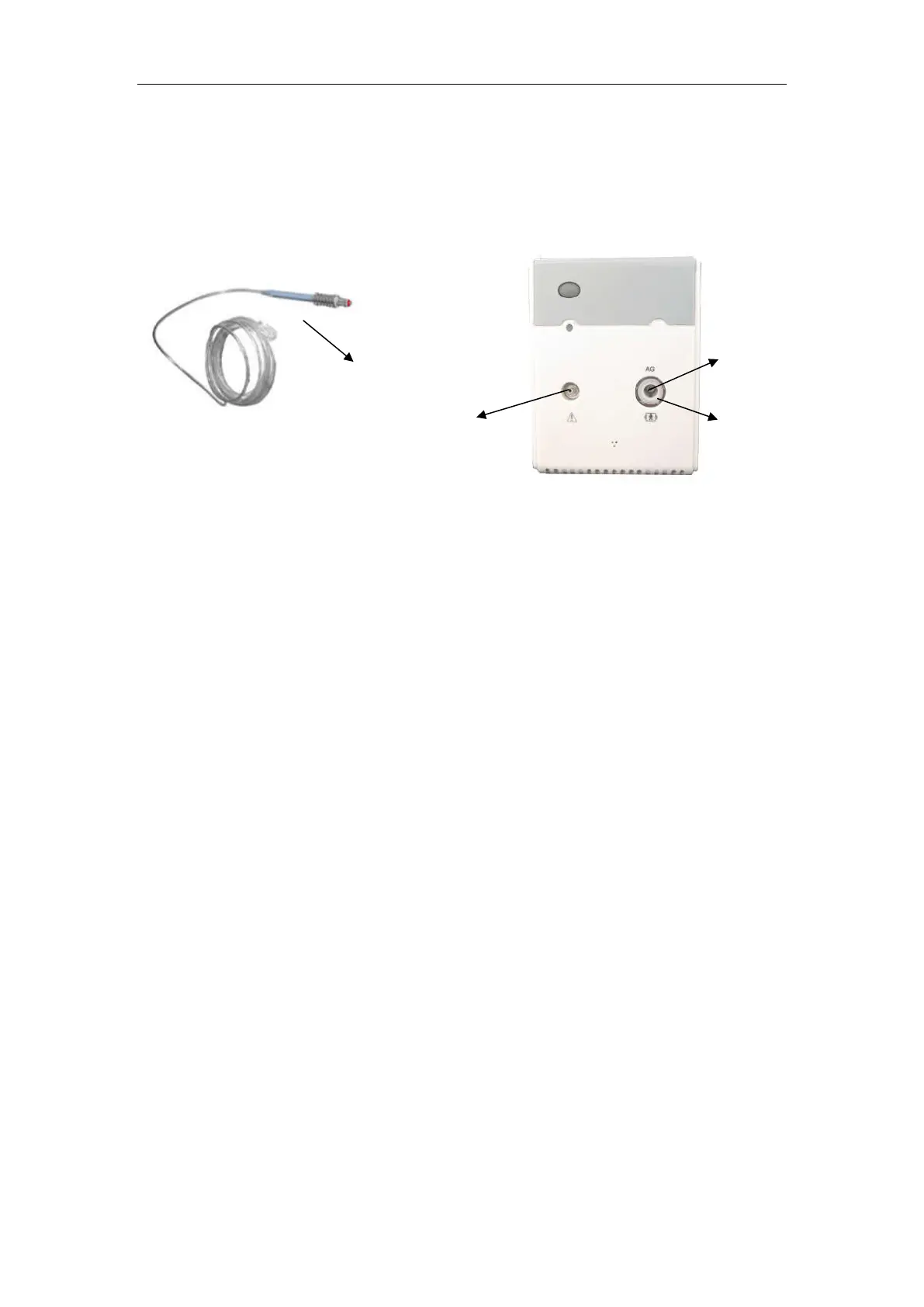
1. Connect a Nomoline sampling line to the inlet port of the AG module.
2. Connect the gas sample exhaust port to a scavenging system or return the gas
to the patient circuit.
3. Power up the patient monitor.
4. A green LED indicates that the AG module is ready for use.
5. Perform a pre-use check.
Pre-use Check
Before connecting the Nomoline sampling line to the breathing circuit, do
the following:
1. Connect the sampling line to the inlet port of the AG module.
2. Check that the AG module shows a steady green light (indicating that the
system is OK)
3. For AG module with O
2
option fitted: Check that the O
2
reading on the
monitor is correct (21%).
4. Breathe into the sampling line and check that valid CO
2
waveforms and
values are displayed on the monitor.
5. Occlude the sampling line with a fingertip and wait for 10 seconds.
6. Check that an occlusion alarm is displayed and that the AG module shows a
flashing red light.
7. If applicable: Perform a tightness check of the patient circuit with the
sampling line attached
.
Sampling line
Gas Inlet port
Gas sample
exhaust port
LED


 To Next Page