17
How the Programmable
Throttle Stop Override works
The Programmable Throttle Stop Override allows a programmable amount of time to be subtracted from either or
both Stages 2 and 4 by pressing the Tap push-button. After the Transbrake releases there is a quarter of a second disable time
before the Programmable Throttle Stop Override is enabled. This is to insure that a late delay Tap is not registered as a
Programmable Throttle Stop Override. If the Programmable Throttle Stop Override is turned on and after the Programmable
Throttle Stop Override is enabled, every time the Tap push-button is pressed while in either Stage 1 or 2 the Programmable
Throttle Stop Override amount will be subtracted from Stage 2. If the Mega 350/450 is in Bracket mode the P.T.S.O. can be
used with stages 3 and 4 also. This done by pressing and releasing the Tap push-button while in either Stage 3 or 4, the
P.T.S.O. amount will be subtracted from Stage 4.
NOTE: When in Bracket mode only the main 4 Stage Timer (Timer 1) is affected by the P.T.S.O.
When in Pro mode only the 2 Stage Timer is affected by the P.T.S.O.
Understanding the 4-Stage Timer
This is to help the racer understand the 4-Stage Timer when controlling a throttle stop. The 4-Stage Timer can also be
used to control other timed devices, nitrous, or timing retarders.
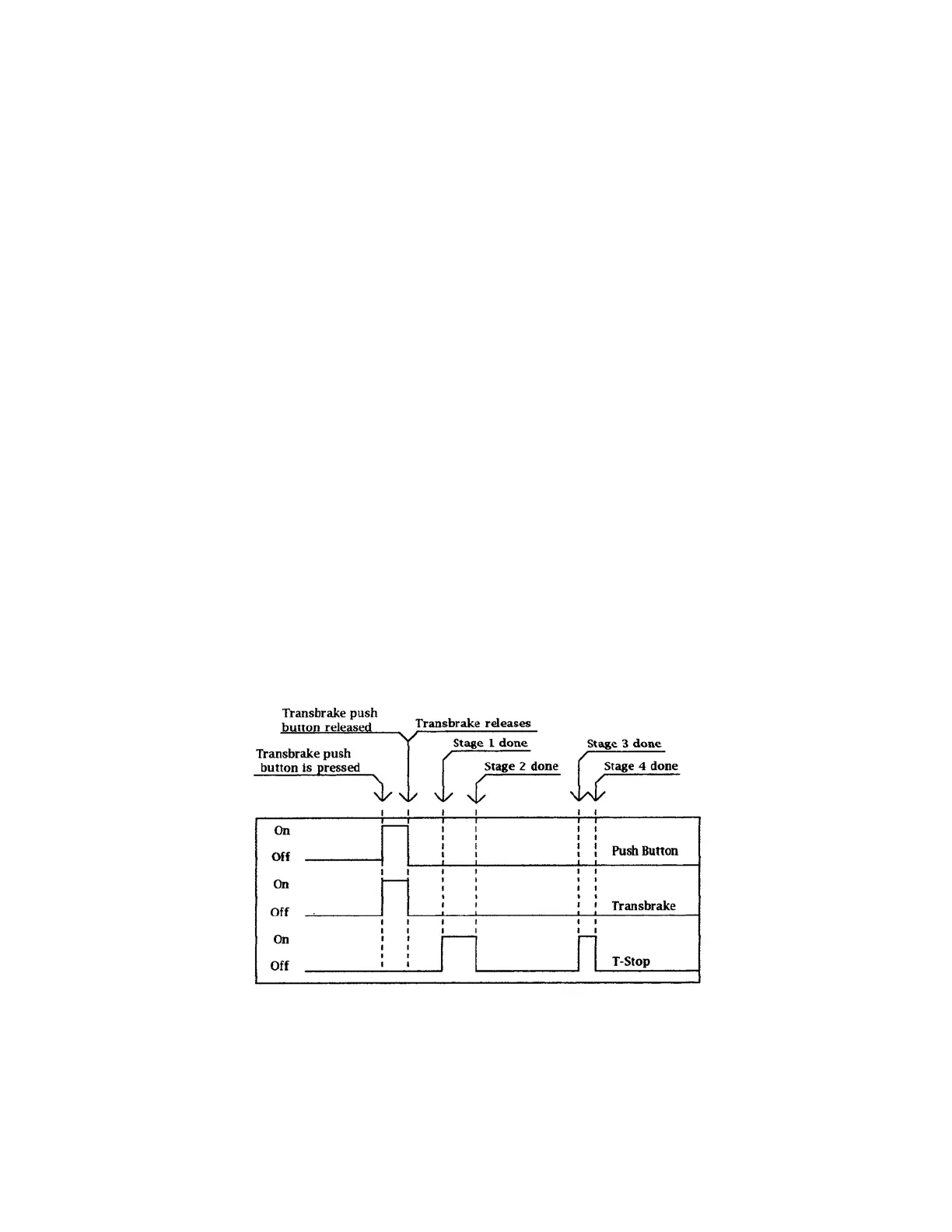
Stage 1 represents when the throttle stop turns on. Stage 2 represents the amount of time (duration) the throttle stop
will stay on. Stage 3 represents when the throttle stop will turn on the second time during the run. Stage 4 represents the
amount of time (or duration) the throttle stays on the second time. Both Stage 1 and Stage 3 start counting from the release of
the Transbrake. Stage 2 starts counting after the amount of time set in Stage 1 is completed. Stage 4 starts counting after the
amount of time set in Stage 3 is completed.
The Pro 2 Stage timer works the same as the first two stages of a 4 Stage timer.
Possible 8.90 S/C pass
Timer 1 = 1.000
Timer 2 = 2.000
Timer 3 = 08.00
Timer 4 = 00.50
Explanation of the Peak RPM
The Peak RPM is shown on the display in place of the Tach any time the engine is off. The Peak RPM value will be
the highest RPM the engine has reached since the last time the Peak RPM cleared. To clear the Peak RPM, repeatedly press
the Set Up key until the text “Tach” is displayed on line 1. Then move the selection arrows to line 1 using the Next key.
While the selection arrows are on line 1 ever time the Clear key is pressed the Peak RPM will be reset to zero.



 To Next Page