19
Operating the BionX Propulsion System
Turn the system on
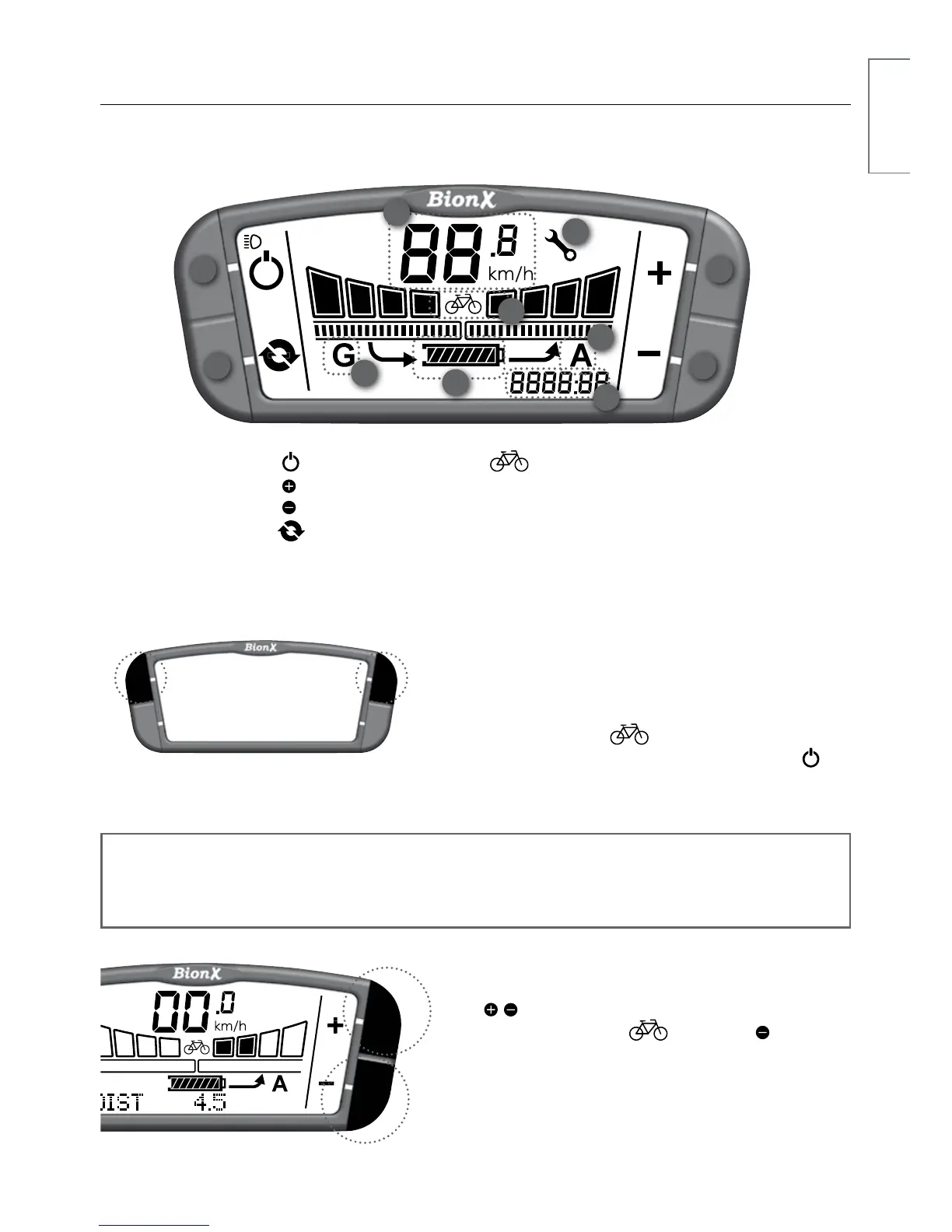
Briefly push either top button on the console. The
battery will beep 4times and you will see a countdown,
this is the system perfoming a self check. After startup,
the system is always in mode (no motor assist/
bike operation). To turn the system off, briefly push .
The battery will beep 5 times. After 5 minutes of “no
operation” the system turns off automatically.
Select Assistance/Generate level
Push / key for more/less assist (see bar “fields 1-4”
above display “A”). From mode push key to
enter continuous Generate mode.
10
9
21
4 3
7
5
8
6
1. Power
2. Key
3. Key
4. Cycle
5. State-of-charge
indicator
6. (bicycle) mode
7. Speedometer
8. Trip distance/average speed/
chronometer/odometer/clock
9. Assist level (A)
10. Generate level (G)
11. Wrench symbol
G2 Console
NOTE
The system performs a self check approximately every hour. Do not be alarmed if the
system turns itself on briefly, and off again, or if the TOUCH PORT flashes momentarily.
11


 To Next Page