Page 17 of 23 BIOPAC Systems, Inc.
10166_Rev08 WWW.BIOPAC.COM 9.09.2019
Setting Up the Epoch System with the BIOPAC Hardware
1. Connect the receiver tray antenna extension (3.5 mm cable) and Faraday shield ground (banana plug) as
shown on page 15.
2. Connect the BIOPAC Modules. (AMI100D/HLT100C for MP160 or UIM100C for MP150)
MP160 Hardware:
• Snap the AMI100D/HLT100C Module onto the right side of the MP160.
• Connect the two CBL102 BNC interface cables from the Epoch receiver tray’s BNC output
terminals to two CBL122 adapters.
• Connect the RJ11 end of the CBL122 adapter to the appropriate channel inputs on the HLT100C
Module.
MP150 Hardware:
• Snap the UIM100C Module onto the right side of the MP150.
• Connect the two CBL102 BNC interface cables from the Epoch receiver tray’s BNC output
terminals to the appropriate channel inputs on the UIM100C Module.
Epoch Module Setup in AcqKnowledge Software
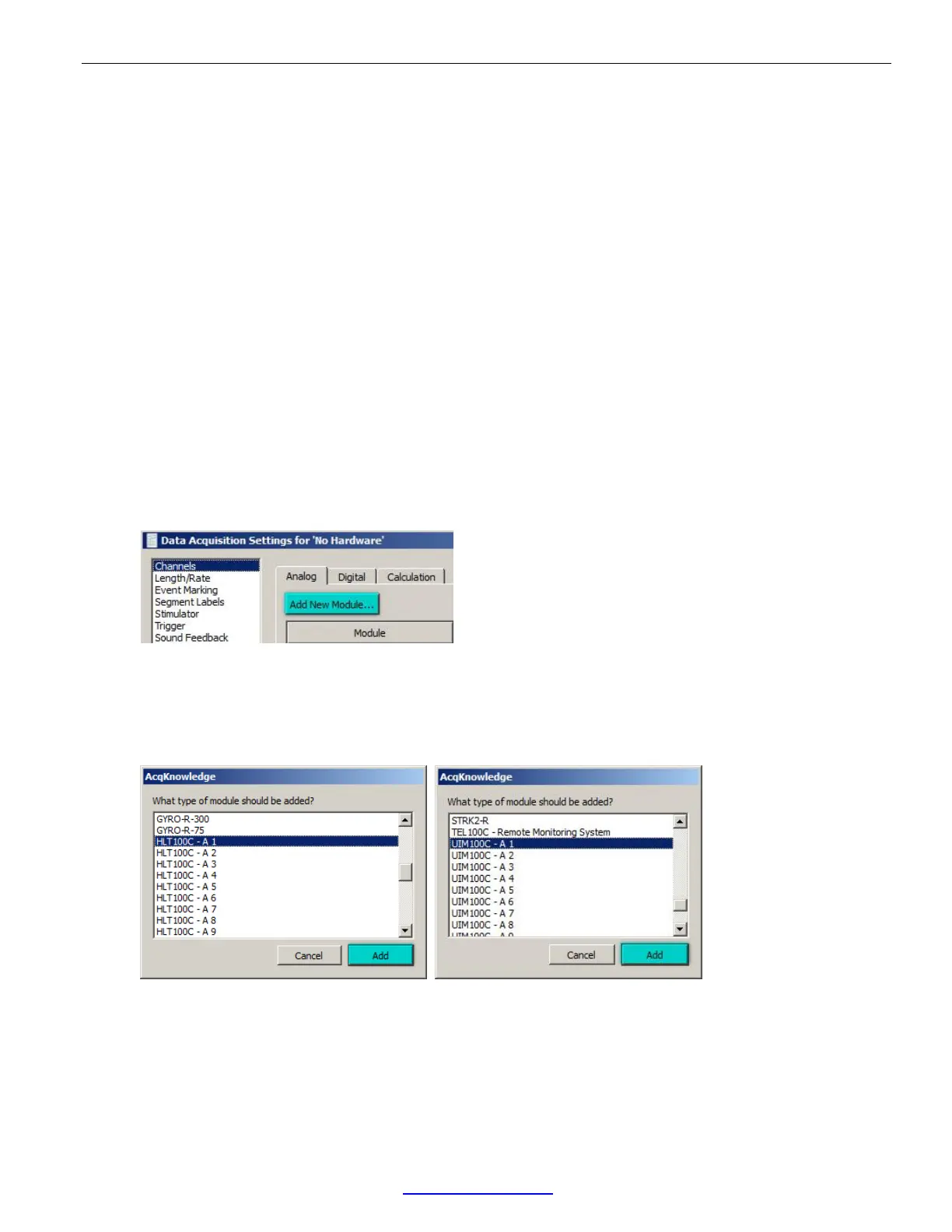
1. In AcqKnowledge, select “MP160/150 > Set Up Data Acquisition > Channels” and choose “Add New
Module.” (The AcqKnowledge Module setup is also presented by default at application launch.)
2. Select the BIOPAC Module (AMI100D/HLT100C for MP160 or UIM100C for MP150) as follows:
• MP160: Select the AMI100D/HLT100C module corresponding to the desired channel and click
“Add.”
• MP150: Select the UIM100C module corresponding to the desired channel and click “Add.”
3. From the “Transducer” menu, select the desired Epoch sensor as follows:
• MP160: Select the Epoch Sensor (and desired gain) from the AMI100D/HLT100C Configuration
list and click “OK.” (Lower left figure)
• MP150: Select the Epoch Sensor (and desired gain) from the UIM100C Configuration list and click
“OK.” (Lower right figure)


 To Next Page