5
3. Usingotherelectricalproductssuchasheadphonesorspeakersoperatingonthesame
frequency(433MHz)maypreventcorrectsignaltransmissionandreception.
4. Neighboursusingelectricaldevicesoperatingonthe433MHzsignalfrequencycanalso
causeinterference.
5. Signalsfromotherhouseholddevices,suchasdoorbellsandhomesecuritysystems,
maytemporarilyinterferewiththeunitsandcausereceptionfailure.Thetransmissionand
receptionoftemperaturereadingwillresumeoncetheinterferencehasstopped.
Themaximumtransmissionrangeis50metres(164feet)fromtheremotesensortothemonitor
(inopenspace).However,thisdependsonthesurroundingenvironmentandinterferencelevels.
Thetemperaturesignaltravelsinastraightlinefromtheremotesensortothemonitor.Thesignal
willnotcurvearoundanobject.Ifnoreceptionispossibledespitetheobservationofthese
factors,allunitswillhavetobereset.
3.0 Mounting
CAUTION:Greatcaremustbetakenwhenmountingthecomponents.Themanufacturer/
suppliercannotbeheldliableforpersonalorpropertydamagewhensettingupthe
components.Pleaseusecautionwhenchoosingamountingpoint.
Priortodrillingmountingholesandpermanentlyafxinganyoftheunits,pleaseensurethe
followingpointsareconsidered:
1.Signalfromtheremotesensorcanbereceivedbythemonitoratmountingpoint.
2.Makesuretheremotesensoriseasilyaccessible.Youwillhavetoperiodicallyreplacebatteries.
3.1 Monitor
Themonitorcanbeplacedonanyatsurface.
3.2 Optimum Viewing Angle
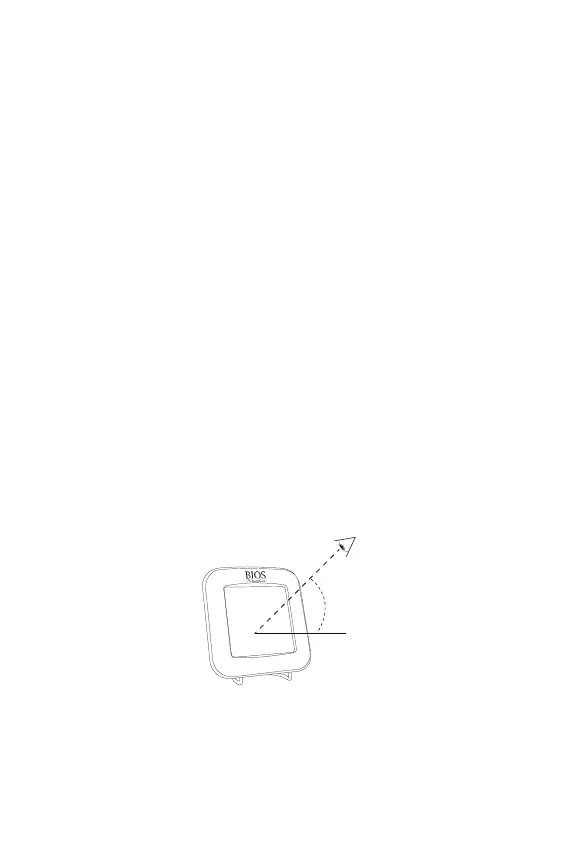
YoumustalwayskeepinmindthattheLCDscreenisconstructedwithan“optimumviewing
angle”.Youreyeshouldbeata45°angletoviewtheLCDscreenclearly.
45°
3.3 Installing the Remote Sensor
Topreventtemperatureinterference,placetheremotesensorawayfromdirectsunlight,air
conditioning,andheatervents.Theremotesensorisdesignedtobesplashproof;neverimmerse
intowaterorexposetoheavyrain.
NOTE:Thetemperaturesignaltravelsinastraightlinefromtheremotesensortothemonitor.
Thesignalwillnotcurvearoundanobject.Pleasetakethisintoconsiderationwhenmountingthe
remote sensor.


 To Next Page